

[SOLVED] [Help] - Passthrough Physical HDD to Win10 VM

EderRCBR

Member
Nov 6, 2022
3
0
6
I would like to passthrough a Sata hard drive (sdb) to my win10 VM.

Screenshot 2022-11-06 at 17-01-10 proxmoxserver - Proxmox Virtual Environment.png

I use the comands:

Shell ->
lsblk
ls /dev/disk/by-id/
ST16000NE000-2RW103_ZL2Q143N-part1
qm set 100 -scsi1 /dev/disk/by-id/ST16000NE000-2RW103_ZL2Q143N-part1
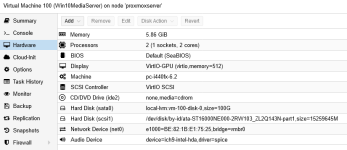
Screenshot 2022-11-06 at 17-01-53 proxmoxserver - Proxmox Virtual Environment.png

But the drive doesn't show up in windows.

Here, there is a how to about it , but say nothinting about how configure the Win10 VM, and say "You may need to configure the guest operating system now that the disk is available.".

What I need to configure in the Windows guest VM?
 
Did you install the virtio drivers? https://pve.proxmox.com/wiki/Windows_10_guest_best_practices

Otherwise there is nothing special. You install the virtio drivers so you can use virtio SCSI and virtio NIC (you should switch from E100 to virtio as virtio NIC is much faster) and then Win should see that new disk. You "sata0" is also not optimal, virtio SCSI would be better but a bit tricky to change that later.
By the way...are you sure you just want to passthough partition 1 of that disk and not the whole disk?
 
Last edited:
  • Like
Reactions: EderRCBR
Did you install the virtio drivers? https://pve.proxmox.com/wiki/Windows_10_guest_best_practices

Otherwise there is nothing special. You install the virtio drivers so you can use virtio SCSI and virtio NIC (you should switch from E100 to virtio as virtio NIC is much faster) and then Win should see that new disk. You "sata0" is also not optimal, virtio SCSI would be better but a bit tricky to change that later.
By the way...are you sure you just want to passthough partition 1 of that disk and not the whole disk?

The virtio drivers are installed, and the disk there are just one partition, and it use whole disk. You say, maybe, can I set ST16000NE000-2RW103_ZL2Q143N instead ST16000NE000-2RW103_ZL2Q143N-part1 ?
 
The virtio drivers are installed, and the disk there are just one partition, and it use whole disk. You say, maybe, can I set ST16000NE000-2RW103_ZL2Q143N instead ST16000NE000-2RW103_ZL2Q143N-part1 ?
Jup, that's how you usually do it.
 
Indeed, I assume that Windows does not handle passthrough of a partition very well. I guess it assumes a whole drive with a partition table (either MBR or GPT).
 
if you want to pass an existing drive with an existing partition, you need to pass trough the drive but not the partition, so you should pass /dev/disk/by-id/ST16000NE000-2RW103_ZL2Q143N instead of /dev/disk/by-id/ST16000NE000-2RW103_ZL2Q143N-part1

but make sure the partition is not mounted/used elsewhere
 
>But the drive doesn't show up in windows.
i'm sure the drive shows up in disk management, but windows won't recognize the existing filesystem that way
do NOT initialize the drive if windows asks for it, you would corrupt your partition/filesystem
 
Thank you all. It worked! ;)
The correct way is to use /dev/disk/by-id/ST16000NE000-2RW103_ZL2Q143N instead of /dev/disk/by-id/ST16000NE000-2RW103_ZL2Q143N-part1.

Dunuin, leesteken and RolandK I am so gratefull.​

Greetings from Brazil. :D