Hi everyone,
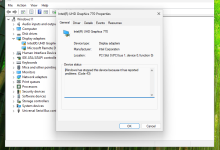
I'm trying to configure iGPU passthrough on Proxmox for my Intel Core i5-13600K (UHD 770) to use in a Windows 11 VM, but I’m facing some difficulties. I’ve followed various guides, but I haven't been able to get it working properly.
I'm trying to configure iGPU passthrough on Proxmox for my Intel Core i5-13600K (UHD 770) to use in a Windows 11 VM, but I’m facing some difficulties. I’ve followed various guides, but I haven't been able to get it working properly.
Current Setup:
- CPU: Intel Core i5-13600K (UHD 770)
- Host OS: Proxmox VE 8.3.4
- Guest OS: Windows 11
- BIOS/UEFI: UEFI
- VT-d & IOMMU: Enabled in BIOS
- Proxmox Kernel: 6.8.12-8-pve