

Hello all,
I'm having a problem with a GPU passthrough getting the error 'MSIX PBA outside of specified BAR' when trying to start the machine.
I found another thread that seemed to be having a similar issue:
However attempting the configurations from from that thread did not resolve my problem.
I have the nvidia card blacklisted and everything. In fact I was successfully passing through an nvidia card, an RTX A2000 in the same VM, same PCI slot and everything. I swapped this GPU out to a Tesla T4, and then this problem started.
If I do the echo 1 > /sys/.../remove and then rescan like the person in that thread said they do, then the rescan apparently fails to find the T4 because it no longer shows up in lspci | grep -i nvidia.
If I don't do the rescan but have pci=realloc=off in my grub command line, then when I got to start the VM I get a different error:
/hw/pci/pci.c:1815: pci_irq_handler: Assertion `0 <= irq_num && irq_num < PCI_NUM_PINS' failed
This is way in the weeds for me so I'm not really sure what to do to actually solve this. I did see another post referencing this error with a thunderbolt card of some sort, and they fixed it by changing the USB bus size. I don't think that is an option for me. I also don't see anything to configure PCI Bus size in my bios. I'm using a SuperMicro X10DRH-iLN4 board right now.
I have tried enable SR-IOV and Above 4G decoding in the bios.
/etc/modules
/etc/modprobe.d/blacklist.conf
GRUB_CMDLINE
Please let me know i f there is something else that would be of use to show.
Any help / direction would be greatly appreciated. I've passed through GPUs in VMs multiple times before but never encountered and error like this, and not finding a lot on it trying to search.
I'm having a problem with a GPU passthrough getting the error 'MSIX PBA outside of specified BAR' when trying to start the machine.
I found another thread that seemed to be having a similar issue:
Hi Everybody,
we have a Dell PowerEdge R7525 with 2x AMD EPYC 74F3 24-Core Processor.
Inside this machine are two Nvidia A16 Grapic Cards.
On this PVE we want to run 8 virtual machines. Every machine should have one pci lane assigned (this config we had with vmware).
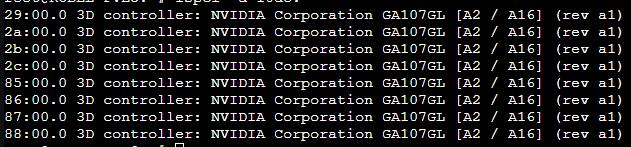
Every GPU has 4 PCI addresses:
What things did we check?:
- IOMMU activated
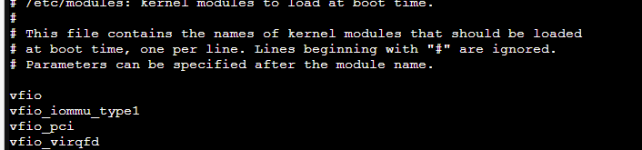
- In /etc/modules we added following lines:
- vfio
- vfio_iommu_type1
- vfio_virqfd
- vfio_pci
- In etc/modprobe.d/pve-blacklist.conf we added following lines:
- nouveau
- nvidia
- nvidiafb...
we have a Dell PowerEdge R7525 with 2x AMD EPYC 74F3 24-Core Processor.
Inside this machine are two Nvidia A16 Grapic Cards.
On this PVE we want to run 8 virtual machines. Every machine should have one pci lane assigned (this config we had with vmware).
Every GPU has 4 PCI addresses:
What things did we check?:
- IOMMU activated
- In /etc/modules we added following lines:
- vfio
- vfio_iommu_type1
- vfio_virqfd
- vfio_pci
- In etc/modprobe.d/pve-blacklist.conf we added following lines:
- nouveau
- nvidia
- nvidiafb...
- robseb
- Replies: 3
- Forum: Proxmox VE: Installation and configuration
However attempting the configurations from from that thread did not resolve my problem.
I have the nvidia card blacklisted and everything. In fact I was successfully passing through an nvidia card, an RTX A2000 in the same VM, same PCI slot and everything. I swapped this GPU out to a Tesla T4, and then this problem started.
If I do the echo 1 > /sys/.../remove and then rescan like the person in that thread said they do, then the rescan apparently fails to find the T4 because it no longer shows up in lspci | grep -i nvidia.
If I don't do the rescan but have pci=realloc=off in my grub command line, then when I got to start the VM I get a different error:
/hw/pci/pci.c:1815: pci_irq_handler: Assertion `0 <= irq_num && irq_num < PCI_NUM_PINS' failed
This is way in the weeds for me so I'm not really sure what to do to actually solve this. I did see another post referencing this error with a thunderbolt card of some sort, and they fixed it by changing the USB bus size. I don't think that is an option for me. I also don't see anything to configure PCI Bus size in my bios. I'm using a SuperMicro X10DRH-iLN4 board right now.
I have tried enable SR-IOV and Above 4G decoding in the bios.
/etc/modules
Code:
root@homelab3:~# cat /etc/modules
# /etc/modules is obsolete and has been replaced by /etc/modules-load.d/.
# Please see modules-load.d(5) and modprobe.d(5) for details.
#
# Updating this file still works, but it is undocumented and unsupported.
vfio
vfio_iommu_type1
vfio_virqfd
vfio_pci
/etc/modprobe.d/blacklist.conf
Code:
root@homelab3:~# cat /etc/modprobe.d/blacklist.conf
blacklist nouveau
blacklist nvidiafb
blacklist radeon
GRUB_CMDLINE
Code:
GRUB_CMDLINE_LINUX_DEFAULT="quiet intel_iommu=on iommu=pt video=vesafb:off,efifb:off pci=realloc=off"
GRUB_CMDLINE_LINUX=""
Please let me know i f there is something else that would be of use to show.
Any help / direction would be greatly appreciated. I've passed through GPUs in VMs multiple times before but never encountered and error like this, and not finding a lot on it trying to search.
Last edited: