Dear all
If there is someone who would like to assist me solving those Issues and get my goals established, I would like to reward with a tip via paypal.
tldr: This is my last attempt with Linux, hence why I ask for help. I do not want to pay for Netflix, Google Drive and Youtube Premium, I rather host everything myself and use Nextcloud, especially after spending thousands on this equipment which currently mostly just sits collecting dust (including several Gen7, 8 and Gen10 HPE servers which are too loud for everydays use) My current biggest issue is listed under "Issue 1" down below.
I already lost my job because I spent hundreds hours on forums and reinstalling things and could not concentrate on work after constant throwbacks implementing the home server idea.
My Knowledge level: 1/10 or 2/10 at best. If you would like to help, please not just tell me what info you need but also which command I need to put for that into the shell. Thank you.
Im struggling since over a month now creating at least one system that does what I want which is not much, I think?
I built already over 10 of those and everytime it is not doing what it supposed to. I learn more and more about Linux and am struggling really hard setting it up because it does break or demand 2 new things if you fix/setup one: rinse, repeat.
-My goals:
1. Create ONE home / file server which is capable of being a file server with SMB share (favourite would be Xpenology since Im used to DSM and prefer BTRFS > ZFS
2. Run Jellyfin with HD transcoding (Intel Arc)
3. Running a Windows Machine with passed through RTX 2060 with no error 43 for Game Streaming via Moonlight to my portable gaming console
4. Get Pi Hole to run without being blocked on all sites and stream services and youtube for using it.
5. Since I bricked already a few systems by passing through things I should have not - I would like to create a backup of Proxmox with all the VMs so I can restore it somewhat easily if it happens again.
I think I have reasonable goals and good enough hardware for it. If needed I could imagine having two machines. I could build another dedicated Optiplex PC for jellyfin and Windows Jumphost with 1 big HDD with media only and Intel ARC GPU inside and the Jonsbo NAS for the rest, but I would love rather having an all in one that does it all.
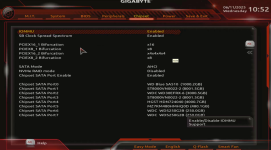
Getting the X399 sata controller to passthrough because of IOMMU groups. I would like to pass it through, currently if I do so, it bricks my whole host and Proxmox need a restart. Im trying to create a NAS / home server with many HDDs and I can utilize only 8 HDDs via HBA card and have to sacrifice another 8 SATA ports because I cant pass them through. Otherwise please let me know how to install Proxmox somewhere else so it wont have this issue having all crucial devices on the same IOMMU group.
-My current setup:
QNAP 10GB RJ45 and SFP+ dumb switch.
Jonsbo NS5 12 bay case (and a lot of space for 2.5" SATA SSDs
Threadripper 1920 TR4
X399 AORUS PRO motherboard
Main x16 Slot - RTX 2060
Second x16 Slot - Intel Arc A310
12x 3.5" HDDs
3x NVMe SSDs in motherboard slots
3x NVME SSDs in PCIe ASUS Adapter, bifurcation 4x4x4x4 is set and working
10GBE PCIe SFP Mellanox card, connected to 10GBE switch with 10GBE Internet
HBA card for 8x SATA
VMs: currently Windows 10P, Windows 11P, Xpenology and bunch of experiments like debian, ubuntu XLC etc.
Current struggle:
Issue 1/Biggest one yet: I have free 8 SATA ports on motherboard which I would like to utilize. Those 8 HDDs I passed through to Xpenology via HBA card work flawlessly and are recognized correctly, temperature is being shown, serial numbers etc.
I tried to pass those HDDs and Sata SSDs connected to x399 SATA Controller via all type of commands, mounted them into boot file etc. etc. but they end up always showing up as QEMU HDDs in Xpenology. I even tried Truenas and OMV and its the same. The issue with that is - I cant be sure if a HDD is failing or not if the NAS VM Xpenology cant even scan them properly. I can only create a RAID out of it but have no information about the disc health. Also I would like to be able to passthrough the 10GBE card to Xpenology to utilize the SSD and NVME speeds if I create those fast volumes later on.
Issue 2: I could not find one solid tutorial for Proxmox about how to make an Intel Arc card work with Jellyfin for hw transcoding and I have tried them ALL. Usually they explain how to do it for integrated graphics. The issue here is - Im pretty sure that I create a bad initial script for Jellyfin without the render and user groups in it.
Issue 3: I could not get the RTX 2060 passed through to either Win10P or Win11P VMs without having the Hardware Error code 43 in the device manager after installing the drivers following all types of tutorials
Issue 4: I have great speeds (1GB) from my main Windows machine via 1GBe NIC to Xpenology RAID (HBA), created a raid and volume just for test. I also have great speeds 1GB to my other frankenstein fileserver. But copying files from old file server to new Xpenology are only 10% of those. It would make my 20TB of data copy for weeks.
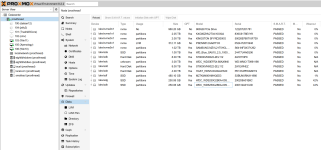
Additionally there are 8x 3.5" HDDs which are passed through to Xpenology which is why they are not showed here:
If there is someone who would like to assist me solving those Issues and get my goals established, I would like to reward with a tip via paypal.
tldr: This is my last attempt with Linux, hence why I ask for help. I do not want to pay for Netflix, Google Drive and Youtube Premium, I rather host everything myself and use Nextcloud, especially after spending thousands on this equipment which currently mostly just sits collecting dust (including several Gen7, 8 and Gen10 HPE servers which are too loud for everydays use) My current biggest issue is listed under "Issue 1" down below.
I already lost my job because I spent hundreds hours on forums and reinstalling things and could not concentrate on work after constant throwbacks implementing the home server idea.
My Knowledge level: 1/10 or 2/10 at best. If you would like to help, please not just tell me what info you need but also which command I need to put for that into the shell. Thank you.
Im struggling since over a month now creating at least one system that does what I want which is not much, I think?
I built already over 10 of those and everytime it is not doing what it supposed to. I learn more and more about Linux and am struggling really hard setting it up because it does break or demand 2 new things if you fix/setup one: rinse, repeat.
-My goals:
1. Create ONE home / file server which is capable of being a file server with SMB share (favourite would be Xpenology since Im used to DSM and prefer BTRFS > ZFS
2. Run Jellyfin with HD transcoding (Intel Arc)
3. Running a Windows Machine with passed through RTX 2060 with no error 43 for Game Streaming via Moonlight to my portable gaming console
4. Get Pi Hole to run without being blocked on all sites and stream services and youtube for using it.
5. Since I bricked already a few systems by passing through things I should have not - I would like to create a backup of Proxmox with all the VMs so I can restore it somewhat easily if it happens again.
I think I have reasonable goals and good enough hardware for it. If needed I could imagine having two machines. I could build another dedicated Optiplex PC for jellyfin and Windows Jumphost with 1 big HDD with media only and Intel ARC GPU inside and the Jonsbo NAS for the rest, but I would love rather having an all in one that does it all.
Getting the X399 sata controller to passthrough because of IOMMU groups. I would like to pass it through, currently if I do so, it bricks my whole host and Proxmox need a restart. Im trying to create a NAS / home server with many HDDs and I can utilize only 8 HDDs via HBA card and have to sacrifice another 8 SATA ports because I cant pass them through. Otherwise please let me know how to install Proxmox somewhere else so it wont have this issue having all crucial devices on the same IOMMU group.
-My current setup:
QNAP 10GB RJ45 and SFP+ dumb switch.
Jonsbo NS5 12 bay case (and a lot of space for 2.5" SATA SSDs
Threadripper 1920 TR4
X399 AORUS PRO motherboard
Main x16 Slot - RTX 2060
Second x16 Slot - Intel Arc A310
12x 3.5" HDDs
3x NVMe SSDs in motherboard slots
3x NVME SSDs in PCIe ASUS Adapter, bifurcation 4x4x4x4 is set and working
10GBE PCIe SFP Mellanox card, connected to 10GBE switch with 10GBE Internet
HBA card for 8x SATA
VMs: currently Windows 10P, Windows 11P, Xpenology and bunch of experiments like debian, ubuntu XLC etc.
Current struggle:
Issue 1/Biggest one yet: I have free 8 SATA ports on motherboard which I would like to utilize. Those 8 HDDs I passed through to Xpenology via HBA card work flawlessly and are recognized correctly, temperature is being shown, serial numbers etc.
I tried to pass those HDDs and Sata SSDs connected to x399 SATA Controller via all type of commands, mounted them into boot file etc. etc. but they end up always showing up as QEMU HDDs in Xpenology. I even tried Truenas and OMV and its the same. The issue with that is - I cant be sure if a HDD is failing or not if the NAS VM Xpenology cant even scan them properly. I can only create a RAID out of it but have no information about the disc health. Also I would like to be able to passthrough the 10GBE card to Xpenology to utilize the SSD and NVME speeds if I create those fast volumes later on.
Issue 2: I could not find one solid tutorial for Proxmox about how to make an Intel Arc card work with Jellyfin for hw transcoding and I have tried them ALL. Usually they explain how to do it for integrated graphics. The issue here is - Im pretty sure that I create a bad initial script for Jellyfin without the render and user groups in it.
Issue 3: I could not get the RTX 2060 passed through to either Win10P or Win11P VMs without having the Hardware Error code 43 in the device manager after installing the drivers following all types of tutorials
Issue 4: I have great speeds (1GB) from my main Windows machine via 1GBe NIC to Xpenology RAID (HBA), created a raid and volume just for test. I also have great speeds 1GB to my other frankenstein fileserver. But copying files from old file server to new Xpenology are only 10% of those. It would make my 20TB of data copy for weeks.
Additionally there are 8x 3.5" HDDs which are passed through to Xpenology which is why they are not showed here:
Last edited: