Getting ntsync in LXC

Jul 15, 2023
9
0
6
Was looking at the recent Wine released and realized that ntsync is probably why i have bad performance in one of my game servers (Enshrouded). Looks like the
Code:
/dev/ntsync
is showing up on the host so I tried to pass it into the LXC like I do with any other device like a GPU, USB, etc. but it is not showing up inside of the LXC.

Here what I put into the .conf
Code:
lxc.cgroup2.devices.allow: c 10:261 rwm
lxc.mount.entry: /dev/ntsync /dev/ntsync none bind,optional,create=file
lxc.hook.pre-start: sh -c "chown 100000:100000 /dev/ntsync"
  • Host
    • Linux 6.17.4-2-pve
    • pve-manager/9.1.4
  • LXC
    • debian Trixie
    • unprivileged
 
I think you have a / too many in your lxc.mount.entry. Have you tried the much easier way, using the recent way in the Proxmox web GUI, by adding a Device Passthrough to the container (instead of the low-level lxc lines)?
 
Interestingly, I realized today that in some LXCs i have that first slash and others i don't. Doesn't seem to make a difference somehow. I'll have to spin up another LXC and manually verify that.

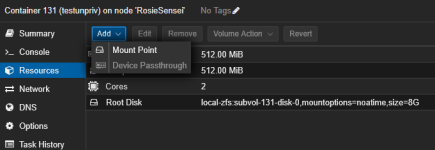
Also I can't use the GUI to add device passthrough. I totally forgot why but its grey'ed out on all of my nodes. i know i looked it up once.
 
The second path is relative. Can you share pct config CTIDHERE and pveversion as code block and a picture of the greyed out option as well as node > Summary?
 
Last edited:
WHELP I fixed it. Not sure what is happening with that first slash but I guess I misunderstood or something. Seems like you can't have the extra slash.
No change to the grey'ed out option

I think I couldn't add ntsync because I started the container before I initialized the ntsync driver after I started the container. so its working now with this:
to have it on boot:
Code:
# echo “ntsync “ > /etc/modules-load.d/ntsync.conf
to have it now without reboot
Code:
# modprobe ntsync
Code:
# pct config 131
arch: amd64
cores: 2
features: nesting=1
hostname: testunpriv
memory: 512
net0: name=eth0,bridge=vmbr0,firewall=1,hwaddr=BC:24:11:D2:D1:98,type=veth
ostype: debian
rootfs: local-zfs:subvol-131-disk-0,mountoptions=noatime,size=8G
swap: 512
unprivileged: 1
lxc.cgroup2.devices.allow: c 10:122 rwm
lxc.mount.entry: /dev/ntsync dev/ntsync none bind,optional,create=file

Code:
# pveversion
pve-manager/9.1.1/42db4a6cf33dac83 (running kernel: 6.14.11-4-pve)

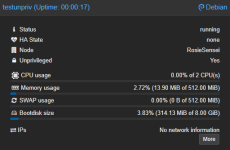
1768975334739.png
1768975351469.png
 
According to the code this item is disabled unless you are logged in as root@pam. Are you?
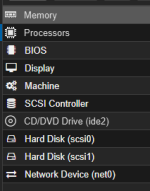
The dark theme can also be weird and make some things appear to be disabled. Look at Memory, Processors and CD/DVD Drive here for example
1768975959321.png
Some browser extensions can exacerbate this. The Device Passthrough entry looks normal for me with it though and I assume you tried to click it so it's likely not that.

You can also do it via the CLI
Bash:
pct set 131 --dev0 /dev/ntsync
Just don't use devX: together with the lxc. stuff as it works the same behind the scenes and interferes with each other. It would also be redundant.
 
Last edited: