

I've got a bunch of drives in my system (note last 6)
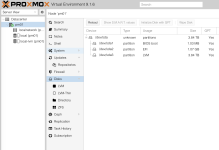
But these do not show up within the WebUI (screenshot). As a result of this I can't create a zfs pool/lvm thinpool etc as you "normally" would be able to.
Or is this to be expected? As the FusionIO drives are basically hacked-together community supported devices because in typical fashion the original "enterprise" vendors abandoned them after a few years: https://github.com/RemixVSL/iomemory-vsl
Also, I don't really want to use ZFS with this (note how some drives are 1.2T while others are 1.1T), a simple "straight LVM" setup is preferable.
Yes, I am aware this can be worked around by creating them over SSH but I was wondering if I can get these drives to show up as other sata ssds/nvme ssds/hdds do.
Code:
NAME               MAJ:MIN RM  SIZE RO TYPE MOUNTPOINTS
sda                  8:0    0  3.5T  0 disk
├─sda1               8:1    0 1007K  0 part
├─sda2               8:2    0    1G  0 part /boot/efi
└─sda3               8:3    0  3.5T  0 part
  ├─pve-swap       252:0    0   32G  0 lvm  [SWAP]
  ├─pve-root       252:1    0  100G  0 lvm  /
  ├─pve-data_tmeta 252:2    0 15.9G  0 lvm
  │ └─pve-data     252:4    0  2.9T  0 lvm
  └─pve-data_tdata 252:3    0  2.9T  0 lvm
    └─pve-data     252:4    0  2.9T  0 lvm
sr0                 11:0    1 1024M  0 rom
fioa               251:0    0  1.2T  0 disk
fiob               251:16   0  1.2T  0 disk
fioc               251:32   0  1.1T  0 disk
fiod               251:48   0  1.1T  0 disk
fioe               251:64   0  1.1T  0 disk
fiof               251:80   0  1.1T  0 disk
But these do not show up within the WebUI (screenshot). As a result of this I can't create a zfs pool/lvm thinpool etc as you "normally" would be able to.
Or is this to be expected? As the FusionIO drives are basically hacked-together community supported devices because in typical fashion the original "enterprise" vendors abandoned them after a few years: https://github.com/RemixVSL/iomemory-vsl
Also, I don't really want to use ZFS with this (note how some drives are 1.2T while others are 1.1T), a simple "straight LVM" setup is preferable.
Yes, I am aware this can be worked around by creating them over SSH but I was wondering if I can get these drives to show up as other sata ssds/nvme ssds/hdds do.
Attachments
Last edited:
