So I have a PVE setup on an /dev/nvme1n0 (OS only) and two blank 1TB disks that I want to use for storage of VM's, templates etc.
Should I create an md (software raid) before adding the mounted mirror as a Directory?
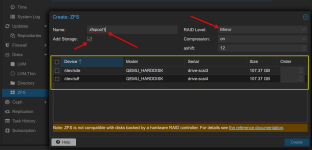
Or would it be better to let PVE create a ZFS mirror from the two blank disks? If so, what are the steps to achieve this?
The third step that I see (for now) is to manually create and mount a dataset, and then use the GUI to add the mounted directory as new Storage
mkdir /mnt/zfs-vm
zpool create zfspool1 mirror /dev/sda /dev/sdb
zfs set mountpoint=/mnt/zfs-vm zfspool1
Any advice for a beginner?
Should I create an md (software raid) before adding the mounted mirror as a Directory?
Or would it be better to let PVE create a ZFS mirror from the two blank disks? If so, what are the steps to achieve this?
The third step that I see (for now) is to manually create and mount a dataset, and then use the GUI to add the mounted directory as new Storage
mkdir /mnt/zfs-vm
zpool create zfspool1 mirror /dev/sda /dev/sdb
zfs set mountpoint=/mnt/zfs-vm zfspool1
Any advice for a beginner?