Hello, i have a very weird issue on my setup.
I have used Firefox until today to ccess my proxmox Web Gui and SSH without any issue.
After i have update proxmox to 8.3.2 and reboot i cant access anymore the ssh and the web gui via Firefox.
Also i cant access all my Docker Containers.
I have try with my second browser Safari and it works.
With Safari i can access every Docker container web interface and Proxmox Web GUI.
I have clear the cache of Firefox but i still cant access.
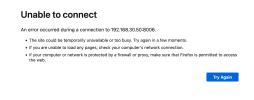
I'm attaching you the error that firefox indicates when trying to visit the web gui.
I would like to let you know that i didnt make any modification to SSH config file. My ssh port is currently listening and the SSH Server is active.
I'm also able to ping the ProxMox server inside my local network and all the LXC Containers
I have used Firefox until today to ccess my proxmox Web Gui and SSH without any issue.
After i have update proxmox to 8.3.2 and reboot i cant access anymore the ssh and the web gui via Firefox.
Also i cant access all my Docker Containers.
I have try with my second browser Safari and it works.
With Safari i can access every Docker container web interface and Proxmox Web GUI.
I have clear the cache of Firefox but i still cant access.
I'm attaching you the error that firefox indicates when trying to visit the web gui.
I would like to let you know that i didnt make any modification to SSH config file. My ssh port is currently listening and the SSH Server is active.
I'm also able to ping the ProxMox server inside my local network and all the LXC Containers