I have an LXC container which I wanted to upgrade from Ubuntu 22.04 to 24.04 last night. I took a backup, then ran the upgrade. All seemed to go well.
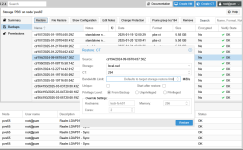
Now, the container boots, but never brings up a prompt when I attach to it, either through the web interface, or when I 'pct console <lxc-id>' to it. I'll debug that separately, but for now, I'd like to just restore it from the backup. When I choose to restore from the web gui, it asks which storage to use (I assume to write the new copy of the root image?) and then gives me the warning that "This will permanently erase current CT data. Mount point volumes are also erased."
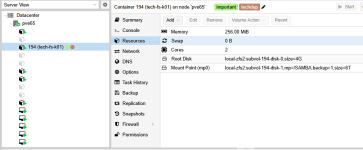
In the lxc config file, I have the root on a storage called 'zfsdata', plus a mountpoint:
I do not want to erase / modify the data on the mountpoint at /tank/nextcloud_files. Can someone please confirm that the restore will only modify the rootfs?
Thank you
Now, the container boots, but never brings up a prompt when I attach to it, either through the web interface, or when I 'pct console <lxc-id>' to it. I'll debug that separately, but for now, I'd like to just restore it from the backup. When I choose to restore from the web gui, it asks which storage to use (I assume to write the new copy of the root image?) and then gives me the warning that "This will permanently erase current CT data. Mount point volumes are also erased."
In the lxc config file, I have the root on a storage called 'zfsdata', plus a mountpoint:
Code:
arch: amd64
cores: 2
hostname: nextcloud
memory: 2048
mp0: /tank/nextcloud_files,mp=/mnt/nextcloud_files
nameserver: 192.168.1.1
net0: name=eth0,bridge=vmbr0,hwaddr=1A:A0:FB:F1:A7:09,ip=dhcp,ip6=dhcp,tag=10,type=veth
onboot: 1
ostype: ubuntu
rootfs: zfsdata:subvol-104-disk-0,size=16G
swap: 2048
I do not want to erase / modify the data on the mountpoint at /tank/nextcloud_files. Can someone please confirm that the restore will only modify the rootfs?
Thank you