[SOLVED] Exclude type from notification manager

Jul 31, 2023
13
3
8
Hello, before the notification manager I simply sent my backup status mails via SMTP to the address defined in the job. With the “new” notification manager, I have built the following matcher so that the backup mails go to a specific mailbox:
Code:
matcher: Backup-Notification
        match-field exact:type=vzdump
        mode all
        target backup
        
smtp: backup
        from-address pve@example.org
        mailto backup@example.org
        mode starttls
        server mx.example.org
        username pve@example.org

This also works so far, but there is also the default matcher for all other notifications:

Code:
matcher: default-matcher
        comment Route all notifications to mail-to-root
        mode all
        target admin
        
smtp: admin
        from-address pve@example.org
        mailto admin@example.org
        mode starttls
        server mx.example.org
        username pve@example.org

My problem now is that the backup mails also all go into the default-matcher channel, how can I prevent this? Negated regex is not allowed in the matcher.
 
You can negate the matcher via the invert-match setting.

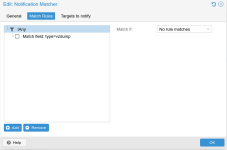
In the UI, the setting can be found in the root node of the match rules tree - under "Match If" select "No rules match" and create the same match-field rule as for the backup notifications.

The resulting matcher config should probably look like this:

Code:
matcher: default-matcher
        comment Route all notifications to mail-to-root
        mode all
        match-field exact:type=vzdump
        invert-match true
        target admin

[1] https://pve.proxmox.com/pve-docs/pve-admin-guide.html#notification_matchers

Hope this helps!
 
  • Like
Reactions: lug-pm
You can negate the matcher via the invert-match setting.

In the UI, the setting can be found in the root node of the match rules tree - under "Match If" select "No rules match" and create the same match-field rule as for the backup notifications.

The resulting matcher config should probably look like this:

Code:
matcher: default-matcher
        comment Route all notifications to mail-to-root
        mode all
        match-field exact:type=vzdump
        invert-match true
        target admin

[1] https://pve.proxmox.com/pve-docs/pve-admin-guide.html#notification_matchers

Hope this helps!
Thanks a million! I didn't know that you could press “All” and still find the “Match if” option there.

1736771052115.png
 
  • Like
Reactions: Lukas Wagner
Glad I could help. Please consider marking the thread as 'solved', this might help other users in the future who face a similar problem.
You can do so by editing your original post and selecting the "Solved" prefix for the subject line.

Thanks! :)