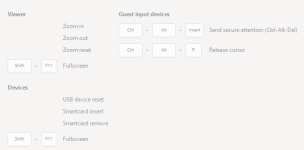
This might be a silly question, but I haven't been able to find a working answer from google.
I enabled the spice client in proxmox on a windows vm, and it works great. The issue is how do I escape back out to get my mouse back? I tried left ctrl+alt and that didn't work, and I have been searching around for other options but nothing.
I did see something from many years ago about modifying proxmox to allow this, but it seems like there should be some defaults.
Any ideas?
I enabled the spice client in proxmox on a windows vm, and it works great. The issue is how do I escape back out to get my mouse back? I tried left ctrl+alt and that didn't work, and I have been searching around for other options but nothing.
I did see something from many years ago about modifying proxmox to allow this, but it seems like there should be some defaults.
Any ideas?