ERRORS

OD3UNICRON

Member
Oct 23, 2022
37
12
13
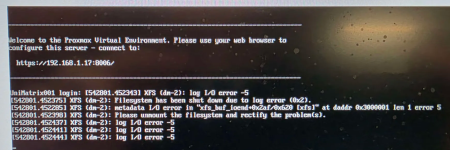
I've attached a screenshot. Please help me fix it — I don't know what's causing the issue.
 

Attachments

  • Screenshot 2025-05-26 030014.png
    Screenshot 2025-05-26 030014.png
    1.1 MB · Views: 9
One of your drives (formatted with XFS) has problems. Run a (long) SMART test to see if the drive itself detects an issue (or whether it might be a cable or connection problem). If this is not your Proxmox installation drive, you could check the system logs to maybe get more information on the actual error.
There is no one quick fix depending on the actual error and circumstances. Prepare for replacing the drive and restoring its content from existing backups (as new backups probably fail or will be corrupted).
Its also not specific to Proxmox so other Linux XFS and drive troubleshooting guide will be relevant too.

 
  • Like
Reactions: OD3UNICRON and UdoB
One of your drives (formatted with XFS) has problems. Run a (long) SMART test to see if the drive itself detects an issue (or whether it might be a cable or connection problem). If this is not your Proxmox installation drive, you could check the system logs to maybe get more information on the actual error.
There is no one quick fix depending on the actual error and circumstances. Prepare for replacing the drive and restoring its content from existing backups (as new backups probably fail or will be corrupted).
Its also not specific to Proxmox so other Linux XFS and drive troubleshooting guide will be relevant too.

I believe this might be the cause: https://www.newegg.com/p/1B3-00BC-00001?Item=9SIAN8JBB02163

The error shown in my screenshot has occurred twice this year. Also, Proxmox indicates that this particular NVMe drive has a wear level of 2%. I’m going to assume that the PCIe card is overheating. What do you think?
 
I don't like clicking on external links. Please test this for yourself. Maybe you can try using your drive without this controller?
The error shown in my screenshot has occurred twice this year. Also, Proxmox indicates that this particular NVMe drive has a wear level of 2%. I’m going to assume that the PCIe card is overheating. What do you think?
I don't know. Please do your own hardware troubleshooting (and there are lots of guides on the internet as this is not Proxmox specific). How can I judge overheating without you showing some logging with temperature information?
If you want more specific help then provide more specific information, like output of various commands (like smartctl and journalctl or log to another system in cause of drive issues).
 
  • Like
Reactions: OD3UNICRON