Error: Device /dev/dri/card0 does not exist after LXC update

nideh

New Member
Aug 1, 2025
6
0
1
Hi Proxmox community,

I am running a proxmox server with one VM running Home Assistant and an LXC container running Immich.
Everything was working fine until this morning when I tried to update Immich to its last version.
Not sure the update completed, but since then my LXC container wont start.
My VM with Home assistant is working fine.

Upon starting I am getting the following error:

TASK ERROR: Device /dev/dri/card0 does not exist

I attempted a backup restore (restore successful), but the container still does not start.

Any idea where to start?

thanks in advance,

Nic
 
Share this from the node
Bash:
lspci -vnnk | awk '/VGA/{print $0}' RS=
ls -l /sys/class/drm/*/device
ls -l /dev/dri
 
Share this from the node
Bash:
lspci -vnnk | awk '/VGA/{print $0}' RS=
ls -l /sys/class/drm/*/device
ls -l /dev/dri
Hi Impact,
thanks for your quick response. Sorry for N00b answer here, you are suggesting I input the code you suggested in the shell of my node?. If so, here is what I am getting:

00:02.0 VGA compatible controller [0300]: Intel Corporation Alder Lake-N [Intel Graphics] [8086:46d4] (prog-if 00 [VGA controller])
DeviceName: Onboard - Video
Subsystem: Intel Corporation Alder Lake-N [Intel Graphics] [8086:7270]
Flags: bus master, fast devsel, latency 0, IRQ 255, IOMMU group 0
Memory at 6000000000 (64-bit, non-prefetchable) [size=16M]
Memory at 4000000000 (64-bit, prefetchable) [size=256M]
I/O ports at 4000
Expansion ROM at 000c0000 [virtual] [disabled] [size=128K]
Capabilities: [40] Vendor Specific Information: Len=0c <?>
Capabilities: [70] Express Root Complex Integrated Endpoint, MSI 00
Capabilities: [ac] MSI: Enable- Count=1/1 Maskable+ 64bit-
Capabilities: [d0] Power Management version 2
Capabilities: [100] Process Address Space ID (PASID)
Capabilities: [200] Address Translation Service (ATS)
Capabilities: [300] Page Request Interface (PRI)
Capabilities: [320] Single Root I/O Virtualization (SR-IOV)
ls: cannot access '/sys/class/drm/*/device': No such file or directory
ls: cannot access '/dev/dri': No such file or directory
 
Last edited:
Please use code blocks. No need to quote the whole message either. Your GPU doesn't seem to be using any driver at the moment but the output looks cut off. Please make sure it is complete. Can you also share this?
Bash:
find /etc/modprobe.d/* -exec tail -n+1 {} +
tail -n+1 /proc/cmdline /etc/kernel/cmdline /etc/default/grub
 
Thanks Impact. Here is what I get with the code you just shared

Code:
Linux proxmox1 6.8.12-15-pve #1 SMP PREEMPT_DYNAMIC PMX 6.8.12-15 (2025-09-12T11:02Z) x86_64

The programs included with the Debian GNU/Linux system are free software;
the exact distribution terms for each program are described in the
individual files in /usr/share/doc/*/copyright.

Debian GNU/Linux comes with ABSOLUTELY NO WARRANTY, to the extent
permitted by applicable law.
Last login: Sun Feb 15 11:10:49 MST 2026 on pts/0
root@proxmox1:~# find /etc/modprobe.d/* -exec tail -n+1 {} +
tail -n+1 /proc/cmdline /etc/kernel/cmdline /etc/default/grub
==> /etc/modprobe.d/blacklist-btusb.conf <==
blacklist btusb

==> /etc/modprobe.d/intel-microcode-blacklist.conf <==
# The microcode module attempts to apply a microcode update when
# it autoloads.  This is not always safe, so we block it by default.
blacklist microcode

==> /etc/modprobe.d/pve-blacklist.conf <==
# This file contains a list of modules which are not supported by Proxmox VE

# nvidiafb see bugreport https://bugzilla.proxmox.com/show_bug.cgi?id=701
blacklist nvidiafb

==> /etc/modprobe.d/zfs.conf <==
options zfs zfs_arc_max=1653604352
==> /proc/cmdline <==
BOOT_IMAGE=/boot/vmlinuz-6.8.12-15-pve root=/dev/mapper/pve-root ro quiet
tail: cannot open '/etc/kernel/cmdline' for reading: No such file or directory

==> /etc/default/grub <==
# If you change this file, run 'update-grub' afterwards to update
# /boot/grub/grub.cfg.
# For full documentation of the options in this file, see:
#   info -f grub -n 'Simple configuration'

GRUB_DEFAULT=0
GRUB_TIMEOUT=5
GRUB_DISTRIBUTOR=`lsb_release -i -s 2> /dev/null || echo Debian`
GRUB_CMDLINE_LINUX_DEFAULT="quiet"
GRUB_CMDLINE_LINUX=""

# If your computer has multiple operating systems installed, then you
# probably want to run os-prober. However, if your computer is a host
# for guest OSes installed via LVM or raw disk devices, running
# os-prober can cause damage to those guest OSes as it mounts
# filesystems to look for things.
#GRUB_DISABLE_OS_PROBER=false

# Uncomment to enable BadRAM filtering, modify to suit your needs
# This works with Linux (no patch required) and with any kernel that obtains
# the memory map information from GRUB (GNU Mach, kernel of FreeBSD ...)
#GRUB_BADRAM="0x01234567,0xfefefefe,0x89abcdef,0xefefefef"

# Uncomment to disable graphical terminal
#GRUB_TERMINAL=console

# The resolution used on graphical terminal
# note that you can use only modes which your graphic card supports via VBE
# you can see them in real GRUB with the command `vbeinfo'
#GRUB_GFXMODE=640x480

# Uncomment if you don't want GRUB to pass "root=UUID=xxx" parameter to Linux
#GRUB_DISABLE_LINUX_UUID=true

# Uncomment to disable generation of recovery mode menu entries
#GRUB_DISABLE_RECOVERY="true"

# Uncomment to get a beep at grub start
#GRUB_INIT_TUNE="480 440 1"
 
Nothing sticks out to me here that would explicitly stop it from loading. I'd try if booting a older kernel version makes the card device appear again. Otherwise check the kernel logs via journalctl -b -k for hints. lspci -nnk -s 00:02.0 should show the kernel driver in use and modules that was missing from the output earlier.
 
Looks like there is no kernel driver to be seen:
Code:
root@proxmox1:~# lspci -nnk -s 00:02.0
00:02.0 VGA compatible controller [0300]: Intel Corporation Alder Lake-N [Intel Graphics] [8086:46d4]
        DeviceName: Onboard - Video
        Subsystem: Intel Corporation Alder Lake-N [Intel Graphics] [8086:7270]
 
That's weird. I don't have an alder lake system running linux/debian (I use it for *sense) but it should look something like this
Bash:
00:02.0 VGA compatible controller [0300]: Intel Corporation Kaby Lake-S GT2 [HD Graphics 630] [8086:5912] (rev 04)
        DeviceName:  Onboard IGD
        Subsystem: Lenovo Device [17aa:3111]
        Kernel driver in use: i915
        Kernel modules: i915
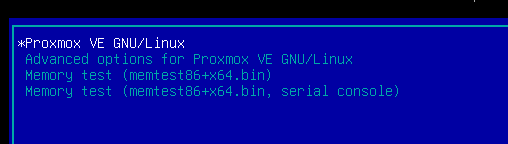
To boot the older kernel you can either select it during boot or give this a read.
You seem to be using GRUB. In this case you can select the kernel during boot in the Advanced options menu
1771184699675.png
 
Last edited:
Thank you very much Impact.
When attempting to reboot (I rebooted multiple times before...) I held the shift key to access the boot menu...
... and magically, my LXC started ! Not sure what happened, but the issue is solved now. Did it somehow reloaded the kernels in the operation?!
I really appreciate your help debugging this issue.
 
Ah, the good ol' turning it off and on again fix. Maybe looking at the old kernel logs gives a clue why it failed then.
Bash:
journalctl -b -1 -k
Usually updating a CT shouldn't cause such issues but I encountered similar things as well with NVIDIA where it gets "stuck". Very rare though,