

Error 500: closing file '/var/tmp/pve-reserved-ports.tmp.1312' failed - No space left on device

simonk

Member
Sep 22, 2019
4
0
21
56
When clicking on shell on one of my nodes I am getting the error 'Error 500: closing file '/var/tmp/pve-reserved-ports.tmp.1312' failed - No space left on device' and it doesn't open the shell.
I can see that it is /dev/mapper/pve-root that is full but I have no idea why it is full or how to clear space, I've followed various instructions I've found but it complains that it doesn't have space to complete some of the commands.
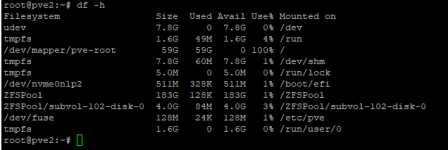
1643593052847.png

Any help gratefully appreciated :)
 
Hi,
please see here for one way to find the file(s) eating up your space.
 
This pve-root is the logical volume that contains the root file system. It's not a directory itself. It is mounted on /, as you can see e.g. in the df output.
 
This pve-root is the logical volume that contains the root file system. It's not a directory itself. It is mounted on /, as you can see e.g. in the df output.
I'm afraid I'm not very familiar Linux.

Is this where I should be running this command to start with? I've tried it and as you can see it just sits there doing nothing :-(

1643664860532.png
 
I'm afraid I'm not very familiar Linux.

Is this where I should be running this command to start with? I've tried it and as you can see it just sits there doing nothing :-(

View attachment 33810
Yes, but it has to read a lot of metadata, so that's why it might take a while. You can also try starting in /var, as that's often where the big files are.
 
Yes, but it has to read a lot of metadata, so that's why it might take a while. You can also try starting in /var, as that's often where the big files are.
As you suggested I started in /var and was soon able to find that it was the dump folder that was full with vma-zst files. I've removed them and all is good again.
At least now I know what to keep an eye on to stop it happening again.
Thanks for your help :)

