Download speed brutally reduced

Amstellodamois

New Member
Apr 11, 2026
6
0
1
Hey all, please be patient: I'm an absolute noob, I don't know what I'm doing :)

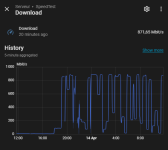
Since yesterday, the download speed of my Proxmox VE 8.4.18 node ('cause I still have 900 Mb/s on my other equipments, including on the switch where the node is plugged in) has brutally dropped from 900 Mb/s to...under 10.

This is my Home Assistant History (one of the two VMs of the node) showing it's a fairly recent issue:

1775926864680.png

ping and upload speed (it's capped at only 60 Mb/s, though) are unaffected.

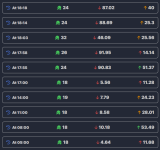
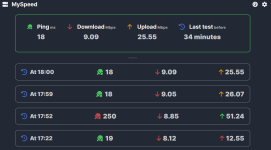
Running a speed test on the other VM confirms the internet bandwidth issue:
1775925306910.png

I didn't test the node itself with a speedtest client but the download speed during an apt install are very bad as well

ethtools looks ok to me:

Code:
root@proxmox:/var/log/apt# ethtool enp1s0
Settings for enp1s0:
        Supported ports: [ TP    MII ]
        Supported link modes:   10baseT/Half 10baseT/Full
                                100baseT/Half 100baseT/Full
                                1000baseT/Full
        Supported pause frame use: Symmetric Receive-only
        Supports auto-negotiation: Yes
        Supported FEC modes: Not reported
        Advertised link modes:  10baseT/Half 10baseT/Full
                                100baseT/Half 100baseT/Full
                                1000baseT/Full
        Advertised pause frame use: Symmetric Receive-only
        Advertised auto-negotiation: Yes
        Advertised FEC modes: Not reported
        Link partner advertised link modes:  10baseT/Half 10baseT/Full
                                             100baseT/Half 100baseT/Full
                                             1000baseT/Full
        Link partner advertised pause frame use: Symmetric Receive-only
        Link partner advertised auto-negotiation: Yes
        Link partner advertised FEC modes: Not reported
        Speed: 1000Mb/s
        Duplex: Full
        Auto-negotiation: on
        master-slave cfg: preferred slave
        master-slave status: slave
        Port: Twisted Pair
        PHYAD: 0
        Transceiver: external
        MDI-X: Unknown
        Supports Wake-on: pumbg
        Wake-on: d
        Link detected: yes

iperf from the node to a VM is excellent:

Code:
root@proxmox:~# iperf3 -c 192.168.0.46
Connecting to host 192.168.0.46, port 5201
[  5] local 192.168.0.42 port 41978 connected to 192.168.0.46 port 5201
[ ID] Interval           Transfer     Bitrate         Retr  Cwnd
[  5]   0.00-1.00   sec  1.94 GBytes  16.6 Gbits/sec    0   1.72 MBytes   
[  5]   1.00-2.00   sec  1.93 GBytes  16.5 Gbits/sec    0   1.72 MBytes   
[  5]   2.00-3.00   sec  1.93 GBytes  16.5 Gbits/sec    0   1.72 MBytes   
[  5]   3.00-4.00   sec  1.91 GBytes  16.4 Gbits/sec    0   2.03 MBytes   
[  5]   4.00-5.00   sec  2.34 GBytes  20.1 Gbits/sec    0   3.09 MBytes   
[  5]   5.00-6.00   sec  2.61 GBytes  22.4 Gbits/sec    0   3.09 MBytes   
[  5]   6.00-7.00   sec  2.48 GBytes  21.3 Gbits/sec    0   3.09 MBytes   
[  5]   7.00-8.00   sec  2.76 GBytes  23.7 Gbits/sec   86   3.09 MBytes   
[  5]   8.00-9.00   sec  2.57 GBytes  22.1 Gbits/sec    0   3.09 MBytes   
[  5]   9.00-10.00  sec  2.26 GBytes  19.4 Gbits/sec    0   3.09 MBytes   
- - - - - - - - - - - - - - - - - - - - - - - - -
[ ID] Interval           Transfer     Bitrate         Retr
[  5]   0.00-10.00  sec  22.7 GBytes  19.5 Gbits/sec   86             sender
[  5]   0.00-10.00  sec  22.7 GBytes  19.5 Gbits/sec                  receiver

iperf Done.

iperf from the node to my desktop (upstairs, using Wifi) is pretty good too (500 Mb/s).


It started yesterday but I don't think (I'm sometimes wary of my memory) I've done anything to the Proxmox. The logs in /var/log/apt/ show some upgrade activity on 2026-03-26 and 2026-04-11 (so, today but not yesterday).

What I've tried: I saw there had been issues between Realtek RTL8111 and r8169 and blindly rushed to install the r8168 that seems to solve the problems for some people. It was a mess: r8168, along with dkms and pve-headers had not installed properly and I rebooted the node in that state. Anyway, I fixed that, my node is back on r8169 and connected but the download problem persists.


What can I do?
(Keep in mind I'm pretty useless)
 
Last edited:
Hi!
check if the nic throws some errors:
Code:
ip -s link show enp1s0
dmesg | grep -E "r8169|enp1s0" | tail -30
You could also try to rule out the cable or switch port:
- Swap the ethernet cable
- Plug into a different switch port
- Check the switch's port stats for errors
 
@ggoller Thank you for taking the time to answer


Hi!
check if the nic throws some errors:
Code:
ip -s link show enp1s0
dmesg | grep -E "r8169|enp1s0" | tail -30

Code:
root@proxmox:~# ip -s link show enp1s0
dmesg | grep -E "r8169|enp1s0" | tail -30
2: enp1s0: <BROADCAST,MULTICAST,UP,LOWER_UP> mtu 1500 qdisc fq master vmbr0 state UP mode DEFAULT group default qlen 1000
    link/ether 76:01:5a:b0:01:6f brd ff:ff:ff:ff:ff:ff
    RX:  bytes packets errors dropped  missed   mcast           
    1974507685 4895438      0       0    4632  110140
    TX:  bytes packets errors dropped carrier collsns           
    7598429869 6797611      0       0       0       0
[  872.574400] vmbr0: received packet on enp1s0 with own address as source address (addr:76:01:5a:b0:01:6f, vlan:0)
[  874.174351] vmbr0: received packet on enp1s0 with own address as source address (addr:76:01:5a:b0:01:6f, vlan:0)
[  889.460696] vmbr0: received packet on enp1s0 with own address as source address (addr:76:01:5a:b0:01:6f, vlan:0)
[  889.460847] vmbr0: received packet on enp1s0 with own address as source address (addr:76:01:5a:b0:01:6f, vlan:0)
[  889.488816] vmbr0: received packet on enp1s0 with own address as source address (addr:76:01:5a:b0:01:6f, vlan:0)
[  889.709846] vmbr0: received packet on enp1s0 with own address as source address (addr:76:01:5a:b0:01:6f, vlan:0)
[  890.141697] vmbr0: received packet on enp1s0 with own address as source address (addr:76:01:5a:b0:01:6f, vlan:0)
[  891.005693] vmbr0: received packet on enp1s0 with own address as source address (addr:76:01:5a:b0:01:6f, vlan:0)
[  891.454404] vmbr0: received packet on enp1s0 with own address as source address (addr:76:01:5a:b0:01:6f, vlan:0)
[  891.454605] vmbr0: received packet on enp1s0 with own address as source address (addr:76:01:5a:b0:01:6f, vlan:0)
[  891.483765] vmbr0: received packet on enp1s0 with own address as source address (addr:76:01:5a:b0:01:6f, vlan:0)
[  891.701746] vmbr0: received packet on enp1s0 with own address as source address (addr:76:01:5a:b0:01:6f, vlan:0)
[  894.461670] vmbr0: received packet on enp1s0 with own address as source address (addr:76:01:5a:b0:01:6f, vlan:0)
[  894.717747] vmbr0: received packet on enp1s0 with own address as source address (addr:76:01:5a:b0:01:6f, vlan:0)
[  896.061705] vmbr0: received packet on enp1s0 with own address as source address (addr:76:01:5a:b0:01:6f, vlan:0)
[  896.125593] vmbr0: received packet on enp1s0 with own address as source address (addr:76:01:5a:b0:01:6f, vlan:0)
[  903.477426] vmbr0: received packet on enp1s0 with own address as source address (addr:76:01:5a:b0:01:6f, vlan:0)
[  904.317436] vmbr0: received packet on enp1s0 with own address as source address (addr:76:01:5a:b0:01:6f, vlan:0)
[  909.309060] vmbr0: received packet on enp1s0 with own address as source address (addr:76:01:5a:b0:01:6f, vlan:0)
[  916.221086] vmbr0: received packet on enp1s0 with own address as source address (addr:76:01:5a:b0:01:6f, vlan:0)
[  926.493239] vmbr0: received packet on enp1s0 with own address as source address (addr:76:01:5a:b0:01:6f, vlan:0)
[  926.493363] vmbr0: received packet on enp1s0 with own address as source address (addr:76:01:5a:b0:01:6f, vlan:0)
[  926.507424] vmbr0: received packet on enp1s0 with own address as source address (addr:76:01:5a:b0:01:6f, vlan:0)
[  926.716724] vmbr0: received packet on enp1s0 with own address as source address (addr:76:01:5a:b0:01:6f, vlan:0)
[  927.132706] vmbr0: received packet on enp1s0 with own address as source address (addr:76:01:5a:b0:01:6f, vlan:0)
[  927.996662] vmbr0: received packet on enp1s0 with own address as source address (addr:76:01:5a:b0:01:6f, vlan:0)
[  929.532443] vmbr0: received packet on enp1s0 with own address as source address (addr:76:01:5a:b0:01:6f, vlan:0)
[  929.660421] vmbr0: received packet on enp1s0 with own address as source address (addr:76:01:5a:b0:01:6f, vlan:0)
[  932.988486] vmbr0: received packet on enp1s0 with own address as source address (addr:76:01:5a:b0:01:6f, vlan:0)
[  939.773208] vmbr0: received packet on enp1s0 with own address as source address (addr:76:01:5a:b0:01:6f, vlan:0)

You could also try to rule out the cable or switch port:
- Swap the ethernet cable
Done, no change (but it reached over 500 Mb/s in LAN anyway).

- Plug into a different switch port
Done (as well as plugging it directly in the ISP's router), no change.

- Check the switch's port stats for errors
I don't have that kind of logging on my unmanaged switch but I tried plugging it into the router directly, so that should eliminate a switch issue.
 
Last edited:
I imagine the switch is out of the equation as I've temporarily plugged the node into the ISP router.

I know we seem to leave Proxmox territory if it's in fact a network problem but any idea on how to identify/fix it?
C'est une box Red SFR THD ;-)
 
Last edited:
I imagine the switch is out of the equation as I've temporarily plugged the node into the ISP router.

I know we seem to leave Proxmox territory if it's in fact a network problem but any idea on how to identify/fix it?
C'est une box Red SFR THD ;-)
stupid question: only 1 nic, no bonding here ?

no vm with same ip or mac address than the host node ?

no docker installed on proxmox host directly ? or another tunneling tool (wireguard/tailscale/....)
 
Last edited:
stupid question: only 1 nic, no bonding here ?

The N100 actually has 2 NICs but I've never used the second one. I'm considering switching everything to that NIC but that's a bit frightening running exclusively headless.

no vm with same ip or mac address than the host node ?
Nope
  1. Node: 76:01:5a:b0:01:6f - 192.168.0.42
  2. VM Home Assistant: 02:6E:6A:28:5F:B8 - 192.168.0.44
  3. VM CasaOS: BC:24:11:3D:D0:52 - 192.168.0.46

no docker installed on proxmox host directly ? or another tunneling tool (wireguard/tailscale/....)
Nope.
The two VMs are Home Assistant and CasaOS, which are both running docker containers but none is installed on the host directly. I'm not using wireguard tailscale anywhere.
 
Is the loop really an issue, though?

The left is a timestamp since boot, right? So, vmbr0/enp1s0 received packets with its own MAC as the source during a 50 sec window TWENTY hours ago but none since.

I ran this (thanks Gemini) for about 10 min, found no incoming packets with the node's MAC:
Code:
root@proxmox:~# tcpdump -i enp1s0 -e -Q in ether src 76:01:5a:b0:01:6f
tcpdump: verbose output suppressed, use -v[v]... for full protocol decode
listening on enp1s0, link-type EN10MB (Ethernet), snapshot length 262144 bytes
^C
0 packets captured
2738 packets received by filter
0 packets dropped by kernel


I shut down both VMs for a few minutes and started them again.
Download speed has been multiplied by 10 since:

1776097360094.png

1776097396976.png

It's better but is still a tenth of what it should be.
It's weirdly capped at 100 when it was 10 earlier, as if it was matching Ethernet speed variants. Even though the link showed at 1000 full duplex and still does:

Code:
root@proxmox:~# ethtool enp1s0
Settings for enp1s0:
        Supported ports: [ TP    MII ]
        Supported link modes:   10baseT/Half 10baseT/Full
                                100baseT/Half 100baseT/Full
                                1000baseT/Full
        Supported pause frame use: Symmetric Receive-only
        Supports auto-negotiation: Yes
        Supported FEC modes: Not reported
        Advertised link modes:  10baseT/Half 10baseT/Full
                                100baseT/Half 100baseT/Full
                                1000baseT/Full
        Advertised pause frame use: Symmetric Receive-only
        Advertised auto-negotiation: Yes
        Advertised FEC modes: Not reported
        Link partner advertised link modes:  10baseT/Half 10baseT/Full
                                             100baseT/Half 100baseT/Full
                                             1000baseT/Full
        Link partner advertised pause frame use: Symmetric
        Link partner advertised auto-negotiation: Yes
        Link partner advertised FEC modes: Not reported
        Speed: 1000Mb/s
        Duplex: Full
        Auto-negotiation: on
        master-slave cfg: preferred slave
        master-slave status: slave
        Port: Twisted Pair
        PHYAD: 0
        Transceiver: external
        MDI-X: Unknown
        Supports Wake-on: pumbg
        Wake-on: d
        Link detected: yes
 
Last edited:
Just hit a bug with Realtek on PVE , 10 MB/s download speed from LAN while 110MB/s download speed from WAN IP (NAT rule on router).
Try disable offloading : ethtool -K enp1s0 gso off gro off tso off

( Credits to Gemini for my case because was focus to Windows which run the nginx http server ... explaining me "router" acts as "buffer" for the Realtek which cannot receive what the Windows sends too quickly with its Intel NIC so TCP slowdown ... )
 
Just hit a bug with Realtek on PVE , 10 MB/s download speed from LAN while 110MB/s download speed from WAN IP (NAT rule on router).
That's the opposite of my issue (10 Mb/s WAN and 500+ Mb/s on LAN)

Just hit a bug with Realtek on PVE , 10 MB/s download speed from LAN while 110MB/s download speed from WAN IP (NAT rule on router).
Try disable offloading : ethtool -K enp1s0 gso off gro off tso off
I tried that yesterday, it didn't change anything at the time.


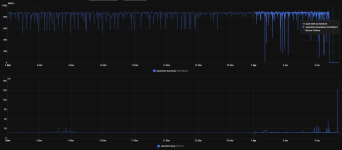
I physically moved things around and put them back where they were and my issue has become intermittent:

1776159979644.png

Frustrating