Disk Space for VMs

athijssen

New Member
Jul 12, 2025
11
2
3
I reinstalled PVE from scratch on the 1TB SSD with a limit of 32gb

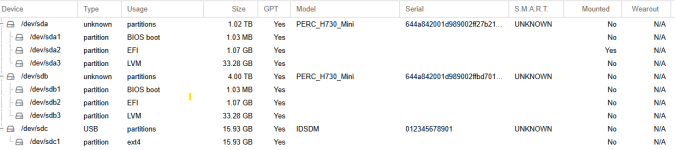
This is where I am at now
View attachment 87926


As you can see i have plenty unused space on sda and sdb, I am trying to create VM's and from what i read i need to create LVM first?
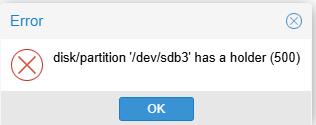
but i get this error
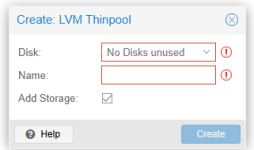
1752417701425.png


I am brand new to all this and even new to linux so bear with me, I am not sure what step I am missing to expose the free disk space so I can create LVM or what ever to create the VMs on


any help is appreciated
 
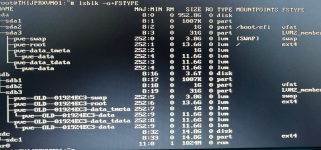
I can't view your attachment. The tool in the second picture expects an empty disk. Likely not what you want to use. Please share lsblk -o+FSTYPE and correct the first attachment. Why the limit and what limit? The installer already formats the disk with sane defaults.
 
Last edited:
the limit i set under options when i installed PVE so it wouldn't not grab the whole 1tb (i tried it and it looks the same as the image below except the SDA3 = 1tb

no matter which way i do it, i am unable to use disk space for anything else, PVE suggested a drive for ISO's and the only think it lets me pick is a usb


Does PVE needs to run on its own dedicated physical driver? (both disks are Raid 10 through Perc hardware controller


Here is another attempt to share the disk view


1752435813078.png
 
Last edited:
You can now either create a partition yourself or expand the LVM partition/volume. If you do the latter you could have just let the installer do its thing though. Please share the command output. Is the 4TB disk used for anything? Its partition table looks the same as the 1TB one.
 
Last edited:
thanks so much for your fast reply. see the requested output
1752437160395.png

- even with SDA3 LVM at 1tb it would not let me create a VM on it, so i figure i limit it to 32gb
- the SDB disk has the same structure, i formatted them when i setup raid 10 so i know there where empty, so pve must have done that during install. That drive will be split between NAS storage and Backup Storage but i cant even wipe it
1752437296769.png

i was on the same track, i think i need partitions for the free space so I can use them. I just dont know how to create these and how to make them available for some VMs. I am not a linux guy and the amount of different storage types is kicking my butt
 
The 4TB one looks unused. Go to node > Disks > LVM-Thin and wipe the old data pool, then the VG in node > Disks > LVM-Thin. Be very careful here. The disk should now be empty and you can format it with LVM-Thin for example. I would recommend you re-install on the 1TB one and leave the advanced options alone or at least pick other ones. You should be able to install a VM on local-lvm. Currently the 1TB disk has unused space but formatting it to be used via the CLI might not be your jam. What you need to understand is that LVM handles volumes, not file systems or files. You can format and mount such a volume with a file system, of course. It's what local is. But it's not necessarily trivial. It's also why there's different storages for different things. If you hadn't used a RAID controller (PERC) I would suggest ZFS which handles both file and block storage. Storage is complicated so I'm unable to explain this all in a better way without writing a novel.
 
Last edited:
Thanks for the help, I wiped the 4tb and re-installed proxmox

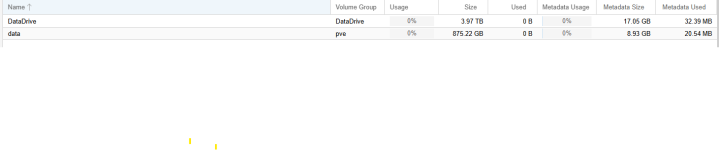
I created LVM on SDB as Suggested and it shows another pool, i assume the remainder is the rest of the 1TB drive

Disks:
1752444515101.png


LVM:
1752444550263.png
LVM-Thin:

1752444634028.png
So all i have to do now is load an ISO file on a stick and use it to create a VM on which ever LVM i want?
 
Indeed but not on a stick. Just go to local > ISO Images and download or upload one.
If the 4TB one is a HDD I'd recommend giving your VM a small OS/boot disk from the fast 1TB SSD storage and a larger one for data from the 4TB HDD.
 
Last edited:
awesome thank you ! All VMs will boot from the SSD and the HDD is for storage of NAS, Backups, etc

Cant thank you enough for you help, solved my issue !
 
Last edited:
  • Like
Reactions: Impact