

I have 2 disks of the same type connected to one of my pve hosts.
One disk is mounted on the pve host and used there. (Sub Directorys mapped to other VM's)
The other one i want to pass to a VM running windows. This drive is formated with NTFS
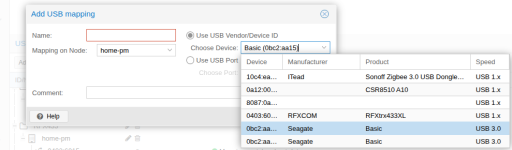
But on "Add USB mapping" dialog they show the same ID.
I could use dmesg to see what port the disks are attached to and map that.
But i'm afraid that if i have to move the disk to another host and back, it will be connected to another port. so i want to use id mapping if possible.
The other drive is mounted by id in fstab with nofail. so it can be plugged in anywhere.
How can i reliably attach the NTFS disk on this vm host when they show with the same id in the gui?
Can you add more info (disk serial or other) to the dropdown info in the "Add USB mapping" dialog? or is there another way?
One disk is mounted on the pve host and used there. (Sub Directorys mapped to other VM's)
The other one i want to pass to a VM running windows. This drive is formated with NTFS
But on "Add USB mapping" dialog they show the same ID.
I could use dmesg to see what port the disks are attached to and map that.
But i'm afraid that if i have to move the disk to another host and back, it will be connected to another port. so i want to use id mapping if possible.
The other drive is mounted by id in fstab with nofail. so it can be plugged in anywhere.
How can i reliably attach the NTFS disk on this vm host when they show with the same id in the gui?
Can you add more info (disk serial or other) to the dropdown info in the "Add USB mapping" dialog? or is there another way?