

Hi Everyone,
I am new to Proxmox and have a Dell server that is directly connected to a Dell storage array through two SAS cables. In Proxmox I have mounted a storage volume directly and formatted the volume as EXT4. Here are the commands that I used:
mkfs.ext4 /dev/sda
mount -t ext4 /dev/sda /mnt
In Proxmox Add Directory /mnt - make sure to select shared storage
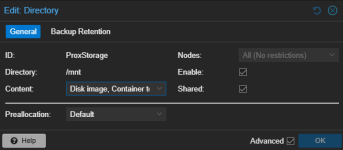
This all seemed to be working great until I added a second Proxmox server to the cluster and connected the same storage to it as well. In the Proxmox cluster I do have it configured as shared storage:
My problem is that I am experiencing slowness and random issues on my VMs and I am also having issues importing new VMs over from VMWare.
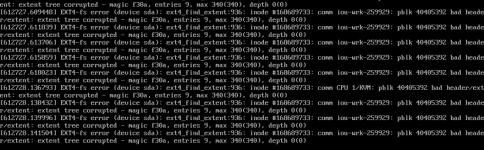
When I pull up a console view of Proxmox I see this on the one Proxmox server:
And this on the other Proxmox server: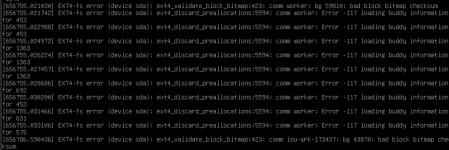
I would greatly appriciate any insight on what I should do to fix all these errors. Please also let me know if I can provide any additional relevant info.
Thanks,
J
I am new to Proxmox and have a Dell server that is directly connected to a Dell storage array through two SAS cables. In Proxmox I have mounted a storage volume directly and formatted the volume as EXT4. Here are the commands that I used:
mkfs.ext4 /dev/sda
mount -t ext4 /dev/sda /mnt
In Proxmox Add Directory /mnt - make sure to select shared storage
This all seemed to be working great until I added a second Proxmox server to the cluster and connected the same storage to it as well. In the Proxmox cluster I do have it configured as shared storage:
My problem is that I am experiencing slowness and random issues on my VMs and I am also having issues importing new VMs over from VMWare.
When I pull up a console view of Proxmox I see this on the one Proxmox server:
And this on the other Proxmox server:
I would greatly appriciate any insight on what I should do to fix all these errors. Please also let me know if I can provide any additional relevant info.
Thanks,
J

