[SOLVED] dataset as iSCSI Share on PBS

MisterDeeds

Well-Known Member
Nov 11, 2021
156
36
48
36
Dear all

We use a PBS to backup the PV Env. This works flawlessly. For the backup of our Office 365 landscape, we use Veeam Backup for Microsoft 365. This runs on a Windows VM and pulls an iSCSI share of a Synology where the data is stored. Now we want to replace the Synology and consolidate the whole backup on the PBS. To do this, I would like to create a new ZFS dataset and share it as an ISCSI share that I can mount in Windows. Now my 2 questions:
- Is this possible at all?
- Does this make sense at all? Or is there a better alternative?

Thank you very much and best regards
 
hi,

what exactly do you mean with 'iscsi share', normally over iscsi you can only export block devices (so not a filesystem directly)
this means that you cannot export a zfs dataset (which is only a logical filesystem) via iscsi, since that would have to be a blockdevice

you can share out zvols (which are block devices) via iscsi (see e.g. lio/targetcli) but if you need a filesystem inside windows you'd have to create it there (and not mount it on 2 machines simultaniously)

i don't know what veeam backup needs to backup, but i guess it's a filesystem

alternatively, you could setup a samba (smb) share on a zfs dataset and use that in your windows vm
 
Dear Dominik

Thank you for the answer. Sorry if I did not communicate clearly.

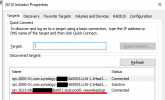
I want to create a new ZVOL on the Proxmox Backup Server and share it via iSCSI. This is then directly mounted into Windows.

I have now solved it as follows:

Code:
apt install open-iscsi tgt sudo -y

zfs create -V 10000G pool0/VeeamBackup

tgtadm --lld iscsi --op new --mode target --tid 1 --targetname iqn.2023-08.domain.pbs001.iscsi:pool0.veeambackup

lsblk |grep zd
zd0    230:0    0   9.8T  0 disk

tgtadm --lld iscsi --op new --mode logicalunit --tid 1 --lun 1 --backing-store /dev/zd0

tgtadm --lld iscsi --op show --mode target

tgtadm --lld iscsi --op bind --mode target --tid 1 --initiator-address ALL

1692869298135.png

After that, just format the target as a normal NTFS disk and so Veeam can put the files there. But this way I have all backups in one place :)

Thanks anyway and best regards

###
Code:
# Expand ZVOL size
zfs set volsize=20000GB pool0/VeeamBackup

# Delete Target
tgtadm --lld iscsi --op delete --mode target --tid=1

# Delete LUN
tgtadm --lld iscsi --mode logicalunit --op delete --tid 1 --lun 1
 
Last edited:
  • Like
Reactions: dcsapak