Hello,
I have a 2-node Proxmox cluster with only local storage (no shared storage, no Ceph, no replication).
Configuration on each node:
- ZFS pool: local-zfs (rpool/data) used for VM and containers
- "local" storage (dir /var/lib/vz) used only for backups and ISOs
- Both storages are located on the same physical disk
Real capacity:
- Node1 ≈ 500 GB
- Node2 ≈ 1 TB
- Real total ≈ 1.5 TB
Problem:
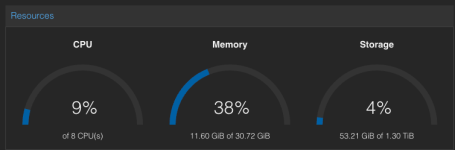
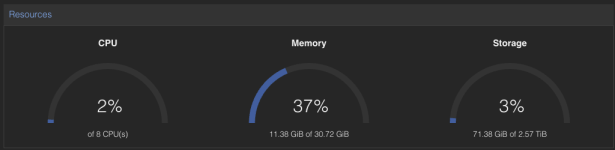
In the Datacenter → Summary dashboard the total storage is shown as about 2.5 TB, which is higher than the real physical capacity.
Checks already done:
- No duplicated entries in storage.cfg
- Each node shows the correct local capacity when viewed individually
- The issue appears only in the aggregated cluster view
- "local" and "local-zfs" are backed by the same physical disk
It looks like the dashboard is summing both storages even if they share the same underlying disk.
Question:
Is this behavior expected/by design in Proxmox, or is it a dashboard bug?
Is there any way to avoid double counting while keeping "local" for backups?
Thanks.
View attachment 95295
Thanks.
I have a 2-node Proxmox cluster with only local storage (no shared storage, no Ceph, no replication).
Configuration on each node:
- ZFS pool: local-zfs (rpool/data) used for VM and containers
- "local" storage (dir /var/lib/vz) used only for backups and ISOs
- Both storages are located on the same physical disk
Real capacity:
- Node1 ≈ 500 GB
- Node2 ≈ 1 TB
- Real total ≈ 1.5 TB
Problem:
In the Datacenter → Summary dashboard the total storage is shown as about 2.5 TB, which is higher than the real physical capacity.
Checks already done:
- No duplicated entries in storage.cfg
- Each node shows the correct local capacity when viewed individually
- The issue appears only in the aggregated cluster view
- "local" and "local-zfs" are backed by the same physical disk
It looks like the dashboard is summing both storages even if they share the same underlying disk.
Question:
Is this behavior expected/by design in Proxmox, or is it a dashboard bug?
Is there any way to avoid double counting while keeping "local" for backups?
Thanks.
Bash:
root@pve1:~# pveversion -v
proxmox-ve: 9.1.0 (running kernel: 6.17.4-2-pve)
pve-manager: 9.1.4 (running version: 9.1.4/5ac30304265fbd8e)

root@pve2:~# pveversion -v
proxmox-ve: 9.1.0 (running kernel: 6.17.4-2-pve)
pve-manager: 9.1.4 (running version: 9.1.4/5ac30304265fbd8e)

root@pve1:~# pvesm status
Name             Type     Status     Total (KiB)      Used (KiB) Available (KiB)        %
local             dir     active       449649152        17492608       432156544    3.89%
local-zfs     zfspool     active       459282504        27125948       432156556    5.91%

root@pve2:~# pvesm status
Name             Type     Status     Total (KiB)      Used (KiB) Available (KiB)        %
local             dir     active       911497088         1549824       909947264    0.17%
local-zfs     zfspool     active       938622316        28674964       909947352    3.06%

root@pve2:~# lsblk | grep nvm
nvme0n1     259:0    0 931.5G  0 disk
├─nvme0n1p1 259:1    0  1007K  0 part
├─nvme0n1p2 259:2    0     1G  0 part
└─nvme0n1p3 259:3    0   930G  0 part

root@pve1:~# lsblk | grep sda
sda        8:0    0 476.9G  0 disk
├─sda1     8:1    0  1007K  0 part
├─sda2     8:2    0     1G  0 part
└─sda3     8:3    0   475G  0 part
View attachment 95295
Thanks.