Create Win 11 VM Failing

Frred

New Member
Jan 8, 2026
4
1
3
I have done some digging, and trying to solve this on my own, but I have a hit a wall.

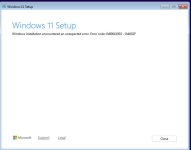
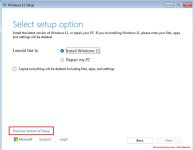
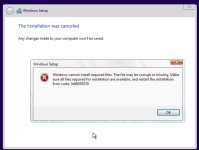
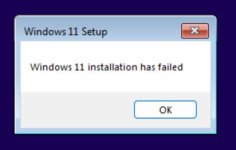
Trying to create a win 11 VM on ProxMox and I cannot get Win 11 to install. I have followed the instructions with Win11_25H2_English_x64.iso and virtio-win-0.1.285.iso, and the installation always fails about 40% into the initial installation process.

It does not seem to give me much of an error to work on, so I am wondering if anyone else has seen this, and can help get past this pretty early hurdle.
 

Attachments

  • 2026-01-05_21-48-08.jpg
    2026-01-05_21-48-08.jpg
    11.9 KB · Views: 6
  • 2026-01-05_22-31-28.jpg
    2026-01-05_22-31-28.jpg
    35.9 KB · Views: 6
Yes, those are the best practices I have been following. I just tried using the v1.0.271 of the virtio and I have the same results. 40% into installing windows it fails.

This is a test environment I am working on so I am using a desktop as the host with the following hardware and software configurations :

Host Hardware

  • Motherboard: ASRock B650
  • BIOS Version: 3.5 (UEFI) (Latest)
  • CPU: AMD Ryzen 7000-series (AM5, iGPU present)
  • GPU:NVIDIA GeForce RTX 4070
    • VGA ID: 10de:2786
    • Audio ID: 10de:22bc
  • Storage:
    • 500 GB SSD – Proxmox OS
    • 1 TB SSD – ZFS pool (vmdata) for VM disks

BIOS / Firmware Configuration

  • UEFI mode (CSM disabled)
  • Secure Boot disabled
  • SVM (AMD-V) enabled
  • IOMMU enabled
  • Above 4G Decoding enabled

Proxmox Environment

  • Proxmox VE: 9.x
  • Base OS: Debian trixie
  • Repositories: No-subscription enabled; enterprise repos disabled
  • Filesystem: ZFS
  • Virtualization: KVM/QEMU

TPM Configuration

  • Software TPM (swtpm)
  • TPM version: 2.0
  • TPM storage on ZFS pool

Windows 11 VM Configuration

  • BIOS: OVMF (UEFI)
  • Machine type: q35
  • EFI disk present
  • TPM 2.0 enabled
  • CPU type: host
  • Disk bus: VirtIO / VirtIO-SCSI
  • Display: Default (VNC) during install
  • GPU passthrough removed during install troubleshooting
Instructions being, https://pve.proxmox.com/wiki/Windows_11_guest_best_practices ?

What machine, BIOS, CPU, etc. is set? TPM?

You may want to use driver v1.0.271. I doubt that's the cause but there are long threads about later versions having issues.
 
Last edited:
Can you please try using the previous version of the W11-setup.

proxmox.png
 
  • Like
Reactions: Kingneutron
Uploading via the Web GUI may have corrupted the ISO.

We recommend verifying the checksums for both the uploaded file and the original file.

If they do not match, we suggest uploading the ISO using SMB or another method.

There are such issues.

 
Last edited:
  • Like
Reactions: Kingneutron
  • Like
Reactions: Kingneutron
oh, interesting. I will see if I can figure out how to get the ISO over to the server. New to this.
I would also try 24H2 ISO, 25 is reportedly a broken shitshow.
Well, this is interesting, and not the result I expected. So Both now work.

First I tried copying 24H2 ISO to the server through the web upload, and the win 11 install worked flawlessly.
Then just for thoroughness - I copied the 25H2 ISO to the server via SMB, and that now also worked. Definitely seems like the issue could have been related to that original 25H@ ISO being corrupted?

Thank you for your help this far.
 
Last edited:
  • Like
Reactions: Kingneutron