

I'm new to Proxmox and networking so apologize if I'm not using correct vernacular and if this is the wrong forum. Tinkering with all of this to teach myself something new.
I tried to install nginx and did some other cleanup of my PVE and found that I can no longer use the default (xterm.js?) console with my LXCs from the PVE web GUI. However, using NoVNC does work (see first image - shows Connection failed for default console and NoVNC working in a separate window).
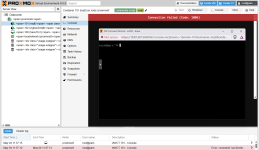
The default console command fails with this message:
client connection: 127.0.0.1:45966
authentication request failed
TASK ERROR: command '/usr/bin/termproxy 5901 --path /vms/101 --perm VM.Console --vncticket-endpoint --verify-port --ticket-fd 6 -- /usr/bin/dtach -A /var/run/dtach/vzctlconsole101 -r winch -z lxc-console -n 101 -e -1' failed: exit code 1
Clearly an authentication error accessing the console but I don't understand the difference between using xterm and NoVNC well enough to understand why those would behave differently.
I also noticed the inclusion of white space characters in the left hand side menu (e.g. <span>) when this started.
Before this started, I had created a LXC for nginx via Proxmox Community Scripts but I had not yet configured the service. I think this script did an update of PVE as a part of installing nginx in a lxc. I previously setup https for my Home Assistant VM via the Let's Encrypt add-on for Home Assistant.
I also edited Hosts to update it to use the current local network address for PVE, changing the IP address used for {nodename}.local {nodename} (to: 10.87.30.154 {nodename}.local {nodename}) and potentially removed or edited something else. I don't recall specifically and unfortunately I do not have a backup of the original content of the Hosts file before I modified it.
I attempted to update/renew the default certificates for proxmox (i.e. those in the Certificates area) as well as the SSH certificates.
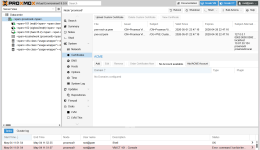
I'm not running a cluster and I no longer have nginx installed. Let's Encrypt is still running in the Home Assistant VM as I haven't been able to figure out how to back that change out yet without breaking access to home assistant via the home assistant app. I can revert to a back-up of the HA VM if needed but would like to avoid that option if possible.
Appreciate any guidance on what to look at next. I've reached the limit of what I've been able to surface via google.
I tried to install nginx and did some other cleanup of my PVE and found that I can no longer use the default (xterm.js?) console with my LXCs from the PVE web GUI. However, using NoVNC does work (see first image - shows Connection failed for default console and NoVNC working in a separate window).
The default console command fails with this message:
client connection: 127.0.0.1:45966
authentication request failed
TASK ERROR: command '/usr/bin/termproxy 5901 --path /vms/101 --perm VM.Console --vncticket-endpoint --verify-port --ticket-fd 6 -- /usr/bin/dtach -A /var/run/dtach/vzctlconsole101 -r winch -z lxc-console -n 101 -e -1' failed: exit code 1
Clearly an authentication error accessing the console but I don't understand the difference between using xterm and NoVNC well enough to understand why those would behave differently.
I also noticed the inclusion of white space characters in the left hand side menu (e.g. <span>) when this started.
Before this started, I had created a LXC for nginx via Proxmox Community Scripts but I had not yet configured the service. I think this script did an update of PVE as a part of installing nginx in a lxc. I previously setup https for my Home Assistant VM via the Let's Encrypt add-on for Home Assistant.
I also edited Hosts to update it to use the current local network address for PVE, changing the IP address used for {nodename}.local {nodename} (to: 10.87.30.154 {nodename}.local {nodename}) and potentially removed or edited something else. I don't recall specifically and unfortunately I do not have a backup of the original content of the Hosts file before I modified it.
I attempted to update/renew the default certificates for proxmox (i.e. those in the Certificates area) as well as the SSH certificates.
I'm not running a cluster and I no longer have nginx installed. Let's Encrypt is still running in the Home Assistant VM as I haven't been able to figure out how to back that change out yet without breaking access to home assistant via the home assistant app. I can revert to a back-up of the HA VM if needed but would like to avoid that option if possible.
Appreciate any guidance on what to look at next. I've reached the limit of what I've been able to surface via google.
