

Confused on bonds, interfaces..

Sep 26, 2023
102
10
23
Hello all.
Doesn't take much, but here's what I have.
pve -
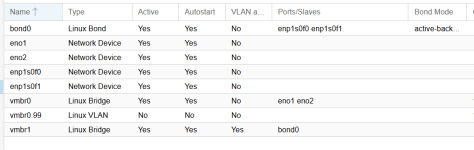
1765822302299.png
From what I am trying to understand -
eno1 and eno2 are active and in the bridge of vmbro.
Both interfaces are active and 1 is being used for mgmt, and the other is where my vlan's are running out of.
The box0 is running off of 2 different interfaces, enp1s0f0 and enp1sof1 - and configured in a active/backup solution.

pvepbr - 2nd box in cluster

1765822353523.png
Only 1 interface is active - due to issues on the switch, which i can't get into.
Whenever I 'migrate' from 1 server to another, and there is a vlan associated with it from PVE server, i have to stop/migrate/adjust the vlan from what it should be, to the 'default' vlan on pvepbr.

What I'm trying to do is essentially the same on pvepbr as on pve - create a bridge which can accept the different vlans on it (specified on the hardware/vlan setting as well as (somehow) create a bond whereby the managment port is dedicated to 1 of the interfaces on pvepbr, and the 2nd interface is handling all the different vlans.

Since this is in production currently, how can i do this?
I can, if need be - migrate all servers from the 2nd box, pvepbr, over to pve and make changes as needed.
I was unsure if i needed to create the bond first, and associated it with the 2 interfaces (eno1 and eno2) but as eno2 wasn't connected to the switch - I was unsure.
If I do this, then connect the 2nd interface to the switch - what will happen to connectivity to the box? Will the 'bond' now start advertising as the new ip, currently associated with the server?
After this is done, then presumably I can create the bridge and add the bond0 to it. ???

How does the system know which address or interface that the vlans are running on, vs the mgmt port?

thanks in advance, and can provide more info if needed.
 
eno1 and eno2 are active and in the bridge of vmbro.
this doesn't work like you think. In effect, this creates a loop which will either have one interface blocked by STP, or the whole switch would be shut down. In other words, this is a poor substitute for an active/passive bond.
The box0 is running off of 2 different interfaces, enp1s0f0 and enp1sof1 - and configured in a active/backup solution.
That is a more appropriate method. If LACP is available to you (check your switch) you should use that instead. you get all the benefits PLUS all (well, most) of the bandwidth.

I find the PVE gui for network management limiting. If you post the content of your /etc/network/interfaces file we can work on getting exactly where you want to go.
 
Here's the info on both the pve and pvepbr as well as the interface status.

on another note, i need to change the default gateway on both boxes as i'm replacing the current 'gw' with another address. can this be done just by changing this file, or are there other files that need to be 'touched' as well?

thanks.
 

Attachments

Last edited:
here's what to do.

create a new file named /etc/network/interfaces.new with the following content:

Code:
auto lo
iface lo inet loopback

iface eno1 inet manual

iface eno2 inet manual
    
auto bond0
iface bond0 inet manual
        bond-slaves eno1 eno2
        bond-miimon 100
        bond-mode active-backup
# If LACP is an option:
#       bond-mode 802.3ad
#       bond-xmit-hash-policy layer2+3

auto vmbr0
iface vmbr0 inet static
        address 172.16.x.x/24
        gateway 172.16.x.x
        bridge-ports bond0
        bridge-stp off
        bridge-fd 0
        bridge-vlan-aware yes
        bridge-vids 2-4094

source /etc/network/interfaces.d/*
reboot to apply.
 
here's what to do.

create a new file named /etc/network/interfaces.new with the following content:

Code:
auto lo
iface lo inet loopback

iface eno1 inet manual

iface eno2 inet manual
   
auto bond0
iface bond0 inet manual
        bond-slaves eno1 eno2
        bond-miimon 100
        bond-mode active-backup
# If LACP is an option:
#       bond-mode 802.3ad
#       bond-xmit-hash-policy layer2+3

auto vmbr0
iface vmbr0 inet static
        address 172.16.x.x/24
        gateway 172.16.x.x
        bridge-ports bond0
        bridge-stp off
        bridge-fd 0
        bridge-vlan-aware yes
        bridge-vids 2-4094

source /etc/network/interfaces.d/*
reboot to apply.

A couple of assumptions.
1. this is regarding the pvepbr box which currently only has 1 interface connected to the switch. Correct?
2. this will create the 'bond' or bond0 for both of those interfaces.
3. i'm unsure about lacp on the switch. I know the current Hp switch has this configuration but am also moving the host-servers over to my new environment - which is a Fortigate environment with managed fortigate switches. i'll have to review the docs on the fortigate side before i can determine how to set the lacp option, by port to get this to work.

Once this is done, then presumably i plug both interfaces from the server over into the corresponding switch ports - and the 'bond0' will come up, but only 1 port will be active and the other is in 'backup/standby' mode. correct?
 
1. this is regarding the pvepbr box which currently only has 1 interface connected to the switch. Correct?
correct

2. this will create the 'bond' or bond0 for both of those interfaces.
correct

3. i'm unsure about lacp on the switch. I know the current Hp switch has this configuration but am also moving the host-servers over to my new environment - which is a Fortigate environment with managed fortigate switches. i'll have to review the docs on the fortigate side before i can determine how to set the lacp option, by port to get this to work.
You really should. if both eno1 and eno2 go to the same switch in an active/passive configuration it doesn't actually provide any utility over using just a single nic.
Once this is done, then presumably i plug both interfaces from the server over into the corresponding switch ports - and the 'bond0' will come up, but only 1 port will be active and the other is in 'backup/standby' mode. correct?
correct. this configuration works on any switch as long as both ports are on the same vlan.
 
A couple of assumptions.
1. this is regarding the pvepbr box which currently only has 1 interface connected to the switch. Correct?
2. this will create the 'bond' or bond0 for both of those interfaces.
3. i'm unsure about lacp on the switch. I know the current Hp switch has this configuration but am also moving the host-servers over to my new environment - which is a Fortigate environment with managed fortigate switches. i'll have to review the docs on the fortigate side before i can determine how to set the lacp option, by port to get this to work.

Once this is done, then presumably i plug both interfaces from the server over into the corresponding switch ports - and the 'bond0' will come up, but only 1 port will be active and the other is in 'backup/standby' mode. correct?
thanks on the lacp thing. I presume you referenced the file with .new so that I can create the new file with the .new extension and then cp interfaces interfaces.old (to keep what I have) and then cp interfaces.new to interfaces so that I'm replacing the current existing file. Then plug into the switch, and reboot the box. Correct? Sorry for the steps, but in this new environment I just need to understand all the processes, and what happens 'next'. Worse case, I can always plug back into the old switch and revert the interface file. I surmise.
 
Last edited:
presume you referenced the file with .new so that I can create the new file with the .new extension and then cp interfaces interfaces.old (to keep what I have) and then cp interfaces.new to interfaces so that I'm replacing the current existing file.
Thats actually not necessary. PVE will automatically deploy interfaces.new on boot if present. just create the file and reboot. Incidentally, this configuration will work the same as the original one in any case, since only one of the bond slaves needs to be plugged in to work.
 
Thats actually not necessary. PVE will automatically deploy interfaces.new on boot if present. just create the file and reboot. Incidentally, this configuration will work the same as the original one in any case, since only one of the bond slaves needs to be plugged in to work.
Thanks for the clarification. I didn't know that would happen.
I'll make the change tomorrow and see what happens.
Just found out the Fortigate 148 switches will do LACP, but not MCLAP between the 2 different boxes so I'll make that change as well and update back.