

I'm trying to automate the creation of a proxmox cluster using the API.
Script: https://gist.github.com/gpetrousov/6fb2d5835e96c9133c0533190d780a79
After I run my script, I can see the new cluster is created. However, the new node, mox4, appears question marked. In the datacenter menu, I see an SSL error.
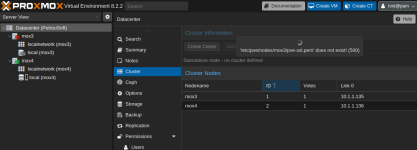
From https://pve.proxmox.com/wiki/Certificate_Management#sysadmin_certs_api_gui I understand that I need to add the public certificate of mox4 into
Both nodes, though, are unresponsive and slow when SSHing into any of them. If I attempt to access any of the directories, the connection hangs.
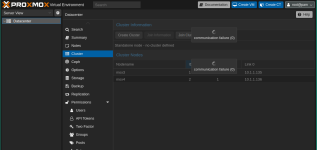
I think I'm pretty close to automate the provisioning of cluster and addition of nodes. However, there's one step that I must be missing. Any ideas?
# Update 26-03-2025
Turns out that the 2 hosts were unable to communicate with each other via their domain names. I set created the 2 records for these 2 nodes in my LAN and force updated their certificates. Re-run the script and got the cluster running with a new error.
I followed https://forum.proxmox.com/threads/unable-to-generate-pve-certificate.19794/post-100916 and deleted the authkey
Force regen the certificates again. Ran the script again and the cluster was created and the node joined.
New error with DNS.
I checked /etc/resolv.conf and noticed that the nameserver changed to the IP of the local node instead of the router, which handles DNS. I updated the file and resolution worked.
New issue: the connection to the webUI hangs and the nodes seem unresponsive.
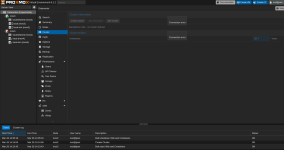
From the browser trying to access the node where the cluster was created returns HTTP 595.
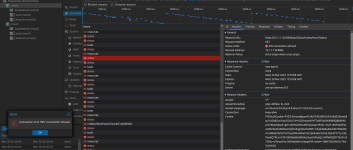
Both nodes agree they're part of a cluster.
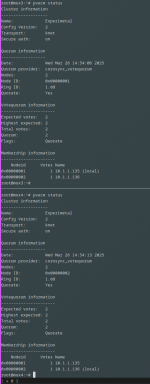
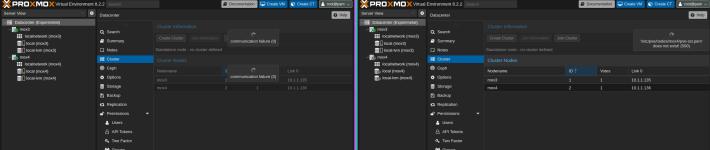
However, they disagree in the webUI.
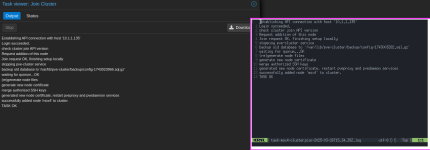
Comparing the logs of the manual step with the automated approach of joining the cluster, I don't see any difference.
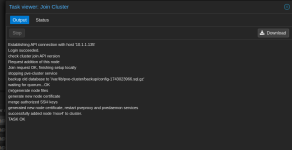
Creating and joining the cluster from the webUI has the same result. Join does not work. I wonder if this has to do something with the domain name.
Script: https://gist.github.com/gpetrousov/6fb2d5835e96c9133c0533190d780a79
After I run my script, I can see the new cluster is created. However, the new node, mox4, appears question marked. In the datacenter menu, I see an SSL error.
From https://pve.proxmox.com/wiki/Certificate_Management#sysadmin_certs_api_gui I understand that I need to add the public certificate of mox4 into
/etc/pve/nodes/mox4/ in mox3.Both nodes, though, are unresponsive and slow when SSHing into any of them. If I attempt to access any of the directories, the connection hangs.
I think I'm pretty close to automate the provisioning of cluster and addition of nodes. However, there's one step that I must be missing. Any ideas?
# Update 26-03-2025
Turns out that the 2 hosts were unable to communicate with each other via their domain names. I set created the 2 records for these 2 nodes in my LAN and force updated their certificates. Re-run the script and got the cluster running with a new error.
Establishing API connection with host '10.1.1.135'
Login succeeded.
check cluster join API version
Request addition of this node
Join request OK, finishing setup locally
stopping pve-cluster service
backup old database to '/var/lib/pve-cluster/backup/config-1743022445.sql.gz'
waiting for quorum...OK
(re)generate node files
generate new node certificate
Certificate request self-signature ok
subject=OU = PVE Cluster Node, O = Proxmox Virtual Environment, CN = mox4.moxcloud.nl
CA certificate and CA private key do not match
40D60B95007E0000:error:05800074:x509 certificate routines:X509_check_private_key:key values mismatch:../crypto/x509/x509_cmp.c:408:
TASK ERROR: unable to generate pve ssl certificate: command 'faketime yesterday openssl x509 -req -in /tmp/pvecertreq-3903.tmp -days 730 -out /etc/pve/nodes/mox4/pve-ssl.pem -CAkey /etc/pve/priv/pve-root-ca.key -CA /etc/pve/pve-root-ca.pem -CAserial /etc/pve/priv/pve-root-ca.srl -extfile /tmp/pvesslconf-3903.tmp' failed: exit code 1
I followed https://forum.proxmox.com/threads/unable-to-generate-pve-certificate.19794/post-100916 and deleted the authkey
Bash:
rm /etc/pve/priv/authkey.key
pvecm updatecerts --force
Force regen the certificates again. Ran the script again and the cluster was created and the node joined.
New error with DNS.
root@mox4:~# dig mox4.moxcloud.nl +short
;; communications error to 10.1.1.136#53: connection refused
;; communications error to 10.1.1.136#53: connection refused
;; communications error to 10.1.1.136#53: connection refused
I checked /etc/resolv.conf and noticed that the nameserver changed to the IP of the local node instead of the router, which handles DNS. I updated the file and resolution worked.
New issue: the connection to the webUI hangs and the nodes seem unresponsive.
From the browser trying to access the node where the cluster was created returns HTTP 595.
Both nodes agree they're part of a cluster.
However, they disagree in the webUI.
Comparing the logs of the manual step with the automated approach of joining the cluster, I don't see any difference.
Creating and joining the cluster from the webUI has the same result. Join does not work. I wonder if this has to do something with the domain name.
Attachments
Last edited: