

I was just backing up a VM before I made some changes that could be catastrophic. Made a backup of the VM, made my changes, fckied up and when I tried to restore my backup I realized it wasnt there.
Never had something like this before. Client and server report a successfull backup, no errors but the backup simply is not there.
server logs
client logs:
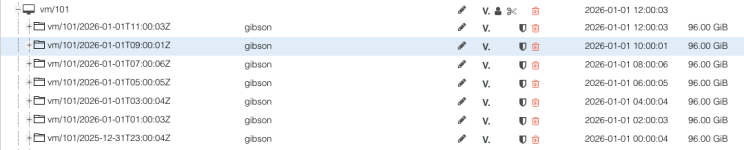
So yea, it is kind of concerning... I have no clue where my backup went?
Any ideas how I could debug this?
Never had something like this before. Client and server report a successfull backup, no errors but the backup simply is not there.
server logs
Code:
ProxmoxBackup Server 3.4.8
()
2026-01-01T13:43:05+01:00: download 'index.json.blob' from previous backup 'vm/101/2026-01-01T11:00:03Z'.
2026-01-01T13:43:05+01:00: register chunks in 'drive-scsi0.img.fidx' from previous backup 'vm/101/2026-01-01T11:00:03Z'.
2026-01-01T13:43:05+01:00: download 'drive-scsi0.img.fidx' from previous backup 'vm/101/2026-01-01T11:00:03Z'.
2026-01-01T13:43:05+01:00: created new fixed index 1 ("ns/xxxx/vm/101/2026-01-01T12:43:05Z/drive-scsi0.img.fidx")
2026-01-01T13:43:05+01:00: add blob "/mnt/pb/ns/xxx/vm/101/2026-01-01T12:43:05Z/qemu-server.conf.blob" (366 bytes, comp: 366)
2026-01-01T13:43:59+01:00: Upload statistics for 'drive-scsi0.img.fidx'
2026-01-01T13:43:59+01:00: UUID: b30db1e7f055444ca366b29f0f20aa47
2026-01-01T13:43:59+01:00: Checksum: 3b7e28fbdad08d8e4fcab2ec541fe3f2c2021132f42d07771e44c63abd10b81b
2026-01-01T13:43:59+01:00: Size: 8703180800
2026-01-01T13:43:59+01:00: Chunk count: 2075
2026-01-01T13:43:59+01:00: Upload size: 8577351680 (98%)
2026-01-01T13:43:59+01:00: Duplicates: 30+4 (1%)
2026-01-01T13:43:59+01:00: Compression: 23%
2026-01-01T13:43:59+01:00: successfully closed fixed index 1
2026-01-01T13:43:59+01:00: add blob "/mnt/pb/ns/xxx/vm/101/2026-01-01T12:43:05Z/index.json.blob" (324 bytes, comp: 324)
2026-01-01T13:43:59+01:00: syncing filesystem
2026-01-01T13:43:59+01:00: successfully finished backup
2026-01-01T13:43:59+01:00: backup finished successfully
2026-01-01T13:43:59+01:00: TASK OK
Code:
ls -la /mnt/pb/ns/xxx/vm/101/2026-01-01T12:43:05Z
ls: cannot access '/mnt/pb/ns/xxx/vm/101/2026-01-01T12:43:05Z': No such file or directory
client logs:
Code:
Header
Proxmox
Virtual Environment 9.1.4
Search
Storage 'core' on node 'pvecore'
Search:
Name, Format, Notes
Server View
Logs
()
INFO: starting new backup job: vzdump 101 --mode snapshot --remove 0 --notes-template '{{guestname}}' --node pvecore --storage core --notification-mode notification-system
INFO: Starting Backup of VM 101 (qemu)
INFO: Backup started at 2026-01-01 13:43:05
INFO: status = running
INFO: VM Name: gibson
INFO: include disk 'scsi0' 'local-zfs:vm-101-disk-1' 96G
INFO: backup mode: snapshot
INFO: ionice priority: 7
INFO: skip unused drive 'local-zfs:vm-101-disk-0' (not included into backup)
INFO: creating Proxmox Backup Server archive 'vm/101/2026-01-01T12:43:05Z'
INFO: issuing guest-agent 'fs-freeze' command
INFO: issuing guest-agent 'fs-thaw' command
INFO: started backup task 'aac5ba45-a0c1-4b4f-96ca-6a1b7910b380'
INFO: resuming VM again
INFO: scsi0: dirty-bitmap status: OK (8.1 GiB of 96.0 GiB dirty)
INFO: using fast incremental mode (dirty-bitmap), 8.1 GiB dirty of 96.0 GiB total
INFO:   6% (532.0 MiB of 8.1 GiB) in 3s, read: 177.3 MiB/s, write: 173.3 MiB/s
INFO:  11% (976.0 MiB of 8.1 GiB) in 6s, read: 148.0 MiB/s, write: 148.0 MiB/s
INFO:  17% (1.4 GiB of 8.1 GiB) in 9s, read: 164.0 MiB/s, write: 162.7 MiB/s
INFO:  23% (1.9 GiB of 8.1 GiB) in 12s, read: 169.3 MiB/s, write: 165.3 MiB/s
INFO:  29% (2.4 GiB of 8.1 GiB) in 15s, read: 153.3 MiB/s, write: 148.0 MiB/s
INFO:  34% (2.8 GiB of 8.1 GiB) in 18s, read: 142.7 MiB/s, write: 142.7 MiB/s
INFO:  39% (3.2 GiB of 8.1 GiB) in 21s, read: 148.0 MiB/s, write: 144.0 MiB/s
INFO:  45% (3.7 GiB of 8.1 GiB) in 24s, read: 168.0 MiB/s, write: 166.7 MiB/s
INFO:  50% (4.1 GiB of 8.1 GiB) in 27s, read: 134.7 MiB/s, write: 130.7 MiB/s
INFO:  55% (4.5 GiB of 8.1 GiB) in 30s, read: 136.0 MiB/s, write: 134.7 MiB/s
INFO:  61% (5.0 GiB of 8.1 GiB) in 33s, read: 162.7 MiB/s, write: 161.3 MiB/s
INFO:  67% (5.5 GiB of 8.1 GiB) in 36s, read: 161.3 MiB/s, write: 157.3 MiB/s
INFO:  73% (5.9 GiB of 8.1 GiB) in 39s, read: 160.0 MiB/s, write: 160.0 MiB/s
INFO:  78% (6.4 GiB of 8.1 GiB) in 42s, read: 157.3 MiB/s, write: 156.0 MiB/s
INFO:  84% (6.9 GiB of 8.1 GiB) in 45s, read: 156.0 MiB/s, write: 153.3 MiB/s
INFO:  88% (7.1 GiB of 8.1 GiB) in 48s, read: 101.3 MiB/s, write: 101.3 MiB/s
INFO:  93% (7.6 GiB of 8.1 GiB) in 51s, read: 156.0 MiB/s, write: 152.0 MiB/s
INFO:  99% (8.1 GiB of 8.1 GiB) in 54s, read: 162.7 MiB/s, write: 160.0 MiB/s
INFO: 100% (8.1 GiB of 8.1 GiB) in 55s, read: 24.0 MiB/s, write: 24.0 MiB/s
INFO: backup was done incrementally, reused 88.02 GiB (91%)
INFO: transferred 8.11 GiB in 55 seconds (150.9 MiB/s)
INFO: adding notes to backup
INFO: Finished Backup of VM 101 (00:00:55)
INFO: Backup finished at 2026-01-01 13:44:00
INFO: Backup job finished successfully
INFO: notified via target `mail-to-root`
TASK OK
So yea, it is kind of concerning... I have no clue where my backup went?
Any ideas how I could debug this?
