Cleaning up previous backups

juju01

Well-Known Member
May 16, 2020
92
3
48
I created a few backups on the local disk before setting up an nfs share for future backups. I forgot to delete my old backups. Now, my boot disk seems full ( 32G ). How do I clean up the old backups on this disk?

Code:
proxmox-backup-manager datastore list
only shows my new nfs storage.
 
You could check where the data is located with this
Bash:
apt install -y gdu
gdu -x /
 
Last edited:
Screenshot 2025-12-15 at 12.55.11.png

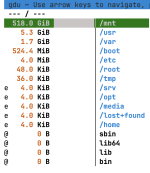
This is what I see. What am I looking for? The /mnt directory is pointing to the network share

And here is what my pbs vm looks like:

Screenshot 2025-12-15 at 13.00.31.png
 
Last edited:
I think the old backups are in pbs-root , no?

Code:
df -hT
Filesystem                                    Type      Size  Used Avail Use% Mounted on
udev                                          devtmpfs  935M     0  935M   0% /dev
tmpfs                                         tmpfs     138M  868K  137M   1% /run
/dev/mapper/pbs-root                          ext4       28G   24G  2.2G  92% /
tmpfs                                         tmpfs     462M     0  462M   0% /dev/shm
efivarfs                                      efivarfs  256K  115K  137K  46% /sys/firmware/efi/efivars
tmpfs                                         tmpfs     5.0M     0  5.0M   0% /run/lock
tmpfs                                         tmpfs     1.0M     0  1.0M   0% /run/credentials/systemd-journald.service
tmpfs                                         tmpfs     462M  348K  462M   1% /run/proxmox-backup
tmpfs                                         tmpfs     462M     0  462M   0% /tmp
/dev/sda2                                     vfat      511M  8.8M  503M   2% /boot/efi
10.1.5.29:/var/nfs/shared/Homelab/Proxmox/PBS nfs        26T  7.0T   19T  28% /mnt/unaspro
tmpfs                                         tmpfs     1.0M     0  1.0M   0% /run/credentials/getty@tty1.service
tmpfs                                         tmpfs     103M  8.0K  103M   1% /run/user/0
 
Yes but I don't see where exactly so my thought was that the mount might shadow it hence the recommendation above. You can also try this if you don't trust gdu
Bash:
du -shcx /* | sort -h
 
Last edited: