

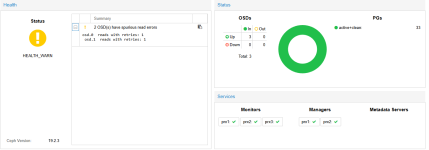
CEPH Probleme : 2 OSD(s) have spurious read errors

guddi_

New Member
Dec 12, 2025
6
1
3
Hi,

ich bin neu bei Proxmox und habe ein 3 Node Clusteraufgebaut und auch einen CEPH Storage Pool eingerichtet. Jeder Node hat local eine SSD Platte. Es lief einige Tage ohne Probleme aber ich habe jetzt schon das zweite mal die o.g. Meldung und der Status geht auf HEALTH_WARN im CEPH. An sich ja wohl kein Problem aber schon etwas komisch wenn das CEPH im WARN bleibt.

Code:
2025-12-12T13:59:55.488574+0100 osd.2 (osd.2) 15 : cluster [DBG] 2.c deep-scrub starts
2025-12-12T13:59:57.268973+0100 mgr.prx1 (mgr.925015) 88012 : cluster [DBG] pgmap v88066: 33 pgs: 33 active+clean; 24 GiB data, 68 GiB used, 1.3 TiB / 1.4 TiB avail; 101 KiB/s wr, 4 op/s
2025-12-12T13:59:59.269361+0100 mgr.prx1 (mgr.925015) 88013 : cluster [DBG] pgmap v88067: 33 pgs: 1 active+clean+scrubbing+deep, 32 active+clean; 24 GiB data, 68 GiB used, 1.3 TiB / 1.4 TiB avail; 132 KiB/s wr, 9 op/s
2025-12-12T13:59:59.474179+0100 mon.prx1 (mon.0) 26287 : cluster [WRN] Health check failed: 2 OSD(s) have spurious read errors (BLUESTORE_SPURIOUS_READ_ERRORS)
2025-12-12T14:00:00.000111+0100 mon.prx1 (mon.0) 26288 : cluster [WRN] Health detail: HEALTH_WARN 2 OSD(s) have spurious read errors
2025-12-12T14:00:00.000144+0100 mon.prx1 (mon.0) 26289 : cluster [WRN] [WRN] BLUESTORE_SPURIOUS_READ_ERRORS: 2 OSD(s) have spurious read errors
2025-12-12T14:00:00.000151+0100 mon.prx1 (mon.0) 26290 : cluster [WRN]      osd.0  reads with retries: 1
2025-12-12T14:00:00.000162+0100 mon.prx1 (mon.0) 26291 : cluster [WRN]      osd.1  reads with retries: 1

Woher kann das kommen? Wie kann ich versuchen das zu verhindern? Oder haben die neuen SSDs hier schon direkt ein HW Problem?

Was ich auch nicht so richtig finden konnte, ist wie den Status acknowleged damit es wieder auf grün geht.

Grüße
Guddi
 

Attachments

  • Screenshot 2025-12-12 184312.png
    Screenshot 2025-12-12 184312.png
    29.5 KB · Views: 2
Hi @Eduardo Taboada I check your link, but when I do execute the command to show the crash id's I do not get any response. It's emty. So maybe no "crash" yet :(

Code:
Linux prx1 6.17.2-2-pve #1 SMP PREEMPT_DYNAMIC PMX 6.17.2-2 (2025-11-26T12:33Z) x86_64

The programs included with the Debian GNU/Linux system are free software;
the exact distribution terms for each program are described in the
individual files in /usr/share/doc/*/copyright.

Debian GNU/Linux comes with ABSOLUTELY NO WARRANTY, to the extent
permitted by applicable law.
root@prx1:~# ceph crash ls
root@prx1:~#
 
Is not a critical error, blueStore has recovered the failure, and the cause can be a puntual problem with the network, or some hardware element (controller, disk) but it appears to be for a low response of these OSD.
To remove the warning:

Code:
ceph config set osd bluestore_warn_on_spurious_read_errors false

Note: Try to use more than one OSD per node if you can, if a OSD fails and depends how much of your pool is occupied, the pool can suddenly be full, because the data of the failed OSD is moved to the other OSD'S
 
  • Like
Reactions: gurubert
Hi, by using that command I can fully deaktivate that check, if done, yes it is back to green. But if I activate it again, the warnings are back. So I can only decide to "deactivate" that check? By that I would loose some early warning? Would'nt that be a risk?

I can only have one disk in the actual HW setup.
 
I have only one nic per node, and one linux bridge configured. I did not create a an extra VLAN or sth. on proxmox. The Network attached itself provides several VLANs as the hostes Container and VMs are located in several VLANs.
 
Is a good practice to separate Ceph data traffic in another interface or almost another VLAN and use 10 Gb or more for this traffic, You should keep in mind that modern SSDs have a very high transfer rate and need a network to match this requirements.
 
  • Like
Reactions: gurubert
Hallo @guddi_,

das dauerhafte Deaktivieren der Warnung unterdrückt nur das Symptom, behebt aber nicht die Ursache. Das Risiko von Instabilität bleibt bestehen.

Neben der von @Eduardo Taboada angesprochenen Netzwerk-Thematik (Single-NIC für Ceph + Corosync + VM-Traffic ist ein extremer Flaschenhals und nicht empfohlen) liegt das Problem vermutlich an der Hardware selbst.

Der Fehler BLUESTORE_SPURIOUS_READ_ERRORS ist typisch für Consumer-SSDs. Diese verfügen meist nicht über Power Loss Protection (PLP) und können die von Ceph geforderten synchronen Schreiblatenzen nicht dauerhaft erbringen, was zu Timeouts und diesen Fehlermeldungen führt.
 
  • Like
Reactions: Eduardo Taboada
Hi @Bu66as danke für die weitere Infos. In meinem Fall sind es Consumer SSDs in einer homelab Umgebung. Ich denke ich werde erst mal mit dem Fehler leben und versuchen nach und nach Netz und weiteres zu verbessern und dann am Ende ggf. die SSDs selbst austauschen.