

So I am trying to make my first VM using Proxmox, and I am having major issues getting the downloaded iso which is from centos website.
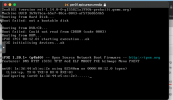
However I am getting the following when I start it up first.
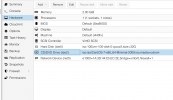
From what I can tell I have loaded it correctly (see image below)
If anyone has had this issue before would be a great help. I was trying to use CT in the pass, but according to cPanel it had some issues with quotas, and as I am new to Proxmox I did not want to start playing around with lines of code I don't understand.
However I am getting the following when I start it up first.
From what I can tell I have loaded it correctly (see image below)
If anyone has had this issue before would be a great help. I was trying to use CT in the pass, but according to cPanel it had some issues with quotas, and as I am new to Proxmox I did not want to start playing around with lines of code I don't understand.
