

[SOLVED] Can't migrate VM

Method

Active Member
Aug 10, 2019
9
2
43
124
Trying to migrate a VM from one node to another on a 2-node cluster.


Code:
2024-12-29 20:49:59 starting migration of VM 107 to node 'pve' (192.168.0.51)
2024-12-29 20:49:59 starting VM 107 on remote node 'pve'
2024-12-29 20:50:00 [pve] volume 'local:107/vm-107-disk-0.qcow2' does not exist
2024-12-29 20:50:00 ERROR: online migrate failure - remote command failed with exit code 255
2024-12-29 20:50:00 aborting phase 2 - cleanup resources
2024-12-29 20:50:00 migrate_cancel
2024-12-29 20:50:01 ERROR: migration finished with problems (duration 00:00:03)
TASK ERROR: migration problems

Code:
root@atlas:~# qm config 107
agent: 1
boot: order=scsi0;net0
cores: 12
cpu: x86-64-v2-AES
memory: 16384
meta: creation-qemu=9.0.2,ctime=1728358264
name: cb-api
net0: virtio=BC:24:11:5C:E9:90,bridge=vmbr0,firewall=1
numa: 0
onboot: 1
ostype: l26
scsi0: local:107/vm-107-disk-0.qcow2,discard=on,iothread=1,size=128G,ssd=1
scsihw: virtio-scsi-single
smbios1: uuid=771badef-b8bc-4739-a9ba-389390429b3d
sockets: 1
vmgenid: 9524c0e9-7569-41f4-bb99-3394cfc295c8

Google seems to indicate that the error means that the `vm-107-disk-0.qcow2` file was deleted, but I don't think thats the case. I can restart the entire host and the VM will start just fine. I seem to get this error on every VM I try to migrate
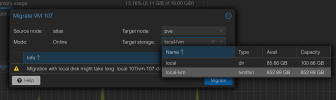
 
Long shot here but can you do a backup of the vm then delete the vm and restore it before you migrate. I also want to suggest maybe the destination storage has to match "local".
 
Long shot here but can you do a backup of the vm then delete the vm and restore it before you migrate. I also want to suggest maybe the destination storage has to match "local".
Yep, I believe the issue is that the new node only has 100GB available to it in the `local` storage. The size of vm-107 is 132GB. This is a fresh install on a 1TB nvme drive. I'm trying to figure out how to increase that 100GB but its not obvious to me how to do that.

Code:
root@pve:~# df -h
Filesystem            Size  Used Avail Use% Mounted on
udev                   16G     0   16G   0% /dev
tmpfs                 3.2G  1.6M  3.2G   1% /run
/dev/mapper/pve-root   94G  9.4G   80G  11% /
tmpfs                  16G   66M   16G   1% /dev/shm
tmpfs                 5.0M     0  5.0M   0% /run/lock
/dev/fuse             128M   32K  128M   1% /etc/pve
tmpfs                 3.2G     0  3.2G   0% /run/user/0
 
Last edited:
This node is only going to host VMs, does it make sense to try and resize `local` to use all available free space? (and again, dunno how to do that lol)

Code:
root@pve:~# lvs
  LV   VG  Attr       LSize   Pool Origin Data%  Meta%  Move Log Cpy%Sync Convert
  data pve twi-aotz-- 794.30g             0.00   0.24                            
  root pve -wi-ao----  96.00g                                                    
  swap pve -wi-ao----   8.00g
 
Last edited:
If you do it by the command line instead of the GUI you can specify a different storage. If downtime isn't an issue, you can do the backup/restore method. Generally you want LVM-thin for vms instead of lvm/local.
 
interesting. I created an LVM-thin on the new node, unset "Shared" on the `local` storage, and now I can specify store on the migration window. it appears to now be migratingSCR-20241229-solk.png