

Can't login to proxmox via webGUI
- Thread starter Novian
- Start date
You are using an out of date browser. It may not display this or other websites correctly.
You should upgrade or use an alternative browser.
You should upgrade or use an alternative browser.
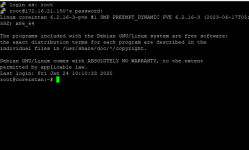


Are you selecting "Linux PAM standard authentication" in the Realm field?
Blockbridge : Ultra low latency all-NVME shared storage for Proxmox - https://www.blockbridge.com/proxmox
Blockbridge : Ultra low latency all-NVME shared storage for Proxmox - https://www.blockbridge.com/proxmox
yes i am selecting "Linux PAM standard authentication"Are you selecting "Linux PAM standard authentication" in the Realm field?
Blockbridge : Ultra low latency all-NVME shared storage for Proxmox - https://www.blockbridge.com/proxmox
Login from SSH, create a file with the following:
execute it, what happens?
replace YOURPASSWORD with your password
Blockbridge : Ultra low latency all-NVME shared storage for Proxmox - https://www.blockbridge.com/proxmox
Code:
password="YOURPASSWORD"
curl -k -X POST "https://localhost:8006/api2/json/access/ticket" \
     -d "username=root@pam" \
     -d "password=$password"
execute it, what happens?
replace YOURPASSWORD with your password
Blockbridge : Ultra low latency all-NVME shared storage for Proxmox - https://www.blockbridge.com/proxmox

Login from SSH, create a file with the following:
Code:password="YOURPASSWORD" curl -k -X POST "https://localhost:8006/api2/json/access/ticket" \ -d "username=root@pam" \ -d "password=$password"
execute it, what happens?
replace YOURPASSWORD with your password
Blockbridge : Ultra low latency all-NVME shared storage for Proxmox - https://www.blockbridge.com/proxmox

Disk being full is indeed a problem that should be resolved. 
Blockbridge : Ultra low latency all-NVME shared storage for Proxmox - https://www.blockbridge.com/proxmox
Blockbridge : Ultra low latency all-NVME shared storage for Proxmox - https://www.blockbridge.com/proxmox
how can i clean the disk? is there any connection with why can't i login proxmox webGUI?Disk being full is indeed a problem that should be resolved.
Blockbridge : Ultra low latency all-NVME shared storage for Proxmox - https://www.blockbridge.com/proxmox
Take a look at this thread, it has similar question and relevant suggestions:how can i clean the disk?
https://forum.proxmox.com/threads/local-disk-full.146137/
Proxmox services, as you can see from the log snippet you provided, require extra space to log things, write configuration to database, update temporary files, etc. While SSH is less demanding, it will also fail at some point when there is absolutely no blocks left.is there any connection with why can't i login proxmox webGUI?
In short, because you are out of space not all PVE services are running properly.
Blockbridge : Ultra low latency all-NVME shared storage for Proxmox - https://www.blockbridge.com/proxmox
Take a look at this thread, it has similar question and relevant suggestions:
https://forum.proxmox.com/threads/local-disk-full.146137/
Proxmox services, as you can see from the log snippet you provided, require extra space to log things, write configuration to database, update temporary files, etc. While SSH is less demanding, it will also fail at some point when there is absolutely no blocks left.
In short, because you are out of space not all PVE services are running properly.
Blockbridge : Ultra low latency all-NVME shared storage for Proxmox - https://www.blockbridge.com/proxmox
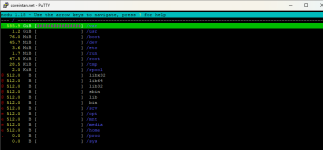
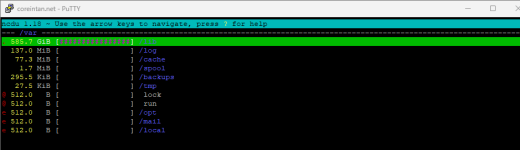
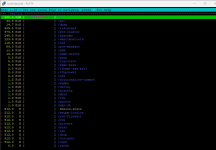
Last edited:
is it okay to delete /vz data?
A quick google search suggests that this is where VM disk images are stored: https://pve.proxmox.com/wiki/Storage:_Directoryis it okay to delete /vz data?
Blockbridge : Ultra low latency all-NVME shared storage for Proxmox - https://www.blockbridge.com/proxmox