[SOLVED] Can't install W11 24H2 on Dell PowerEdge R715 - AMD Opteron 6128

andrea.tilli

New Member
Feb 24, 2025
4
0
1
Hi,
I’m unable to install Windows 11 on a freshly installed Proxmox 8.3.4 running on a Dell PowerEdge R715 (16 x AMD Opteron(tm) Processor 6128 (2 Sockets)).
I’ve followed multiple guides, but I never manage to reach the Windows installation screen.

Images used:
Win11_24H2_English_x64.iso
virtio-win-0.1.266.iso

Hardware:
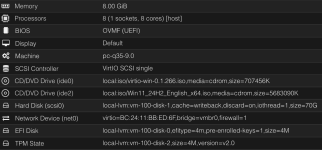
Hardware.png

Options:
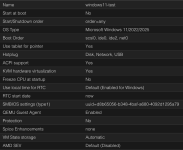
Options.png

This is a screen recording of the console.

Many thanks
 
There could be multiple problems but the most likely is that the opteron cpu ist too old. it does not support the cpu instructions required by windows 11 and virtualization wont change that. look at the windows 11 cpu compatibility list: https://learn.microsoft.com/de-de/w...supported/windows-11-supported-amd-processors

but in theory you should at least get to the install screen an then get an error message. maybe the newest windows install iso does not support even booting on an unsupported cpu?
 
There could be multiple problems but the most likely is that the opteron cpu ist too old. it does not support the cpu instructions required by windows 11 and virtualization wont change that. look at the windows 11 cpu compatibility list: https://learn.microsoft.com/de-de/w...supported/windows-11-supported-amd-processors

but in theory you should at least get to the install screen an then get an error message. maybe the newest windows install iso does not support even booting on an unsupported cpu?
That could be the reason. I’ve never seen the installation screen, just the Windows logo when I switch to SeaBIOS, but instead of the install screen, it goes into a boot loop.
 
Hello. I have a server with AMD Opteron as well: 24 x AMD Opteron(TM) Processor 6234 (2 Sockets) and I have a VM W11 running
Check your hardware configuration, and test with this processor model: x86-64-v2-AES
 
Hello. I have a server with AMD Opteron as well: 24 x AMD Opteron(TM) Processor 6234 (2 Sockets) and I have a VM W11 running
Check your hardware configuration, and test with this processor model: x86-64-v2-AES
I've changed many settings over the course of last few days, but nothing seemed to work.
Happy to know it's working for you! changing to that processor I get this proxmox error right away:

swtpm_setup: Not overwriting existing state file.
kvm: warning: host doesn't support requested feature: CPUID.01H:ECX.ssse3 [bit 9]
kvm: warning: host doesn't support requested feature: CPUID.01H:ECX.sse4.1 [bit 19]
kvm: warning: host doesn't support requested feature: CPUID.01H:ECX.sse4.2 [bit 20]
kvm: warning: host doesn't support requested feature: CPUID.01H:ECX.aes [bit 25]
kvm: Host doesn't support requested features
stopping swtpm instance (pid 178642) due to QEMU startup error
TASK ERROR: start failed: QEMU exited with code 1
 
depending on you use case you could use windows 10.
if you need security updates there is the option to use windows 10 iot ltsc. you have to check if it runs virtualized on your opteron and if the software you intent to use works (no offical support for office 356 in windows 10 iot ltsc as an example). the license is not cheap and im not sure if it is even allowed to run a virtualized instance of windows 10 iot ltsc.

https://learn.microsoft.com/en-us/w...whats-new/windows-10-iot-enterprise-ltsc-2021