[SOLVED] Cant connect to webui after fresh install on bare metal

wholesuhm

New Member
Feb 6, 2025
5
0
1
(First time trying this) I followed the instructions to the best of my ability. I have tried reinstalling and using different inputs and have checked youtube. However I could not find a fix.
Also pings don't work

This is probably a simple mistake :')
Feel free to ask for logs
 
Last edited:
Hello wholesuhm! If you cannot access the web UI and pings don't work, it's most probably a network issue. Can you please do the following:
  1. Post the output of the command cat /etc/network/interfaces.
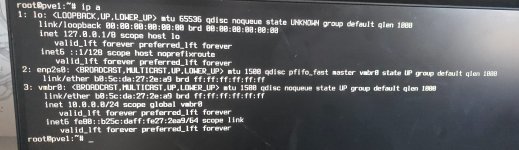
  2. Post the output of the command ip a
 
cat /etc/network/interfaces

auto lo
iface lo inet loopback

iface enp2s0 inet manual

auto vmbr0
iface vmbr0 inet static
address 10.0.0.0/24
gateway 10.0.0.1
bridge-ports enp2s0
bridge-stp off
bridge-fd 0

source /etc/network/interfaces.d/#
 

Attachments

  • 20250206_140951.jpg
    20250206_140951.jpg
    873.6 KB · Views: 9
my arch system is 192.168.1.12
and my windows laptop is 192.168.1.6
Then you should set your PVE to something like 192.168.1.20 with a subnet 255.255.255.0 or /24 (confirm your existing hosts).
Also, set appropriate gateway. Often - 192.168.1.1. Again, check your existing system.
Don't forget the DNS.

Additionally, if you have a DHCP server on the network, i.e. cable router, make sure you reserve appropriate IP and/or use an IP outside the dynamic range.

I'd recommend watching a few youtube videos about PVE installation. Some of them have good insights, I suspect.


Blockbridge : Ultra low latency all-NVME shared storage for Proxmox - https://www.blockbridge.com/proxmox
 
You need to access the host and edit the interfaces file.

nano /etc/network/interfaces

in the line: address, you should change the ip to, for example: 10.0.0.99/24
(but check with a ping command that this ip is allowed).

ping 10.0.0.99
You should update your suggestion based on the information OP provided in comment #5


Blockbridge : Ultra low latency all-NVME shared storage for Proxmox - https://www.blockbridge.com/proxmox
 
  • Like
Reactions: gfngfn256
bbgeek17 has given you very detailed & accurate advice. But I feel I must add something. It would appear you have little comprehension on Networking & its workings. Don't worry - so do 99.9% of the population! Since Proxmox is a highly network-centric system, I think that first, you should try & gain better knowledge in this realm (videos, blogs etc.), before attempting a HV like Proxmox. Maybe start with a regular plain Debian OS & see how it goes? Get an understanding of general Linux & its' NW system/s. From there, you could eventually move on to Proxmox (also Debian based), & challenge yourself with its hurdles, (they will exist!).

If you follow my advice - I believe you will be grateful (eventually).
 
Then you should set your PVE to something like 192.168.1.20 with a subnet 255.255.255.0 or /24 (confirm your existing hosts).
Also, set appropriate gateway. Often - 192.168.1.1. Again, check your existing system.
Don't forget the DNS.

Additionally, if you have a DHCP server on the network, i.e. cable router, make sure you reserve appropriate IP and/or use an IP outside the dynamic range.

I'd recommend watching a few youtube videos about PVE installation. Some of them have good insights, I suspect.


Blockbridge : Ultra low latency all-NVME shared storage for Proxmox - https://www.blockbridge.com/proxmox
i managed to get it solved with the help of this and the video earlier i just reinstalled it fixing the ip addresses in the iso

i used:

IP CIDR: 192.168.1.30/24
Gateway: 192.168.1.254
DNS: 192.168.1.254

correct me if something is wrong

WEBUI i working <3
 
As told before make sure this is not within your DHCP assigned-range. Also that no other devices use this IP.


I assume you have checked this is your correct GW.
yes i have my router opened on another tab. after getting it working everything slowly started to click in my brain. Thank you for your support <3