Cannot remove disk for VM when not all Proxmox nodes are online

devedse

Member
Aug 20, 2023
33
11
13
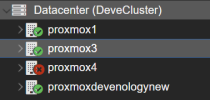
I'm currently using a 4 node proxmox cluster with a CEPH filesystem as storage. Of these 4 nodes only 3 of these are running and 1 is offline.
1740400524751.png
Which is intended for my purposes.

I have a VM (104) which is currently stored on an erasure pool. The erasure pool is only stored on the online nodes. The proxmox4 node is not participating in this CEPH pool.

However when I try to remove the disk for VM 104 (or in this case, the whole VM), proxmox shows an error that it can't acquire cfs lock:

Code:
()
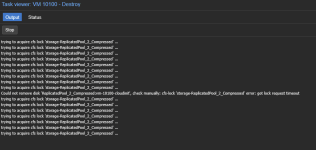
trying to acquire cfs lock 'storage-DeveErasurePool_P1' ...
Could not remove disk 'DeveErasurePool_P1:vm-104-disk-0', check manually: cfs-lock 'storage-DeveErasurePool_P1' error: got lock request timeout
purging VM 104 from related configurations..
TASK OK

Only when I turn on proxmox4, I am able to remove this disk.
 
Hi,

What says the output `pvecm status` when only 3 nodes are online? Could you also please provide us with the output of `pveceph status` command.
 
The weird thing is, is that after booting up that offline proxmox host, and turning it off again, I can now still remove disks.

I've had this problem happen multiple items in the past though and the only thing that I could do to solve it was to start that offline proxmox host.

It's a bit hard to reproduce sadly.

Anyway, I've ran the commands as you requested:

Code:
root@proxmox1:~# pvecm status
Cluster information
-------------------
Name:             DeveCluster
Config Version:   8
Transport:        knet
Secure auth:      on

Quorum information
------------------
Date:             Mon Feb 24 16:31:47 2025
Quorum provider:  corosync_votequorum
Nodes:            3
Node ID:          0x00000001
Ring ID:          1.16dbb
Quorate:          Yes

Votequorum information
----------------------
Expected votes:   3
Highest expected: 3
Total votes:      3
Quorum:           2 
Flags:            Quorate

Membership information
----------------------
    Nodeid      Votes Name
0x00000001          1 10.88.20.10 (local)
0x00000003          1 10.88.20.12
0x00000004          1 10.88.20.13
root@proxmox1:~# pveceph status
  cluster:
    id:     3d4ac63a-0d65-479a-a467-cf90a222c285
    health: HEALTH_WARN
            6 osds down
            1 host (6 osds) down
            Reduced data availability: 128 pgs stale
 
  services:
    mon: 3 daemons, quorum proxmox1,proxmoxdevenologynew,proxmox3 (age 23m)
    mgr: proxmox1(active, since 24m), standbys: proxmoxdevenologynew, proxmox3
    mds: 1/1 daemons up, 1 standby
    osd: 9 osds: 3 up (since 3m), 9 in (since 2h)
 
  data:
    volumes: 1/1 healthy
    pools:   8 pools, 321 pgs
    objects: 270.40k objects, 1.0 TiB
    usage:   2.1 TiB used, 3.1 TiB / 5.2 TiB avail
    pgs:     193 active+clean
             128 stale+active+clean
 
  io:
    client:   6.4 MiB/s rd, 18 MiB/s wr, 238 op/s rd, 78 op/s wr

I configured proxmox4 to not have any votes in quorum. (Since it's mostly offline)
 
@Moayad , I just ran into this same error again:

1751626416062.png

Here's the pveceph status:

Code:
root@proxmox1:~# pveceph status
  cluster:
    id:     3d4ac63a-0d65-479a-a467-cf90a222c285
    health: HEALTH_WARN
            3 osds down
            1 host (6 osds) down
            Reduced data availability: 128 pgs inactive
            128 pgs not deep-scrubbed in time
            128 pgs not scrubbed in time
 
  services:
    mon: 3 daemons, quorum proxmox1,proxmoxdevenologynew,proxmox3 (age 3w)
    mgr: proxmox1(active, since 3w), standbys: proxmoxdevenologynew, proxmox3
    mds: 1/1 daemons up, 1 standby
    osd: 9 osds: 3 up (since 3w), 6 in (since 7w)
 
  data:
    volumes: 1/1 healthy
    pools:   8 pools, 321 pgs
    objects: 197.38k objects, 753 GiB
    usage:   1.5 TiB used, 993 GiB / 2.5 TiB avail
    pgs:     39.875% pgs unknown
             193 active+clean
             128 unknown
 
  io:
    client:   341 B/s rd, 138 KiB/s wr, 0 op/s rd, 21 op/s wr
 
I actually used AI to do some research and found the underlying issue:

After investigation, this is not a cfs-lock or quorum problem (the cluster is quorate and pmxcfs is healthy throughout). The real chain is:

The VM being removed lives on a healthy, fully-online RBD pool. However, Proxmox's disk-removal / VM-purge path enumerates all configured RBD storages (e.g. via rbd ls) to locate any disks belonging to the VMID, regardless of which pool the VM actually uses.

My cluster has additional RBD pools that are intentionally backed by a single host which is powered off as part of normal operation (the pool is meant to vanish when that host is off). With that host down, every PG in those pools goes stale+active+clean — both replicas were on OSDs on the offline host — so any client op against the pool, including rbd ls, blocks in librados indefinitely (no I/O timeout).

The enumeration step therefore hangs on the unavailable pool. The qmdestroy worker sits in select() waiting on the child rbd process (confirmed: child stuck in futex_wait against the offline pool), while holding the per-VM config lock. Subsequent removal attempts then fail with can't lock file '/var/lock/...' because the first operation never releases its lock. Powering the offline host back on un-stales the PGs, the blocked rbd ls returns, and all queued removals drain immediately, which is why the workaround has always been "turn all nodes on."

Reproduction (with an RBD pool whose backing host is offline):

```
timeout 10 rbd -p <offline_pool> ls # exits 124 (blocks until timeout)
```

while removing a VM stored on a different, healthy pool still hangs, because the purge enumerates the offline pool too.

Suggested fix: during VM/disk removal, RBD storage enumeration should either (a) honor a bounded rados_osd_op_timeout / client op timeout so an unavailable pool fails fast instead of blocking forever, or (b) skip storages that are disabled or restricted away from the node, or (c) only scan the storage(s) actually referenced by the VM config rather than all RBD storages. Any of these would prevent one deliberately-offline pool from blocking removal of unrelated VMs.
Operator workaround: restricting each single-host pool's storage definition to its own node (nodes <hostname> in storage.cfg) so other nodes don't enumerate it, or setting disable 1 while the host is off.

*End of AI research*

I honestly think option C might be the best since to me it makes sense to skip storages that are currently offline since they are not related to the VM we are handling.