Cannot destroy VMs

Krayson211

New Member
Apr 9, 2024
2
0
1
Hi guys,

Been pulling my hair out over a few problem VMs.

I mounted 2 ISCSI drives for the VMs but stupidly detached and wiped the drives before destroying the VMs, now I cannot destroy them because Proxmomx cannot see the conf files to destroy the VM.

Hope that made sense to someone
 
Code:
     VMID NAME                 STATUS     MEM(MB)    BOOTDISK(GB) PID       
       343 Win-11-Template      stopped    4096              32.00 0         
       491 Minecraft            running    16384             37.00 1270     
       543 Plex                 running    16244             80.00 1438     
       673 Khali-Linux          stopped    16388             32.00 0         
       684 Wazuh                running    8192              70.00 2611     
       815 HomeAssistant        running    4096              32.00 1549     
       933 WindowsServer2019WDS running    4096              42.00 1188     
      4567 PFSense              stopped    2048              32.00 0         
      9484 2022-DC              running    4096              40.00 1649
Code:
dir: local
        path /var/lib/vz
        content vztmpl,iso,backup

lvmthin: local-lvm
        thinpool data
        vgname pve
        content rootdir,images

lvm: Node1-VM-Install
        vgname Node1-VM-Install
        content images,rootdir
        nodes Node1
        shared 0

nfs: Truenas
        export /mnt/Abydos/Backups/Proxmox-Backups/VM-Backups
        path /mnt/pve/Truenas
        server 10.5.0.40
        content backup
        prune-backups keep-all=1

nfs: Images
        export /mnt/Abydos/Backups/Proxmox-Backups/ISO-Storage
        path /mnt/pve/Images
        server 10.5.0.40
        content iso,vztmpl
        prune-backups keep-all=1

dir: HB-Cache
        path /mnt/pve/HB-Cache
        content iso,backup,vztmpl,snippets,rootdir,images
        is_mountpoint 1
        nodes Node1

1712696325183.png

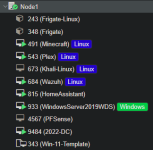
This is the issue the VMs do not show in the list because the conf files where on the ISCSI drives (Shown in screenshot).

I can usually figure these things out but this has me stumped.
 
If you want a fairly quick solution to this:

o Write down / document your current network config (might even want to take a picture of [node] / Network in the GUI for reference)

o tar backup your /etc config somewhere
o Shutdown all VMs and back them up to external storage (USB disk / other disk that is not part of root / NAS)

o Do a clean install of PVE on the same hardware with the same settings

o Add your backup storage in the GUI
o Restore valid VMs that you want running on this server.

...Make notes and be more careful in the future, and consider this as a minor test of your DR plan

If you don't already have one, define a regular backup regimen, and automate it.

You should have been able to restore these missing VMs from backup to other storage, worst case. There's nothing wrong with keeping a decommed VM backup for a week/month unless you're severely starved for backup storage space. Although keep in mind, you can get 6TB USB3 external backup drives for under $90 these days.