

Hello Everyone, I'm newbie on proxmox, i have trouble on access Web GUI, it say
"This site can’t be reached, 192.168.100.100 refused to connect."
I install proxmox on Supermicro server, the supermicro server have GUI on 192.168.100.100
I Install proxmox and configure 192.168.100.100 too (previously on 192.168.100.2 - default when installation, still cannot access)
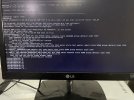
The interface on proxmox is attach
vmbr0:
inet 192.168.100.100/24
On my router i already reserve that IP to static DHCP
Thank you for advance
SOLVE, THE URL, USE HTTPS:// INSTEAD HTTP:// Thank you
"This site can’t be reached, 192.168.100.100 refused to connect."
I install proxmox on Supermicro server, the supermicro server have GUI on 192.168.100.100
I Install proxmox and configure 192.168.100.100 too (previously on 192.168.100.2 - default when installation, still cannot access)
The interface on proxmox is attach
vmbr0:
inet 192.168.100.100/24
On my router i already reserve that IP to static DHCP
Thank you for advance
SOLVE, THE URL, USE HTTPS:// INSTEAD HTTP:// Thank you
Attachments
Last edited:
