Hi all,
I've got what seems like a simple problem but I am stumped.
I have Pfsense runnin in a VM on ProxMox. Everything is working great, I repurposed my Netgear router as AP only and it is assigned a static IP that is ouside the dhcp scope of my dhcp server.
original setup: Xfinity Modem => Nighthake Router/AP => LAN switch (could access both ProxMox & PFsense interfaces without issue since I was just routing subnet 172.16.16.0 and the Proxmox was pulling DHCP from the Nighthawk)
New setup: Xfinity Modem => Proxmox/PFsnes VM => LAN switch => Nighthawk as AP. All my wired and wireless clients are working great on the 172.16.16.0 subnet and internet access is just fine.
My problem is I can no longer access the ProxMox Web GUI.
Setup is as follows:
Proxmox running on an 8-core appliance with 5 2.5Gbs physical ports.
Physiccal Port #1 vmbr0 is connected to the WAN via DHCP 73.190.84.x The address is from Xfinity
Physiccal Port #2 vmbr1 is connected to the LAN via static 172.16.16.1 The address is outside of the DHCP Scope on my PFsense dhcp server.
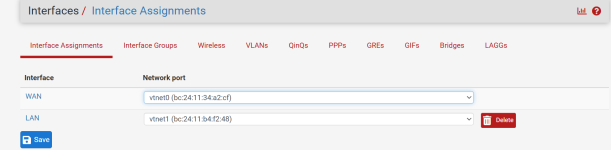
On Pfsense gui, the interface assignments are:
WAN vtnet0
LAN vtnet1
I am on a laptop on the LAN with a pfsense assigned dhcp address of 172.16.16.78
I can access the pfsense gui and the internet. Firewall in PFsense appears to be working very well.
When I try to access the ProxMox GUI, I cannot access it. I don't know what IP it is on since it gets it's IP from the PFsense VM running on top of it.
I have access to the ProxMox console via keyboard and mouse on the physical device
I tried configuring the GUI on 172.16.16.2 (Known good address outside the dhcp pool) to no avail.
ip r on the console returns:
default via 172.16,16,1 dev vmbr0 proto kernal onlink
172.16.16.0/24 dev vmbr0 proto kernal scope link src 172.16.16.2
I'm so close but his has got me stumped, any help greatly appreciated
I've got what seems like a simple problem but I am stumped.
I have Pfsense runnin in a VM on ProxMox. Everything is working great, I repurposed my Netgear router as AP only and it is assigned a static IP that is ouside the dhcp scope of my dhcp server.
original setup: Xfinity Modem => Nighthake Router/AP => LAN switch (could access both ProxMox & PFsense interfaces without issue since I was just routing subnet 172.16.16.0 and the Proxmox was pulling DHCP from the Nighthawk)
New setup: Xfinity Modem => Proxmox/PFsnes VM => LAN switch => Nighthawk as AP. All my wired and wireless clients are working great on the 172.16.16.0 subnet and internet access is just fine.
My problem is I can no longer access the ProxMox Web GUI.
Setup is as follows:
Proxmox running on an 8-core appliance with 5 2.5Gbs physical ports.
Physiccal Port #1 vmbr0 is connected to the WAN via DHCP 73.190.84.x The address is from Xfinity
Physiccal Port #2 vmbr1 is connected to the LAN via static 172.16.16.1 The address is outside of the DHCP Scope on my PFsense dhcp server.
On Pfsense gui, the interface assignments are:
WAN vtnet0
LAN vtnet1
I am on a laptop on the LAN with a pfsense assigned dhcp address of 172.16.16.78
I can access the pfsense gui and the internet. Firewall in PFsense appears to be working very well.
When I try to access the ProxMox GUI, I cannot access it. I don't know what IP it is on since it gets it's IP from the PFsense VM running on top of it.
I have access to the ProxMox console via keyboard and mouse on the physical device
I tried configuring the GUI on 172.16.16.2 (Known good address outside the dhcp pool) to no avail.
ip r on the console returns:
default via 172.16,16,1 dev vmbr0 proto kernal onlink
172.16.16.0/24 dev vmbr0 proto kernal scope link src 172.16.16.2
I'm so close but his has got me stumped, any help greatly appreciated