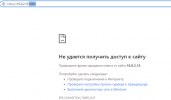
I IKirill New Member Mar 30, 2022 2 0 1 Apr 2, 2022 #1 Hi, to all! I can`t reach my proxmox ip address 10.0.2.15 in any browser. I try to change different setting in Virtual Box such as NAT, NAT network, virtual adapter and bridge. Please tell me any suggestions.
Hi, to all! I can`t reach my proxmox ip address 10.0.2.15 in any browser. I try to change different setting in Virtual Box such as NAT, NAT network, virtual adapter and bridge. Please tell me any suggestions.
Dunuin Distinguished Member Jun 30, 2020 14,792 4,883 290 Germany Apr 2, 2022 #2 First make sure you really use "https://10.0.2.15:8006/". Using "http" or not specifying the port it won't work.
First make sure you really use "https://10.0.2.15:8006/". Using "http" or not specifying the port it won't work.
I IKirill New Member Mar 30, 2022 2 0 1 Apr 2, 2022 #3 Dunuin said: First make sure you really use "https://10.0.2.15:8006/". Using "http" or not specifying the port it won't work. Click to expand... it doesn't work anyway Attachments Снимок123.PNG 17.9 KB · Views: 11
Dunuin said: First make sure you really use "https://10.0.2.15:8006/". Using "http" or not specifying the port it won't work. Click to expand... it doesn't work anyway
dcsapak Proxmox Staff Member Staff member Feb 1, 2016 10,784 1,782 273 38 Vienna Apr 4, 2022 #4 if you run pve inside virtualbox (at least that is what i gathered from you post), check https://pve.proxmox.com/wiki/Proxmox_VE_inside_VirtualBox
if you run pve inside virtualbox (at least that is what i gathered from you post), check https://pve.proxmox.com/wiki/Proxmox_VE_inside_VirtualBox