

[SOLVED] Bug Web-GUI Firefox+IPv6
- Thread starter Maksel
- Start date
You are using an out of date browser. It may not display this or other websites correctly.
You should upgrade or use an alternative browser.
You should upgrade or use an alternative browser.
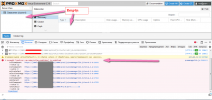

I have several setups. 1 - cluster, 2 - separate proxmox, without cluster.
On all servers - Firefox +IPv6 the web is not displayed correctly.
Win 7 + Firefox 86.0.1 (64-bit) - bug
Win 2016 + Firefox 86.0.1 (64-bit) bug
Ubuntu 18.04.5 + Firefoh 86.0 - bug
Win 10:
I uninstalled the newer version of Firefox 86 and installed the old one, Firefox 82 - no errors.
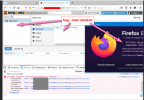
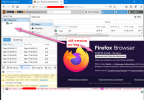
Coogle Chrome 89.0.4389.90 - no errors.
PS. ProxmoxBackupServe - Firefox 86.0.1 + IPv6 - also displayed incorrectly. Chrome 89.0.4389.90 - no errors.
On all servers - Firefox +IPv6 the web is not displayed correctly.
Win 7 + Firefox 86.0.1 (64-bit) - bug
Win 2016 + Firefox 86.0.1 (64-bit) bug
Ubuntu 18.04.5 + Firefoh 86.0 - bug
Win 10:
I uninstalled the newer version of Firefox 86 and installed the old one, Firefox 82 - no errors.
Coogle Chrome 89.0.4389.90 - no errors.
PS. ProxmoxBackupServe - Firefox 86.0.1 + IPv6 - also displayed incorrectly.
Chrome 89.0.4389.90 - no errors.
Last edited:
Hi. Not. I have not changed any settings. Here I installed a new Windows 7 + download last firefox.
I did not change any settings.
Can't you check with yourself, or we do not have an ipv6 address on your hosts.
Used to work on old version of firefox, then firefox was updated and stopped. (I don’t remember the version for which last time I worke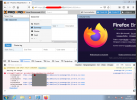
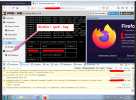
I did not change any settings.
Can't you check with yourself, or we do not have an ipv6 address on your hosts.
Used to work on old version of firefox, then firefox was updated and stopped. (I don’t remember the version for which last time I worke
We also found out. If you add an entry to the hosts
2a.......:20 prox20.test.net
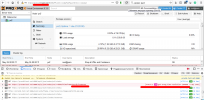
and open in firefox by this domain name https://prox20.test.net:8006 data is displayed.
it does not work if it is enter to the address in the ipv6 format https://[xxxxx]:8006
2a.......:20 prox20.test.net
and open in firefox by this domain name https://prox20.test.net:8006 data is displayed.
it does not work if it is enter to the address in the ipv6 format https://[xxxxx]:8006
