Backup Recommendation

Jimmy Brown

New Member
Jul 20, 2025
10
5
3
Hi everyone,


This is my second post here, and I’m looking for some advice and guidance on storage and RAID options for my main Proxmox server.


I’m currently running Proxmox as my primary homelab host. It runs my main Pi-hole instance along with a few test nodes. I’ve been really happy with the setup so far. My Pi-hole cluster uses a virtual network that communicates with the correct VLANs in my Ubiquiti environment, keeping IoT and trusted devices properly segmented.


Current Storage Setup​


Proxmox OS drive:


  • SanDisk SD9TB8W256G1001 (SSD) – 238.5 GB

Secondary drive (backups / ISOs):


  • KXG50ZNV1T02 NVMe TOSHIBA 1024GB (M.2) – 953.9 GB

Hardware​


  • Lenovo ThinkCentre M720q
  • I have a 4-pin to 2/3-port SATA power splitter cable available, so I can add additional SATA SSDs if needed.

I also have two spare M.2 drives:


  • SK Hynix SC311 (128GB)
  • SK Hynix PC401 (256GB)

My Question​


Is it okay to mix and match different SSDs (SATA and NVMe, different sizes and models) in a RAID setup, or is that generally not recommended?


Ideally, I’d prefer not to spend much (or any ) money on additional hardware if I can make use of what I already have.

I’d like to improve redundancy and overall reliability, and I’m especially interested in best practices for RAID and storage configuration in a Proxmox homelab environment.
The final stage is link to Proxmox to a NAS for additional redundancy.

Any recommendations, suggestions, or lessons learned would be greatly appreciated.
 
Is it okay to mix and match different SSDs (SATA and NVMe, different sizes and models) in a RAID setup, or is that generally not recommended?
Besides the potential for performance issues and differing drive capacities, where only the capacity of the smallest drive would be applied to all others in a pool/array, I'd say it's fine doing that in a home lab.

But more importantly, RAID is not a backup!!! So I'd say it would probably be better to use one of the drives as a backup drive instead of integrating it into a RAID array. And yes, storing backups on a drive in the same computer is still not a good backup, but it's better than RAID, which again is not a backup!
The final stage is link to Proxmox to a NAS for additional redundancy.
...which could, and then should also be used for backups. Actual backups! ;)

You randomly mix and match the terms "redundancy" and "backup" in your post, which are fundamentally different.

RAID provides redundancy/availability, meaning that if one drive fails, your system will still run.

Backup is for beeing able to restore your VMs, containers, configs and data in case of a catastrophic event, such as if all drives die at the same time, or in the event of a fire, theft, user error etc... Backups should be stored at least on a separate drive or storage pool. Important data should also be backed up at a second or even third device, one of which should be offsite.
 
Last edited:
Besides the potential for performance issues and differing drive capacities, where only the capacity of the smallest drive would be applied to all others in a pool/array, I'd say it's fine doing that in a home lab.

But more importantly, RAID is not a backup!!! So I'd say it would probably be better to use one of the drives as a backup drive instead of integrating it into a RAID array. And yes, storing backups on a drive in the same computer is still not a good backup, but it's better than RAID, which again is not a backup!

...which could, and then should also be used for backups. Actual backups! ;)

You randomly mix and match the terms "redundancy" and "backup" in your post, which are fundamentally different.

RAID provides redundancy/availability, meaning that if one drive fails, your system will still run.

Backup is for beeing able to restore your VMs, containers, configs and data in case of a catastrophic event, such as if all drives die at the same time, or in the event of a fire, theft, user error etc... Backups should be stored at least on a separate drive or storage pool. Important data should also be backed up at a second or even third device, one of which should be offsite.
Thanks for clarifying. I re-read my paragraphs and I definitely used the term "redundancy" and "backups" incorrectly! Thank you for spotting that.
 
Last edited:
  • Like
Reactions: proxuser77
Addition/clarification: While mixing and matching drives from different vendors is generally fine for a home lab, I wouldn't recommend putting NVMe and SATA drives in the same pool. These have significant performance differences and I don't know if this may cause other side effects.

You should also avoid mixing and matching TLC and QLC NAND or SMR and CRM in hard disks. Otherwise, as long as you're fine with the performance/capacity of the slowest/smallest drive, it shouldn't be a problem.
 
Last edited:
Addition/clarification: While mixing and matching drives from different vendors is generally fine for a home lab, I wouldn't recommend putting NVMe and SATA drives in the same pool. These have significant performance differences and I don't know if this may cause other side effects.

You should also avoid mixing and matching TLC and QLC NAND or SMR and CRM in hard disks. Otherwise, as long as you're fine with the performance/capacity of the slowest/smallest drive, it shouldn't be a problem.
Thanks, more carful planning to consider.

I might fork out some monies and get x2 m.2 or SSD of the same brand/type for redundancy/availability on the OS side of things.

Anything you recommend for price to performance ratio?

I actually have a Synology NAS laying in dust. I think it has x2 of the same 1TB NAS grade drive inside it. Going to see if it works and hook it up to Proxmox
 
To be honest, if money is tight, I would rather do without RAID and make backups instead. RAID with two disks doesn't give you any performance advantages, and at the end of the day, if uptime isn't absolutely mission critical and your setup is relatively simple, with VMs or containers that aren't too large, it's easier to just reinstall Proxmox and restore the VMs and containers from the backups than to rebuild a RAID. And if the VM/CT disks are on a separate drive, and the boot drive fails you don't even have to restore the backups. Just reinstall Proxmox on a new disk, restore the VM configuration files and/or manually recreate the VMs/CTs from the UI, re-attach the existing virtual disks, and all VMs will be up and running again.

If I were you, I would use the 1TB NVMe drive for VMs and the SATA drive as a boot drive. And the NAS for backups. Just keep an eye on the wear levels of the SSDs, so you can get a replacement early enough before they fail. This can happen with consumer SSDs, but it's not as critical in a home setting as some forum posts suggest, especially if you use ext4 instead of ZFS, which I would recommend here.

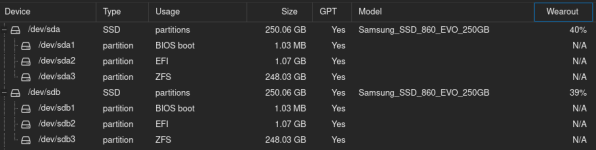
By the way... I have two 250 GB Samsung Evo boot drives in my main server. It has been running 24/7 for eight years with ZFS RAID1, and the wear level is now just under 50%.

Oh, and the Toshiba drive in your post is TLC 3D NAND, so it should be fine for running VMs in a home lab.
 
Last edited:
Oh, and one more thing ;-)

If you buy two new SSDs and put them in an RAID1, they will wear out fairly evenly. In other words, there is a high chance that they will wear out at the same time or around the same time and then fail within a similar time frame. I would save the money for now, unless your existing 1TB SSD is already almost worn out. It might be better to invest the money in more backup space, i.e., a larger disks for your NAS if at all, as 1TB night be a bit small if you want to keep multiple versions of your VM backups.
 
I would suggest to get a used enterprise ssd (with power-loss-protection) which matches the capacity of your M2. SSD, then put both together in ZFS mirror. Due to ZFS flexibiltiy you can then use it for both the OS and your vms/containers. I do this myself on my mini-pcs.
The M2 ssd will propably wearout sooner than the SATA SSD so be prepared to replace it from time to time. Alternatively get yourself a M2. SSD with powerloss protection, sadly they are not cheap new and hard to get used.

Your backups shouldn't be on the same machine as your main data. If your budget is tight I would get use multiple USB discs as external backup storage, store one of them outside your place and swap them out from time to time. Or get a cheap vserver and run ProxmoxBackupServer on it. ProxmoxBackupServernow also has support for S3 storage now, but it's still "technology preview", so I wouldn't use it as sole backup

If you have the budget another mini-pc (for PBS) or nas (some can host vms, PBS can be run as vm too) would be a good option for a low-budget backup in your local network. You would still need another backup outside of your place (so you still have a backup in case of an emergency e.g. fire) though
 
I think power-loss protection is somewhat overrated as well in a home lab, particularly if the budget is limited. With modern file systems, and modern branded SSDs it's not strictly necessary, provided you can accept the loss of any data that was "in flight" when the power went out. The file system itself will survive the power-loss, In fact, I would argue that it's quite hard to corrupt e.g. a ZFS file system, even if you tried really hard to do so deliberately, unless there are additional issues, like bad firmware on some no name chineese SSD maybe. ;-)

And once again, regarding wear levels: it obviously depends on what you do with your server, but on a home server, very little usually happens most of the time. Even if you have 50 web apps and 50 databases installed, most of the time nobody is actually using them. A work laptop in an office normally sees a lot more activity throughout the day than the avarage homelab, and the consumer grade SSDs in those still last for years.

I think, many users on this forum seem to be applying their experience from the business world, where multiple users are constantly working with the services hosted on these disks. ;-)
 
Last edited:
When people recommend PLP it's often not directly about PLP itself but about the increased (sync) performance
Yes, but the same principle applies here as with wear levels. If many users access IOPS-intensive applications on your server simultaneously, this will likely have a significant impact. However, on my home server with Nextcloud, Plex and a few web apps, which my girlfriend and I use, you won't notice any real-world performance difference. In other words, the performance for two users is 'good enough' with consumer SSDs.

I mean, people host these kinds of things on Raspberry Pis and they run them for years with perfectly adequate performance. So why should it suddenly become a problem on a PC with Proxmox?

Oh, and the following pics are for those who claim that you shouldn’t use consumer SSDs as a boot drive with ZFS because they’ll be dead after a year... ;)

1772716487849.png

1772716539712.png

EDIT: If now anyone says: But that partition layout is newer than the disks, then they would be right. ;) That's because I recently reinstalled the server. But these disks were actually already in use with a ZFS mirror and Proxmox for the entire 64714 hours.
 
Last edited:
However, to be fair, I could imagine that there are probably significant differences between different consumer SSDs. So far, I’ve always used Samsung Evos (TLC) and, in one case, a Pro (MLC), and I haven’t managed to kill any of them yet, at least not with my workloads, even with ZFS.

So I’d say: buy at least mid-level models with TLC nand from a reputable brand and you’re most likely fine. Although the 256 GB SanDisk entry-level SSD in my pfSense box has been running for almost 10 years now. An impossibility, if not an outright miracle, because according to some users on the Netgate forum, it should have been dead long ago with all the logging that pfSense does. ;)

By the way, my new Lenovo 1L PC, which I bought to complement my main Proxmox server because it was the only PC with 64 GB of RAM that I could find for under €1,000, came with two WD Black SN7100s. I guess I’ll have to wait and see how long they last, but I'm not particularly worried. Performance-wise, I haven't noticed any issues with the things I run on this machine.
 
Last edited:
  • Like
Reactions: Johannes S