

Hi all,
I'm having a similar issue to https://forum.proxmox.com/threads/aquantia-aqc107-dhcp-failed-during-proxmox-installation.139847/ but since it's been almost a year and that workaround doesn't work for me I decided to start a new thread, happy to move it to that thread if it makes more sense.
I reiterate the issue and differences:
- I installed the newest version of proxmox and with this atlantic AQC107 card is not working and didn't assign an IP.
- I have a 2gbps internet connection and with the same onboard card and windows it's working at full speed. I checked and I had the latest version of the firmware as well.
- I tried switching to the 1gbps port on the router but still doesn't work (this worked in the other thread).
Since I cannot access it via ssh or web interface, let me add pictures of the commands I've seen used to troubleshoot it.
cat /etc/network/interfaces
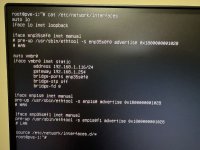
enp35s0f0 and enp35s0f1 were an intel X550-T2 that I removed from the system. With that card at least I was assigned an IP from the router but I still had issues with the speed, after adding the pre-up line of code (that I found in another thread here) at least it started working at roughly 500mb/s. I tried with that code and without it for enp1s0 (atlantic) and still doesn't work and no difference in the following outputs either.
ethtool enp1s0
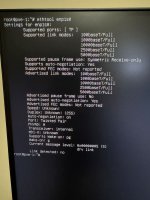
I assume that the supported link modes are because of my router that supports up to 5gbps, but I'm not sure.
ethtool vmbr0
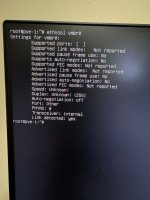
dmesg | grep atlantic
After taking the pictures I commented out enp35s0f0 and enp35s0f1 on /etc/network/interfaces and everything else remains the same, no change in the outputs.
I will eventually get another dual port 10g card but I would appreciate if I can get help to resolve this issue because the card works with other OSs.
Thanks in advance for your help.
I'm having a similar issue to https://forum.proxmox.com/threads/aquantia-aqc107-dhcp-failed-during-proxmox-installation.139847/ but since it's been almost a year and that workaround doesn't work for me I decided to start a new thread, happy to move it to that thread if it makes more sense.
I reiterate the issue and differences:
- I installed the newest version of proxmox and with this atlantic AQC107 card is not working and didn't assign an IP.
- I have a 2gbps internet connection and with the same onboard card and windows it's working at full speed. I checked and I had the latest version of the firmware as well.
- I tried switching to the 1gbps port on the router but still doesn't work (this worked in the other thread).
Since I cannot access it via ssh or web interface, let me add pictures of the commands I've seen used to troubleshoot it.
cat /etc/network/interfaces
enp35s0f0 and enp35s0f1 were an intel X550-T2 that I removed from the system. With that card at least I was assigned an IP from the router but I still had issues with the speed, after adding the pre-up line of code (that I found in another thread here) at least it started working at roughly 500mb/s. I tried with that code and without it for enp1s0 (atlantic) and still doesn't work and no difference in the following outputs either.
ethtool enp1s0
I assume that the supported link modes are because of my router that supports up to 5gbps, but I'm not sure.
ethtool vmbr0
dmesg | grep atlantic
Code:
[ 3.029200] atlantic 0000:01:00.0 enp1s0: renamed from eth0After taking the pictures I commented out enp35s0f0 and enp35s0f1 on /etc/network/interfaces and everything else remains the same, no change in the outputs.
I will eventually get another dual port 10g card but I would appreciate if I can get help to resolve this issue because the card works with other OSs.
Thanks in advance for your help.
