All Helper Scripts Fail

JakeBr

New Member
Feb 24, 2026
1
0
1
Hey there, I'm new to Proxmox and LXC so I've been trying to stand up apps using helper scripts. Every attempt—regardless of the application—fails with Exit Code 255approximately 2 minutes after creation.

The Symptoms:
  1. The script successfully creates the container.
  2. I manually start the container.
  3. The script hangs for about 2 minutes.
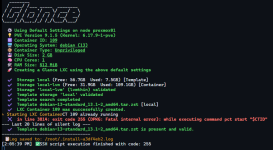
  4. After the timeout, it fails with: in line 3814: exit code 255 (DPKG: Fatal internal error): while executing command pct start "$CTID".
The Environment:
  • PVE Version: 9.1.5 (pve-manager: 9.1.5)
  • Kernel: 6.17.9-1-pve
  • Storage: LVM-Thin (pve/data)
  • Template: debian-13-standard_13.1-2_amd64.tar.zst
What I have tried:
  1. AppArmor: Currently disabled at the kernel level (apparmor=0 in GRUB). aa-status confirms it is not running.
  2. Max Release: Modified /usr/share/perl5/PVE/LXC/Setup/Debian.pm to allow versions up to 15.
  3. Tested both Privileged and Unprivileged modes; same result.
  4. Nesting and Keyctl enabled or disabled; same result.

Any input or suggestions would be greatly appreciated.

Screenshot 2026-02-24 140618.png
 
Last edited:
I've had the same error installing the smokeping script, its a different line number but the same effect. The error isn't generated by the install script as such, but by DPKG generating a Fatal error. The script is trying to start a container using its containerID.

My environment:
  • PVE Version 8.4.11 (Kernel: 6.8.12-13-pve) pve-manager/8.4.11
  • Template debian-13-standard_13.1-2_amd64.tar.zst [local]
  • Storage: nas mounted share
So there's something else going on, a swift look in dpkg.log shows [in my case]

status triggers-pending libc-bin:amd64 2.36-9+deb12u10
2026-04-21 11:09:28 status half-configured lxc-pve:amd64 6.0.0-1
2026-04-21 11:09:28 status unpacked lxc-pve:amd64 6.0.0-1
2026-04-21 11:09:28 status half-installed lxc-pve:amd64 6.0.0-1
2026-04-21 11:09:28 status triggers-pending man-db:amd64 2.11.2-2
2026-04-21 11:09:28 status unpacked lxc-pve:amd64 6.0.0-2
2026-04-21 11:09:28 upgrade pve-container:all 5.3.0 5.3.3
2026-04-21 11:09:28 status triggers-pending pve-ha-manager:amd64 4.0.7
2026-04-21 11:09:28 status triggers-pending pve-manager:all 8.4.11
2026-04-21 11:09:28 status half-configured pve-container:all 5.3.0
2026-04-21 11:09:28 status unpacked pve-container:all 5.3.0
2026-04-21 11:09:28 status half-installed pve-container:all 5.3.0
2026-04-21 11:09:28 status unpacked pve-container:all 5.3.3

This is because the smokeping install script prompted me with
 An update for the Proxmox LXC stack is available
pve-container: installed=5.3.3 candidate=5.3.4
lxc-pve : installed=6.0.0-2 candidate=6.0.0-2

[1] Upgrade LXC stack now (recommended)
[2] Use an older debian template instead (may not work with all scripts)
[3] Cancel

I chose option 1, which means I have broken the dpkg installation on this node [I have a two, (yeah I know), node cluster, it will be three], running the install script on the second node generates the Update prompt also, so I am going to fix dpkg first.oo

Ch

Tried fixing dpkg, ran apt update, ran apt upgrade, node now completely borked. Will not boot using any existing boot image nor into recovery mode, stalls at about 5 seconds in.. It is version 8.x..

What I should have noticed at the end of the upgrade were two messages:

Run this:

echo 'grub-efi-amd64 grub2/force_efi_extra_removable boolean true' | debconf-set-selections -v -u

Then this:

apt install --reinstall grub-efi-amd64
Before rebooting.
My second node was fine, the first node is still very slow to boot, without a console attached it looks frozen, but its taking two minutes to mount a disk, still figuring out what is happening.
 
Last edited:
Hey there, I'm new to Proxmox and LXC so I've been trying to stand up apps using helper scripts. Every attempt—regardless of the application—fails with Exit Code 255approximately 2 minutes after creation.

The Symptoms:
  1. The script successfully creates the container.
  2. I manually start the container.
  3. The script hangs for about 2 minutes.
  4. After the timeout, it fails with: in line 3814: exit code 255 (DPKG: Fatal internal error): while executing command pct start "$CTID".
The Environment:
  • PVE Version: 9.1.5 (pve-manager: 9.1.5)
  • Kernel: 6.17.9-1-pve
  • Storage: LVM-Thin (pve/data)
  • Template: debian-13-standard_13.1-2_amd64.tar.zst
What I have tried:
  1. AppArmor: Currently disabled at the kernel level (apparmor=0 in GRUB). aa-status confirms it is not running.
  2. Max Release: Modified /usr/share/perl5/PVE/LXC/Setup/Debian.pm to allow versions up to 15.
  3. Tested both Privileged and Unprivileged modes; same result.
  4. Nesting and Keyctl enabled or disabled; same result.

Any input or suggestions would be greatly appreciated.


View attachment 96067

I would run apt update then apt upgrade and reboot the node, then try to install again.


AND check the status of the dpkg log files iin /var/log - expect to see each package update appear at least three times, for example

Code:
2026-04-23 08:41:23 trigproc man-db:amd64 2.11.2-2 <none>
2026-04-23 08:41:23 status half-configured man-db:amd64 2.11.2-2
2026-04-23 08:41:25 status installed man-db:amd64 2.11.2-2
I'm no expert, but as long as you haven't got any incomplete packages your updates should be good.
 
OK, could you explain why not - it would be much appreciated - thank you, if its not best practice it would be good to know what is.
It's literally in the link posted by impact where Proxmox developer Fiona Ebner explains it: Because due to proxmox-specific differences to vanilla Debian things might break otherwise. She also links some relevant forum and reddit threads with examples of breakage.
The pve manual also clearly status to use dist-upgrade: https://pve.proxmox.com/pve-docs/chapter-sysadmin.html#system_software_updates
 
  • Like
Reactions: Impact
It's literally in the link posted by impact where Proxmox developer Fiona Ebner explains it: Because due to proxmox-specific differences to vanilla Debian things might break otherwise. She also links some relevant forum and reddit threads with examples of breakage.
The pve manual also clearly status to use dist-upgrade: https://pve.proxmox.com/pve-docs/chapter-sysadmin.html#system_software_updates
OK, so it wasn't the specific of apt update, but in NOT performing an apt dist-upgrade.

As per https://pve.proxmox.com/wiki/Downlo...Proxmox_Virtual_Environment_8.x_to_latest_8.4.

That now makes sense, and I appreciate the guidance [note to self, Proxmox on Debian != Debian].
To get from 8.4 to 9.1 this is the correct path https://pve.proxmox.com/wiki/Upgrade_from_8_to_9#Prerequisites.

What I am going to do is add another node to my cluster [resolving the cluster quorum challenge], built from an ISO using the latest 9.1-1 and go from there. But everything will be backed up first, and there will be no workload on the third node.
 
It's literally in the link posted by impact where Proxmox developer Fiona Ebner explains it: Because due to proxmox-specific differences to vanilla Debian things might break otherwise. She also links some relevant forum and reddit threads with examples of breakage.
The pve manual also clearly status to use dist-upgrade: https://pve.proxmox.com/pve-docs/chapter-sysadmin.html#system_software_updates
My bad.

The almost hidden link is what I dislike most about modern browsers and usability, having to hover the mouse over a two word response to figure out its a hyperlink to something important is intensely frustrating.

I have indifferent eyesight, owing to spending 40+ years in front of a monitor, if its a link, it should look like one, not merely text in an alternate colour I shall have to look more closely, thank you for your patience.
 
What I am going to do is add another node to my cluster [resolving the cluster quorum challenge], built from an ISO using the latest 9.1-1 and go from there. But everything will be backed up first, and there will be no workload on the third node.
I would strongy recommend NOT to add a third node if it's just for quorum. Firstreal node also needs a dedicated corosync network adapter which a qdevice doesn't need: https://pve.proxmox.com/wiki/Cluster_Manager#_corosync_external_vote_support
This device doesn't need to do much it just must be able to run Debian (or any other Linux which ships the package), making things like old PCs or Raspberrys ideal for it.
Second it's possible to use ProxmoxBackupServer as qdevice, which also gives you the benefits of a dedicated backup device and a qdevice on the same physical machine.. There is one caveat though: By default after adding the qdevice each member of the cluster can also connect via ssh to the qdevice so any bad actor who take over your cluster then can also wreak havok on your backups. To avoid this you can remove the ssh access. Fellow community member @UdoB describes the process here in following post:
https://forum.proxmox.com/threads/f...nd-secure-it-by-disabling-root-access.181525/
To have a real seperation it might sense to install the ProxmoxBackupServer and PVE bare-metal together on the node and afterwards setup a small Debian lxc or VM just for the qdevice. Note that you don't install the PBS as vm, the idea is to be able to have working restores even if the PVE breaks for whatever reason. Such a setup was described by Proxmox staff member aaron in following thread:
https://forum.proxmox.com/threads/2-node-ha-cluster.102781/post-442601
You also wouldn't add this single-node install to the cluster so everything stays isolated from each other.
Personally I would do both, so setting up a combined qdevice/PBS as explained by Aaron and afterwards secure it as explained by Udo.