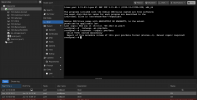
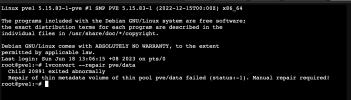
activating LV 'pve/data' failed: Check of pool pve/data failed (status:1). Manual repair required!

muner

New Member
Jun 9, 2023
17
0
1
Hello
everyone.
im facing during outage electricity, I have tried many things but it doesn't work.

activating LV 'pve/data' failed: Check of pool pve/data failed (status:1). Manual repair required!

I hope someone can help me with my problem.

Thank,
 

Attachments

  • Screenshot 2023-06-14 at 15.51.23.png
    Screenshot 2023-06-14 at 15.51.23.png
    393.9 KB · Views: 359
  • Screenshot 2023-06-14 at 17.05.19.png
    Screenshot 2023-06-14 at 17.05.19.png
    330.9 KB · Views: 326
  • Screenshot 2023-06-14 at 17.06.06.png
    Screenshot 2023-06-14 at 17.06.06.png
    75.4 KB · Views: 300
  • Screenshot 2023-06-14 at 17.08.36.png
    Screenshot 2023-06-14 at 17.08.36.png
    96.1 KB · Views: 324
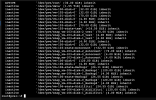
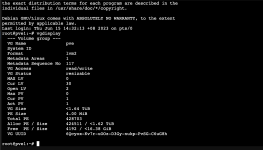
Please post: vgdisplay

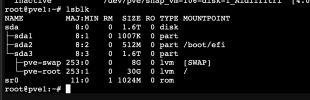
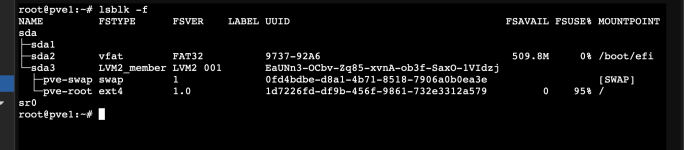
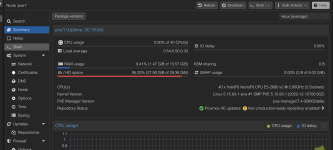
Your pve-root is 95% filled with 0 FSAVAILABLE?

lvconvert --repair calls thin_repair. man thin_repair states that it's important to have enough space left for metadata - maybe that's the issue?
 
Hi Mr Alex.


Vgdisplay here for ur reference

Code:
lvconvert --repair calls thin_repair. man thin_repair states that it's important to have enough space left for metadata - maybe that's the issue?

what should i do now.

thank support
 

Attachments

  • Screenshot 2023-06-18 at 12.20.49.png
    Screenshot 2023-06-18 at 12.20.49.png
    190.4 KB · Views: 359
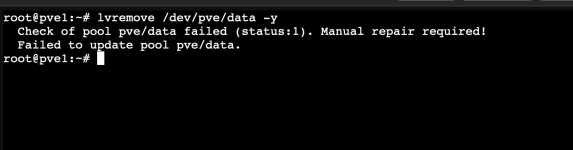
lvremove /dev/pve/data -y

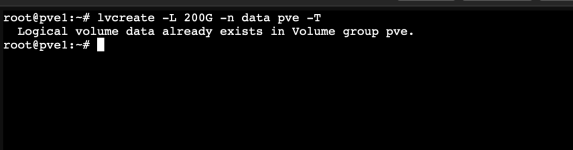
lvcreate -L 10G -n data pve -T
 

Attachments

  • Screenshot 2023-06-18 at 13.02.55.png
    Screenshot 2023-06-18 at 13.02.55.png
    41.5 KB · Views: 147
  • Screenshot 2023-06-18 at 13.04.12.png
    Screenshot 2023-06-18 at 13.04.12.png
    35.8 KB · Views: 138
Last edited:
lvconvert --repair pve/data
 

Attachments

  • Screenshot 2023-06-18 at 13.38.21.png
    Screenshot 2023-06-18 at 13.38.21.png
    123.3 KB · Views: 217
lvremove /dev/pve/data -y
Why trying this? If successful you would lose all your VM and snapshot data.

Start with freeing space on your pve-root.
 
I'm sorry but maybe you can mount/repair your volumes when booting from a live USB stick (e.g. Debian or easier Ubuntu). When successful you can backup your needed data and reinstall Proxmox VE. It's a bit of work and learning but that's probably your best choice to get a well working default setup back again.
 
I'm sorry but maybe you can mount/repair your volumes when booting from a live USB stick (e.g. Debian or easier Ubuntu). When successful you can backup your needed data and reinstall Proxmox VE. It's a bit of work and learning but that's probably your best choice to get a well working default setup back again.
ok i try. even a bit stuck
 
what do you think build another proxmox than copy/mount Data into new proxmox.
but pve/data old proxmox inactive how to transfer.
 
Hey Muner,

Wanted to see if you made it any further since you last posted? I have a similar issue however my storage is only 6% full. I am about to make a separate post but was curios for any update you may have.

Were you able to use another OS to pull the data and move it to another Proxmox server? I have data I dont want to lose, but also hadnt made a backup yet...
 
Hey all - wanted to share my experience today if helpful, YMMV - I am not a pro by any means. Ultimately I was able to run Alex's lvconvert command (lvconvert --repair <thinpool>) and get back up and running.

Background -
My system powers down and restarts daily with no issues. The system has two physical volumes, one ssd and one nvme, Today I powered on the system and went to boot the vms and also received the Check of pool pve/ssd01 failed (status:1) message. The thin pool on the ssd reported "not available" in lvdisplay as well. vgdisplay on the ssd drive showed free of 16gb, alloc of 448GB, for a total of 464 on the vg.

On the drive is a thin pool (ssd01) with 338g total (96GB for root, 8G on swap (unsure where the missing 6g is)), with 5 thin provisioned vm disks in that pool (their sum is 390gb). Proxmox metrics in the UI showing about 45% utilization on the pool. Today however the pool showed as "not available" in lvdisplay and "inactive" in lvscan, and since the pool was down all the dependent lvs were reporting that as well. dmsetup info -c was not showing the lvs either. Tried a lvchange -a y pve/ssd01 first and received the same message. Then performed the lvconvert --repair pve/ssd01.

On running I received the below messages

WARNING: Sum of all thin volume sizes (390.01 GiB) exceeds the size of thin pools and the amount of free space in volume group (12.55 GiB).
WARNING: You have not turned on protection against thin pools running out of space.
WARNING: Set activation/thin_pool_autoextend_threshold below 100 to trigger automatic extension of thin pools before they get full.
WARNING: LV pve/ssd01_meta0 holds a backup of the unrepaired metadata. Use lvremove when no longer required.
After a couple successful reboots I removed the pve/ssd01_meta0 lvremove pve/ssd01_meta0
I also removed an extra clone to reduce over provisioning risk, and left the other messages slide per this thread

Not sure how the system got into this state. I ran a pvck /dev/sda3 for the drive in question and no metadata error messages. I read through syslog for a while looking for anything but did not find any message indicating a root cause for the pvestatd[1264]: activating LV 'pve/ssd01' failed. SMART values on the drive show no wearout and no failing attributes (PASSED).

I'll report back if I see anything further here.

Running proxmox version 8.0.3

Also just wanted to drop a general thanks to the Proxmox team - appreciate the awesome product as always.

 
  • Like
Reactions: jpgeek
Hey all - wanted to share my experience today if helpful, YMMV - I am not a pro by any means. Ultimately I was able to run Alex's lvconvert command (lvconvert --repair <thinpool>) and get back up and running.

Background -
My system powers down and restarts daily with no issues. The system has two physical volumes, one ssd and one nvme, Today I powered on the system and went to boot the vms and also received the Check of pool pve/ssd01 failed (status:1) message. The thin pool on the ssd reported "not available" in lvdisplay as well. vgdisplay on the ssd drive showed free of 16gb, alloc of 448GB, for a total of 464 on the vg.

On the drive is a thin pool (ssd01) with 338g total (96GB for root, 8G on swap (unsure where the missing 6g is)), with 5 thin provisioned vm disks in that pool (their sum is 390gb). Proxmox metrics in the UI showing about 45% utilization on the pool. Today however the pool showed as "not available" in lvdisplay and "inactive" in lvscan, and since the pool was down all the dependent lvs were reporting that as well. dmsetup info -c was not showing the lvs either. Tried a lvchange -a y pve/ssd01 first and received the same message. Then performed the lvconvert --repair pve/ssd01.

On running I received the below messages


After a couple successful reboots I removed the pve/ssd01_meta0 lvremove pve/ssd01_meta0
I also removed an extra clone to reduce over provisioning risk, and left the other messages slide per this thread

Not sure how the system got into this state. I ran a pvck /dev/sda3 for the drive in question and no metadata error messages. I read through syslog for a while looking for anything but did not find any message indicating a root cause for the pvestatd[1264]: activating LV 'pve/ssd01' failed. SMART values on the drive show no wearout and no failing attributes (PASSED).

I'll report back if I see anything further here.

Running proxmox version 8.0.3

Also just wanted to drop a general thanks to the Proxmox team - appreciate the awesome product as always.

I ran into the same problem and was also solved with the lvconvert repair option.
 
Hello everybody
I've the same issue, but
Code:
lvconvert --repair pve/data
fails with output:
Code:
  Volume group "pve" has insufficient free space (480 extents): 4048 required.
  WARNING: LV pve/data_meta0 holds a backup of the unrepaired metadata. Use lvremove when no longer required.
What should I do. The disk space is not over provisioned, I mean the sum of VM disk sizes does not exceed the total amount of space available on /pve/data
I've no backups or snapshots on /pve/data.
What should I do next? Deleting vm disks is not an option unfortunately.
Thank you

Code:
root@pve-verona:~# lvdisplay
  --- Logical volume ---
  LV Path                /dev/pve/swap
  LV Name                swap
  VG Name                pve
  LV UUID                yv7Zl0-JUtd-S5UJ-gDbw-NcGc-U9vB-8rqvgS
  LV Write Access        read/write
  LV Creation host, time proxmox, 2022-08-11 00:35:15 +0200
  LV Status              available
  # open                 2
  LV Size                16.00 GiB
  Current LE             4096
  Segments               1
  Allocation             inherit
  Read ahead sectors     auto
  - currently set to     1024
  Block device           253:0

  --- Logical volume ---
  LV Path                /dev/pve/root
  LV Name                root
  VG Name                pve
  LV UUID                usoXbH-GLf3-sphT-2EKE-4wSJ-YFs6-FV5o9p
  LV Write Access        read/write
  LV Creation host, time proxmox, 2022-08-11 00:35:16 +0200
  LV Status              available
  # open                 1
  LV Size                16.00 GiB
  Current LE             4096
  Segments               1
  Allocation             inherit
  Read ahead sectors     auto
  - currently set to     1024
  Block device           253:1

  --- Logical volume ---
  LV Name                data
  VG Name                pve
  LV UUID                VOiuqa-BLXg-Mbf4-J3RM-V4a0-8mZg-hvSVI8
  LV Write Access        read/write
  LV Creation host, time proxmox, 2022-08-11 00:37:53 +0200
  LV Pool metadata       data_tmeta
  LV Pool data           data_tdata
  LV Status              NOT available
  LV Size                5.39 TiB
  Current LE             1413887
  Segments               1
  Allocation             inherit
  Read ahead sectors     auto

  --- Logical volume ---
  LV Path                /dev/pve/vm-502-disk-0
  LV Name                vm-502-disk-0
  VG Name                pve
  LV UUID                06zTwB-6jyo-mfsZ-thqX-4GAD-GbyD-pKU345
  LV Write Access        read/write
  LV Creation host, time pve-verona, 2022-08-12 22:54:08 +0200
  LV Pool name           data
  LV Status              NOT available
  LV Size                16.00 GiB
  Current LE             4096
  Segments               1
  Allocation             inherit
  Read ahead sectors     auto

  --- Logical volume ---
  LV Path                /dev/pve/vm-501-disk-0
  LV Name                vm-501-disk-0
  VG Name                pve
  LV UUID                W1885j-cHbt-afIW-TCUY-7I25-SAvI-tW1XVo
  LV Write Access        read/write
  LV Creation host, time pve-verona, 2022-08-12 22:57:34 +0200
  LV Pool name           data
  LV Status              NOT available
  LV Size                40.00 GiB
  Current LE             10240
  Segments               1
  Allocation             inherit
  Read ahead sectors     auto

  --- Logical volume ---
  LV Path                /dev/pve/vm-601-disk-0
  LV Name                vm-601-disk-0
  VG Name                pve
  LV UUID                42C6Sm-coeE-Twuc-wprJ-twA7-0S1p-KaiqWf
  LV Write Access        read/write
  LV Creation host, time pve-verona, 2022-08-14 09:58:38 +0200
  LV Pool name           data
  LV Status              NOT available
  LV Size                8.00 GiB
  Current LE             2048
  Segments               1
  Allocation             inherit
  Read ahead sectors     auto

  --- Logical volume ---
  LV Path                /dev/pve/vm-601-disk-1
  LV Name                vm-601-disk-1
  VG Name                pve
  LV UUID                oFAJLQ-vVV1-P7lQ-zbnI-FxTV-vVK6-TQnO2C
  LV Write Access        read/write
  LV Creation host, time pve-verona, 2022-08-14 10:31:54 +0200
  LV Pool name           data
  LV Status              NOT available
  LV Size                5.00 TiB
  Current LE             1310720
  Segments               1
  Allocation             inherit
  Read ahead sectors     auto

  --- Logical volume ---
  LV Path                /dev/pve/vm-503-disk-0
  LV Name                vm-503-disk-0
  VG Name                pve
  LV UUID                vu6FXK-FRIE-QHfZ-o6SR-dDIH-fW57-EaqE7Z
  LV Write Access        read/write
  LV Creation host, time pve-verona, 2023-05-14 11:18:35 +0200
  LV Pool name           data
  LV Status              NOT available
  LV Size                16.00 GiB
  Current LE             4096
  Segments               1
  Allocation             inherit
  Read ahead sectors     auto

  --- Logical volume ---
  LV Path                /dev/pve/data_meta0
  LV Name                data_meta0
  VG Name                pve
  LV UUID                FgGmOe-TSGx-gGFU-OS6W-ix5S-1TAf-yw8Tcc
  LV Write Access        read/write
  LV Creation host, time proxmox, 2022-08-11 00:35:16 +0200
  LV Status              NOT available
  LV Size                15.81 GiB
  Current LE             4048
  Segments               1
  Allocation             inherit
  Read ahead sectors     auto

root@pve-verona:~# vgdisplay
  --- Volume group ---
  VG Name               pve
  System ID
  Format                lvm2
  Metadata Areas        1
  Metadata Sequence No  140
  VG Access             read/write
  VG Status             resizable
  MAX LV                0
  Cur LV                9
  Open LV               2
  Max PV                0
  Cur PV                1
  Act PV                1
  VG Size               <5.46 TiB
  PE Size               4.00 MiB
  Total PE              1430655
  Alloc PE / Size       1430175 / <5.46 TiB
  Free  PE / Size       480 / <1.88 GiB
  VG UUID               lhtZjW-odi2-1w4z-sqhx-vqeN-jszn-luzjeP

EDIT: I could delete only vm-501-disk-0 but it's 40GB in size, so I don't think it will be enough. The other disks are not deletable.
 
Last edited: