

Hi everyone,
I'm not sure if I am in the right place, but let's try and see if anyone here has had the same issue already.
I'm using Acronis Cyber Protect for the backups of my virtual machines and it works pretty stable. With the latest driver update to 0.302, something changed for VSS and Acronis can no longer take backups with the client on the VM. So I thought we can use the Proxmox integration of Acronis and install a client on the host and get the backups that way.
The installation worked just fine, but Cyber Protect does not see all of my VMs. I only see the newer ones, but my oldest four VMs never show up in Acronis. It looks like that:
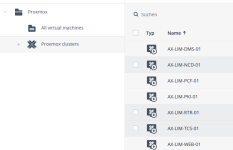
Those are Windows and Linux machines that are currently working with Acronis backup via Proxmox. I have eleven VMs total on my host:
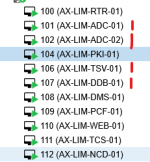
Those four are Windows machines that are affected by the driver issue. PKI is also a Windows machine, but created way later than the four I marked red, but also has the driver issue.
So I'm not sure why Acronis cannot see those machines. They are all installed on ZFS, they are all configured in the same way regarding Proxmox.
Did anyone here have an issue like that before?
I have customer installations where it works just fine and I see all the machines without problems in Acronis. It's just not working on my machine :-(
I'm not sure if I am in the right place, but let's try and see if anyone here has had the same issue already.
I'm using Acronis Cyber Protect for the backups of my virtual machines and it works pretty stable. With the latest driver update to 0.302, something changed for VSS and Acronis can no longer take backups with the client on the VM. So I thought we can use the Proxmox integration of Acronis and install a client on the host and get the backups that way.
The installation worked just fine, but Cyber Protect does not see all of my VMs. I only see the newer ones, but my oldest four VMs never show up in Acronis. It looks like that:
Those are Windows and Linux machines that are currently working with Acronis backup via Proxmox. I have eleven VMs total on my host:
Those four are Windows machines that are affected by the driver issue. PKI is also a Windows machine, but created way later than the four I marked red, but also has the driver issue.
So I'm not sure why Acronis cannot see those machines. They are all installed on ZFS, they are all configured in the same way regarding Proxmox.
Did anyone here have an issue like that before?
I have customer installations where it works just fine and I see all the machines without problems in Acronis. It's just not working on my machine :-(
Last edited:

