Need Help: Proxmox VE 7.4-17 – Windows Server 2012 VM Fails to Boot

fhandika

New Member
Sep 1, 2026
9
0
1
Hi everyone,

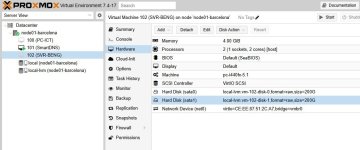
I’m currently running Proxmox Virtual Environment (PVE) 7.4-17, and for the past two days I’ve been experiencing an issue with one of my Windows Server 2012 VMs.

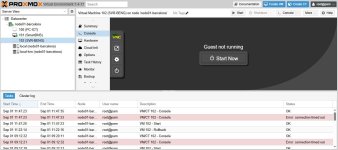
The VM sometimes starts successfully and I can briefly access Windows, but suddenly it returns to the guest/VM menu and the Windows operating system stops loading. This has happened repeatedly over the past two days.

I have already tried restarting the VM several times, but the issue keeps recurring.

Could anyone please advise what might be causing this problem and what troubleshooting steps I should take?

Any suggestions regarding disk/storage issues, VM configuration, boot settings, or Proxmox logs would be greatly appreciated.

Thank you in advance for your help.
 

Attachments

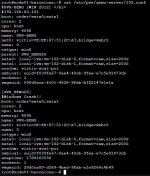
  • problem proxmox.JPG
    problem proxmox.JPG
    110.2 KB · Views: 4
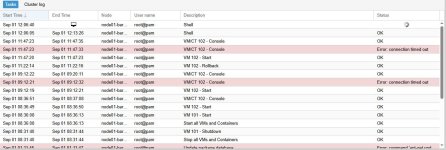
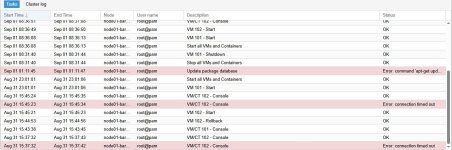
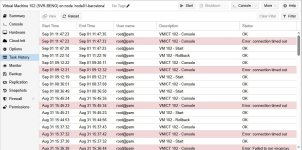
Are you rolling back before the crash or what's going on with it? You might need to show the Task History on your VM to see the full picture. Doesn't sound like a configuration problem if those VM settings have worked forever, might be something Windows is doing?

Other question, do you have any backups? I would restore from a known working backup in the past and see if that VM crashes as well. Personally I would restore it as a new VM and try run both side by side and see if the backup version works.
 
Last edited:
Are you rolling back before the crash or what's going on with it? You might need to show the Task History on your VM to see the full picture. Doesn't sound like a configuration problem if those VM settings have worked forever, might be something Windows is doing?

Other question, do you have any backups? I would restore from a known working backup in the past and see if that VM crashes as well. Personally I would restore it as a new VM and try run both side by side and see if the backup version works.
 

Attachments

  • log 0.JPG
    log 0.JPG
    115.3 KB · Views: 4
  • log 1.JPG
    log 1.JPG
    121.3 KB · Views: 4
Thank you for your suggestions.

Unfortunately, I did not have a backup of the VM before this issue occurred. The problem started suddenly yesterday without any changes or rollback being performed beforehand.

The VM had been running normally for a long time, and I was able to access Windows Server 2012 normally before the issue suddenly started happening.

At the moment, I’m trying to determine whether the problem is related to Windows, the virtual disk/storage, or something on the Proxmox side.

I will also check the VM Task History and Proxmox logs to see if there are any errors or clues that could help identify the cause.

Unfortunately, since I don’t have a previous working backup, restoring the VM as a new VM from backup is not an option for me.

Any advice on how I can safely troubleshoot or recover the existing VM without risking further data loss would be greatly appreciated.
 
Ah that's not great, if it's a production VM it's very highly recommended to backup the VMs in the event the VM corrupts.

From my perspective there's nothing wrong with the Proxmox and it doesn't sound hardware related. But my best guess would be you'd need to load into Windows and look at the Event logs to see what it's doing and why it's shutting itself down like that, if Windows is doing it then there'll be tons of errors in the logs to show that.

Can you try boot into safe mode on that server?
 
Ah that's not great, if it's a production VM it's very highly recommended to backup the VMs in the event the VM corrupts.

From my perspective there's nothing wrong with the Proxmox and it doesn't sound hardware related. But my best guess would be you'd need to load into Windows and look at the Event logs to see what it's doing and why it's shutting itself down like that, if Windows is doing it then there'll be tons of errors in the logs to show that.

Can you try boot into safe mode on that server?
Unfortunately, I cannot access the Windows Server at all now. When I click “Guest Running”, the VM starts loading for a short time, but then it suddenly exits and returns to the “Guest Running” menu again.

Yesterday, I restarted the Proxmox VE host, and after the restart I was able to successfully log in to Windows Server 2012. However, after running for a while, it suddenly disconnected again and returned to the “Guest Running” state.

I’m quite concerned and honestly not sure what is causing this issue.

Since I don’t have a previous backup, I would like to ask: Is there any way to recover or extract the data from the Windows Server VM without successfully booting into Windows?

I’m especially concerned about the data stored inside the VM and would like to avoid doing anything that could cause further data loss.

Any advice on how I can safely diagnose the problem and recover the data would be greatly appreciated.
 
It gets pretty complicated to do without backups but here's what I would do:

Create a fresh new VM and install Windows on it and boot into it, set it up as per usual so you can get to the desktop.

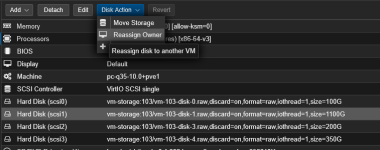
Then I would reassign both disks over to the the new VM

1788241558470.png

Mount them to windows and then make sure you can see them in the file explorer.

Then grab everything off there and start rebuilding everything from scratch.

Unsure if this is the best path or recommended at all but this is what I would do if I was in this situation.
 
  • Like
Reactions: Johannes S
It gets pretty complicated to do without backups but here's what I would do:

Create a fresh new VM and install Windows on it and boot into it, set it up as per usual so you can get to the desktop.

Then I would reassign both disks over to the the new VM

View attachment 99679

Mount them to windows and then make sure you can see them in the file explorer.

Then grab everything off there and start rebuilding everything from scratch.

Unsure if this is the best path or recommended at all but this is what I would do if I was in this situation.
Alright, I’ll give it a try. Hopefully, it works. Thank you for your help!
 
It gets pretty complicated to do without backups but here's what I would do:

Create a fresh new VM and install Windows on it and boot into it, set it up as per usual so you can get to the desktop.

Then I would reassign both disks over to the the new VM

View attachment 99679

Mount them to windows and then make sure you can see them in the file explorer.

Then grab everything off there and start rebuilding everything from scratch.

Unsure if this is the best path or recommended at all but this is what I would do if I was in this situation.
By the way, would it be possible to install Windows 7 instead for now? I’m thinking of using Windows 7 temporarily rather than installing Windows Server at this stage.
 
My 2 cents:
  • No backups is unacceptable.
  • If your data is important then before anything - backup/copy those disk images to another medium, before proceeding.
  • Proxmox VE 7.4-17 has been EOL since 2024. Update that server.
 
  • Like
Reactions: Johannes S
By the way, would it be possible to install Windows 7 instead for now? I’m thinking of using Windows 7 temporarily rather than installing Windows Server at this stage.
Which disk should I re-assign owner to?
 

Attachments

  • re-assign owner.JPG
    re-assign owner.JPG
    71.5 KB · Views: 2