Hi there,
Running Proxmox 9.2.2 here with kernel 7.0.2-6-pve (straight version non-updated from the 9.2-1 ISO installer). I've been also using 9.1.1 on other hypervisors too for a while.
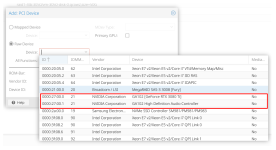
My issue is with GPU passthrough(not vGPU) in Windows VMs. I have a RTX 6000, 6000 ADA or 5000 ADA and all have the same issue - I get the infamous error 43 in Windows. My hosts are DELL 7525s with AMD CPUs
First a big premise, this just works fine for Linux VMs, meaning the pass through BIOS/GRUB/IOMMU settings are correct otherwise the Linux VMs wouldn't start/work with GPU pass through from my understanding.
Have tried in the VM to set the usuals to make the nvidia driver happy.
root@proxmox:/etc/pve/qemu-server# cat 3849.conf
args: -cpu 'host,hv_vendor_id=null,kvm=off'
bios: ovmf
boot: order=ide0;ide2;net0
cores: 32
cpu: host,hidden=1
efidisk0: localraid:vm-3849-disk-0,efitype=4m,ms-cert=2023k,pre-enrolled-keys=1,size=1M
hostpci0: 0000:81:00,pcie=1,x-vga=1
ide0: localraid:vm-3849-disk-1,discard=on,size=500G,ssd=1
machine: pc-q35-10.1
memory: 65535
meta: creation-qemu=10.1.2,ctime=1786350381
name: windows11
net0: e1000e=BC:24:11:FC:18:A7,bridge=vmbr1,tag=2
numa: 0
ostype: win11
scsihw: virtio-scsi-single
smbios1: uuid=3578e213-32dc-4055-8fb6-76535096df1d
sockets: 1
tpmstate0: localraid:vm-3849-disk-2,size=4M,version=v2.0
vmgenid: 42eae470-add3-4fea-9590-4fe1d3577401
root@proxmox:~# dmesg | grep MMU
[ 3.611262] pci 0000:60:00.2: AMD-Vi: IOMMU performance counters supported
[ 3.613645] pci 0000:40:00.2: AMD-Vi: IOMMU performance counters supported
[ 3.615458] pci 0000:20:00.2: AMD-Vi: IOMMU performance counters supported
[ 3.618140] pci 0000:00:00.2: AMD-Vi: IOMMU performance counters supported
[ 3.622413] pci 0000:e0:00.2: AMD-Vi: IOMMU performance counters supported
[ 3.624866] pci 0000:c0:00.2: AMD-Vi: IOMMU performance counters supported
[ 3.627183] pci 0000:a0:00.2: AMD-Vi: IOMMU performance counters supported
[ 3.629009] pci 0000:80:00.2: AMD-Vi: IOMMU performance counters supported
[ 3.641469] perf/amd_iommu: Detected AMD IOMMU #0 (2 banks, 4 counters/bank).
[ 3.641591] perf/amd_iommu: Detected AMD IOMMU #1 (2 banks, 4 counters/bank).
[ 3.641720] perf/amd_iommu: Detected AMD IOMMU #2 (2 banks, 4 counters/bank).
[ 3.641860] perf/amd_iommu: Detected AMD IOMMU #3 (2 banks, 4 counters/bank).
[ 3.642004] perf/amd_iommu: Detected AMD IOMMU #4 (2 banks, 4 counters/bank).
[ 3.642133] perf/amd_iommu: Detected AMD IOMMU #5 (2 banks, 4 counters/bank).
[ 3.642278] perf/amd_iommu: Detected AMD IOMMU #6 (2 banks, 4 counters/bank).
[ 3.642393] perf/amd_iommu: Detected AMD IOMMU #7 (2 banks, 4 counters/bank).
root@proxmox:~# cat /etc/default/grub
......
GRUB_CMDLINE_LINUX_DEFAULT="nomodeset amd_iommu=on iommu=pt"
Anything else to try - known issues with Windows ? This worked just fine in vmware... on the same hosts. and again Linux is just as happy but unfortunately I need also Windows...
Thanks in advance for any pointers.
Running Proxmox 9.2.2 here with kernel 7.0.2-6-pve (straight version non-updated from the 9.2-1 ISO installer). I've been also using 9.1.1 on other hypervisors too for a while.
My issue is with GPU passthrough(not vGPU) in Windows VMs. I have a RTX 6000, 6000 ADA or 5000 ADA and all have the same issue - I get the infamous error 43 in Windows. My hosts are DELL 7525s with AMD CPUs
First a big premise, this just works fine for Linux VMs, meaning the pass through BIOS/GRUB/IOMMU settings are correct otherwise the Linux VMs wouldn't start/work with GPU pass through from my understanding.
Have tried in the VM to set the usuals to make the nvidia driver happy.
root@proxmox:/etc/pve/qemu-server# cat 3849.conf
args: -cpu 'host,hv_vendor_id=null,kvm=off'
bios: ovmf
boot: order=ide0;ide2;net0
cores: 32
cpu: host,hidden=1
efidisk0: localraid:vm-3849-disk-0,efitype=4m,ms-cert=2023k,pre-enrolled-keys=1,size=1M
hostpci0: 0000:81:00,pcie=1,x-vga=1
ide0: localraid:vm-3849-disk-1,discard=on,size=500G,ssd=1
machine: pc-q35-10.1
memory: 65535
meta: creation-qemu=10.1.2,ctime=1786350381
name: windows11
net0: e1000e=BC:24:11:FC:18:A7,bridge=vmbr1,tag=2
numa: 0
ostype: win11
scsihw: virtio-scsi-single
smbios1: uuid=3578e213-32dc-4055-8fb6-76535096df1d
sockets: 1
tpmstate0: localraid:vm-3849-disk-2,size=4M,version=v2.0
vmgenid: 42eae470-add3-4fea-9590-4fe1d3577401
root@proxmox:~# dmesg | grep MMU
[ 3.611262] pci 0000:60:00.2: AMD-Vi: IOMMU performance counters supported
[ 3.613645] pci 0000:40:00.2: AMD-Vi: IOMMU performance counters supported
[ 3.615458] pci 0000:20:00.2: AMD-Vi: IOMMU performance counters supported
[ 3.618140] pci 0000:00:00.2: AMD-Vi: IOMMU performance counters supported
[ 3.622413] pci 0000:e0:00.2: AMD-Vi: IOMMU performance counters supported
[ 3.624866] pci 0000:c0:00.2: AMD-Vi: IOMMU performance counters supported
[ 3.627183] pci 0000:a0:00.2: AMD-Vi: IOMMU performance counters supported
[ 3.629009] pci 0000:80:00.2: AMD-Vi: IOMMU performance counters supported
[ 3.641469] perf/amd_iommu: Detected AMD IOMMU #0 (2 banks, 4 counters/bank).
[ 3.641591] perf/amd_iommu: Detected AMD IOMMU #1 (2 banks, 4 counters/bank).
[ 3.641720] perf/amd_iommu: Detected AMD IOMMU #2 (2 banks, 4 counters/bank).
[ 3.641860] perf/amd_iommu: Detected AMD IOMMU #3 (2 banks, 4 counters/bank).
[ 3.642004] perf/amd_iommu: Detected AMD IOMMU #4 (2 banks, 4 counters/bank).
[ 3.642133] perf/amd_iommu: Detected AMD IOMMU #5 (2 banks, 4 counters/bank).
[ 3.642278] perf/amd_iommu: Detected AMD IOMMU #6 (2 banks, 4 counters/bank).
[ 3.642393] perf/amd_iommu: Detected AMD IOMMU #7 (2 banks, 4 counters/bank).
root@proxmox:~# cat /etc/default/grub
......
GRUB_CMDLINE_LINUX_DEFAULT="nomodeset amd_iommu=on iommu=pt"
Anything else to try - known issues with Windows ? This worked just fine in vmware... on the same hosts. and again Linux is just as happy but unfortunately I need also Windows...
Thanks in advance for any pointers.