no ssh and GUI access

dbrega

Member
Sep 6, 2025
34
0
6
Installed proxmox in a single lenovo ThinkStation P3 but after some hours I not be able to access system with gui and ssh
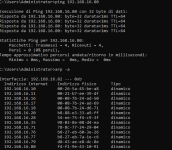
Test ping to pve is ok
1785734937292.png
The nestat comand response is below
1785735051747.png
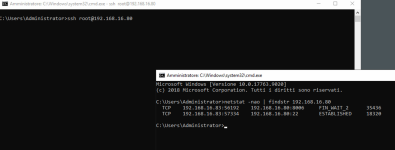
Also the connection give established status I not see the web page login.
In this proxmox running Lxc Container and the ip address responde to ping command
In this situation, the only thing I can do is force-shutdown the PVE using the power button, then restart it, and everything starts working again.
 
please show
Code:
ip addr show
ip route show
ethtool <net-device> # example eth0, enoX, enpYsZ
 
With NIC is in your PC installed?
A INTEL E1000(E)? then please read the 1000 Threads about the Problem.
 
With NIC is in your PC installed?
A INTEL E1000(E)? then please read the 1000 Threads about the Problem.
no the NIC is intel ethernet I219-LM and not INTEL E1000
please show
Code:
ip addr show
ip route show
ethtool <net-device> # example eth0, enoX, enpYsZ
for ethtool <net-device> I need to force reboot manualy
After restarting, are there any logs I can check to figure out what the problem is?
Otherwise, after two hours, I'll be back where I started—meaning I still won't be able to manage the pve node.
 
And you don't need to restart your lenovo ThinkStation P3 PC, if you have installed it bevor.
Yes I installed iit bevor but I need to reboot the pve because in this state, I can't manage the PVEs using either SSH or the web GUI
and based on your link, it looks like the command has to be run from a shell console, which I don't have access to.
I hope I've made myself clear now that's why I mentioned earlier the need to force a restart of the PVE.
 
Let me try to be clearer, then.
I have no problem restarting the PVE host by forcing it to shut down using the power button and then switching it back on.
At the moment, this is the only way I can do it, unless I can send a command from an LXC container to the PVE host’s IP address that allows me to restart the PVE host remotely.
What I was asking was whether it’s possible to identify the cause of this problem from the logs – a problem that always occurs a few hours after the PVE host starts up, even though there is an LXC container running on it.
Thank You
 
but after some hours I not be able to access system with gui and ssh
Triple check if there is an IP address conflict.

If some other device grabs that IP address - or it is assigned by a DHCP server - then these effects are normal. It also is normal, that Containers and/or VMs are not affected...

PVE should have a statically configured network configuration. And it must be conflict free = not from inside a DHCP range, handled by a random router.

Disclaimer: just guessing...
 
Triple check if there is an IP address conflict.

If some other device grabs that IP address - or it is assigned by a DHCP server - then these effects are normal. It also is normal, that Containers and/or VMs are not affected...

PVE should have a statically configured network configuration. And it must be conflict free = not from inside a DHCP range, handled by a random router.

Disclaimer: just guessing...
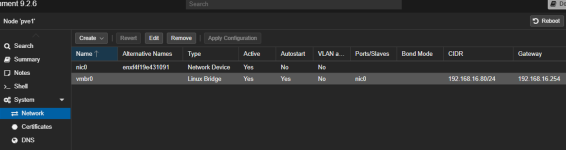
pve nic is configured with static address see belove screenshot gui config
1785749248757.png

If some other device grabs that IP address - or it is assigned by a DHCP server - then these effects are normal. It also is normal, that Containers and/or VMs are not affected...
Is not possible beacuse when i reboot the pve ping not response,
This morning I restated pve.
This morning I’ve been working on the PVE environment as usual.
The issue with the web GUI and the SSH remote shell being unavailable doesn’t occur whilst I’m working on it; it only occurs when the system hasn’t been accessed for some time.
When you try to log in again, you can no longer do so, but the VMs configured on the PVE node remain available and operational.
 
It's not clear whether you applied the E1000E fix yet or not. Also try if it works again after getting a temporary DHCP lease.
Perhaps I didn’t explain myself very well
I not have problem with E1000.
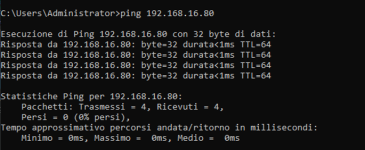
The installation of proxmox work fine but if i not connected with GUI or ssh shell after few hours i not be able to access web gui and ssh shell but the ping comand to ip address 192.168.16.80 from another pc in the same network also work
 
Check lspci -k. It likely uses E1000E. I'd apply the fix and try what I suggested above and also check journalctl -rp warning when it happens again.
Thank you so much for explaining clearly how to check the E1000E network controller
I’ve now understood what you were trying to explain to me.
I’ve followed your advice and will keep an eye on things over the next few days; if the problem occurs again,
I’ll try performing a forced reboot using the button and then run the recommended command to check the logs.
 
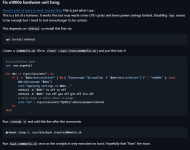
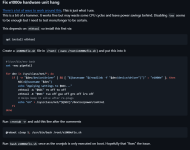
This morning the problem cropped up again, even though yesterday I followed your advice, which I have set out below
1785833552143.png
The current status of the PVE host is as follows.
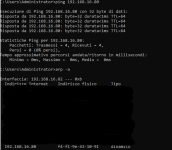
The network card responds to ping, and the `arp -a` command displays the correct MAC address of the NIC, ruling out any possibility that another device on the network is attempting to use this IP address.
1785833882242.png
The `netstat` command confirms that port 8006 is in use for the Proxmox GUI web management interface.
1785833990772.png
Unable to access the web GUI
Unable to access the SSH shell
1785834156749.png
What can I do in this situation?
 

Attachments

  • 1785833795550.png
    1785833795550.png
    328.1 KB · Views: 1
Check and share this from the node side
Bash:
ethtool -k nic0
journalctl -rp warning
systemctl status pveproxy
ss -lntp
Also try the temporary DHCP address method I linked to earlier.
 
Last edited:
Also try the temporary DHCP address method I linked to earlier.
This isn’t possible because I’m connecting remotely to a network that I don’t manage, and I’d like to avoid losing control of the PVEs entirely.
Bash:
Code:
ethtool -k nic0
journalctl -rp warning
systemctl status pveproxy
ss -lntp
I have attached the files generated by each of the suggested commands
 

Attachments

Pveproxy is listening normally on 8006. You might want to run newaliases and fix the invalid NIC reference. I'm guessing the NFS message is related to the network issue? You definitely did not apply my fix correctly. TSO is still on. I also cannot rule out an ip conflict without that DHCP test. I don't notice anything else from briefly looking at this.
 
You definitely did not apply my fix correctly
When you say that, are you referring to this correction?
1785850863934.png
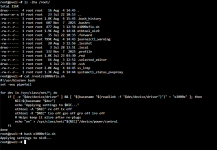
Below you can see screenshots of the configuration and execution of the accepted bash command
1785851314862.png
Now is ok?
After this, do I need to generate some more log files to check whether the system has accepted this fix?