

ceph 1 daemons have recently crashed
- Thread starter dbrega
- Start date
You are using an out of date browser. It may not display this or other websites correctly.
You should upgrade or use an alternative browser.
You should upgrade or use an alternative browser.
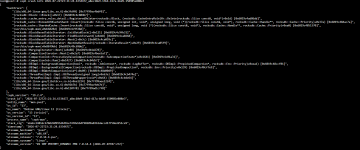
Could you also share:
~# ceph status
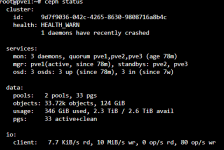
I confirm that is always mon.pve2
Last edited:
So at the moment, the daemon successfully restarted, and running for more than hour.
Looking at journalctl may provide related information, so the last crash from shared crash info was at 2026-07-27 23:21, therefore take look what happend before that:
Attach the generated log file if its fine for you.
Looking at journalctl may provide related information, so the last crash from shared crash info was at 2026-07-27 23:21, therefore take look what happend before that:
root@pve2 :# journalctl -k --since "2026-07-27 22:00:00" --until "2026-07-27 23:30:00" > /tmp/syslog.txt.gzAttach the generated log file if its fine for you.
as you advised me I removed the mon.pve2 and tried to recreate it on pve2 but now I get this error even though the mon.pve2 is not actually present in the gui
this is the gui that possible see mon.pve2 is not present

this is the error that appears when I try to create the new
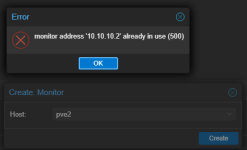
this is the gui that possible see mon.pve2 is not present
this is the error that appears when I try to create the new
the generated file is empty, maybe because I deleted mon.pve2 before generating itSo at the moment, the daemon successfully restarted, and running for more than hour.
Looking at journalctl may provide related information, so the last crash from shared crash info was at 2026-07-27 23:21, therefore take look what happend before that:
root@pve2 :# journalctl -k --since "2026-07-27 22:00:00" --until "2026-07-27 23:30:00" > /tmp/syslog.txt.gz
Attach the generated log file if its fine for you.
as you advised me I removed the mon.pve2 and tried to recreate it on pve2 but now I get this error even though the mon.pve2 is not actually present in the gui
this is the gui that possible see mon.pve2 is not present
View attachment 99159
this is the error that appears when I try to create the new
View attachment 99160
You can attempt again after couple of minutes, if still same issue check:
- Check the Active Mon Map
ceph mon dumpPlease try without the -k option:the generated file is empty, maybe because I deleted mon.pve2 before generating it
root@pve2 :# journalctl --since "2026-07-27 22:00:00" --until "2026-07-27 23:30:00" > /tmp/syslog.txt.gzYou can attempt again after couple of minutes, if still same issue check:
- Check the Active Mon Map
ceph mon dump
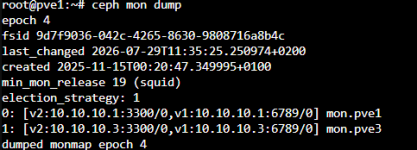
I also rebooted pve2
The problem persist.
generated file attachedPlease try without the -k option:
root@pve2 :# journalctl --since "2026-07-27 22:00:00" --until "2026-07-27 23:30:00" > /tmp/syslog.txt.gz
Attachments
can you share:
~# cat /etc/pve/ceph.confcan you share:
~# cat /etc/pve/ceph.conf
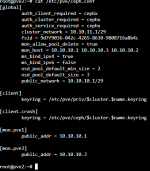
I also tried to restart mon.pve1 and mon.pve3 without resolve the problem
Last edited:
Okay, so 10.10.10.2 is still listed at the end of the mon_host line inside the [global] section.
You can use your preferaed editor and delete the ip: 10.10.10.2. make a copy of the file before making any change.