

[SOLVED] Getting Control-D screen, but mounting manually works

Red Squirrel

Renowned Member
May 31, 2014
78
14
73
I had a large failure on my network that caused all networking across the board to die, trying to upgrade firewall and introducing the new firewall made a big mess. Reverted back to old one for now. This caused lot of VMs to corrupt as in the process they lost access to storage. It's a really weird issue because even traffic within the same vlan was failing. One of the VMs that corrupted is my proxmox backup server. Yeah I know, I probably shouldn't put that in a VM... and this is exactly why. It's a chance I took, and I lost.

But here's the weird thing, if I hit CTRL+D the system boots up normally, and everything works.

I saw this post but this does not work in my case.

Basically what happens is it sits at "Welcome to Grub!" for around 5-10 minutes, and then fails. But once I hit ctrl+d it just finishes booting and everything is mounted and seems to look fine. I can get to the web console, see all the backups and everything. So what exactly is going on?
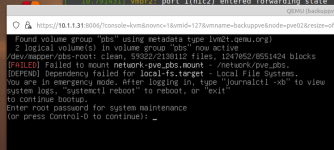

Screenshot from 2026-07-21 22-03-34.png
 
Maybe during a boot-up, the network storage is now unavailable longer than previously or some similar reason.
You haven't shown your /etc/fstab so we don't know if possibly you already have this option there...

I would add _netdev option for the network storage entries.

See man mount

Code:
_netdev
           The filesystem resides on a device that requires network access (used to prevent the system
           from attempting to mount these filesystems until the network has been enabled on the system).
 
Last edited:
  • Like
Reactions: meyergru
@Red Squirrel
One more idea to check... Is the availability of the network storage anyhow dependent on some (virtual or not) machine (e.g. a firewall)?
If yes, then: is the order of starting the machines correct? I mean: is that machine available and working before other machines need to access network storage?
 
Nothing that is dependent on other machines. I thought maybe DNS but I double checked and my physical DNS server is in the /etc/resolv.conf file.

This is what my fstab looks like:

Code:
# <file system> <mount point> <type> <options> <dump> <pass>
/dev/pbs/root / ext4 errors=remount-ro 0 1
/dev/pbs/swap none swap sw 0 0
proc /proc proc defaults 0 0
nas.localdomain:/volumes/raid2/pve_pbs /network/pve_pbs nfs,vers=3 async 0 0


Where would I put the _netdev option?
 
Where would I put the _netdev option?
In the "options" (fourth) field (see the description in the first line of your file), i.e.:

nas.localdomain:/volumes/raid2/pve_pbs /network/pve_pbs nfs,vers=3 async,_netdev 0 0

(fields are separated by tabs or spaces).

BTW: probably not related to the issue, but: the 6th field ("pass") in that line should be 2, not 0.

Because (see man fstab ):

Code:
   The sixth field (fs_passno).
       This field is used by fsck(8) to determine the order in which filesystem checks are done at boot
       time. The root filesystem should be specified with a fs_passno of 1. Other filesystems should
       have a fs_passno of 2. [...]
 
Thanks that seems to have worked! Boots up immediately now with no error. So this is what the fstab line looks like now:

Code:
nas.localdomain:/volumes/raid2/pve_pbs /network/pve_pbs nfs,vers=3 async,_netdev 2 0