Let's Encrypt DNS Validation through CNAME Alias

dononeil

New Member
Oct 18, 2025
1
0
1
I'm new to Proxmox 9, and I'm not understanding how to set up a DNS challenge using my own DNS server that doesn't have an API.

I'm trying to follow the "DNS Validation through CNAME Alias" from https://pve.proxmox.com/wiki/Certificate_Management, but I simply don't understand what I'm supposed to set up in the CNAME, nor what I'm supposed to select for the DNS API in the GUI.

My host name is 'proxmox' ... and I have complete editing rights to my domain DNS, i.e. 'mydomain.com'.

What should the CNAME I create be for the host proxmox.mydomain.com? What should the settings be in the ACME DNS Plugin config to make Lety's Encrypt work? I have already successfully setup the Let's encrypt account, but it cant' validate via https because my machine is on a private network.

Thanks!
 
Welcome to the Forum!

Disclaimer: I have not tested it myself, I'm just reading https://pve.proxmox.com/wiki/Certificate_Management#sysadmin_certs_acme_dns_challenge :)

You should own some other domain (let's call it your-other-domain.com) which is kept in other DNS server which does support the API. The lists of such DNS providers are at

https://community.letsencrypt.org/t...egrate-with-lets-encrypt-dns-validation/86438
and
https://github.com/acmesh-official/acme.sh/wiki/dnsapi#how-to-use-dns-api

Then in YOUR domain you create the CNAME record like

_acme-challenge.mydomain.com. IN CNAME _acme-challenge.your-other-domain.com.

Note the dots at the ends of the strings!
In case you want to limit the setup only to proxmox.mydomain.com, maybe you can create more specific record, like

_acme-challenge.proxmox.mydomain.com. IN CNAME _acme-challenge.your-other-domain.com.

Then the Proxmox documentation instructs:
set the alias property on the corresponding acmedomainX key in the Proxmox VE node configuration file to
your-other-domain.com.

How, in detail, it is being set, I'm not sure. Here the Proxmox documentation (both the one you linked and PDF version of the Administrator Guide) is inconsistent with the GUI reality.

It reads "Choose DNS as challenge type". But there is no "challenge type" field! Neither in the screenshot in the docs, nor in my real GUI.
I guess that you go to "Datacenter --> ACME" and first you fill in "Account --> Add"
Then in "Challenge Plugins --> Add" you make up some Plugin ID and then in "DNS API" drop-down list you select the DNS provider of your-other-domain.com. I guess...

Let us know if my description have helped you.
Good luck!
 
Testing this on PVE 9.1.4 right now, and there's still no ability to add an Alias when you add a Domain to ACME in the Web UI. But you can add it through the command line.

If you've already added an ACME domain, find out what number it's using by running pvenode config get | grep acmedomain and you'll get something like this:
Code:
acmedomain0: pve.domain.com,plugin=alias-domain-auth

Take note of the number after acmedomainX. Then add the alias= key to it by running a command like:
Code:
pvenode config set --acmedomain0 pve.domain.com,alias=pve.domain.com.alias-domain.com,plugin=alias-domain-auth

Assuming you've setup the CNAME right (_acme-challenge.pve.domain.com points to _acme-challenge.pve.domain.com.alias-domain.com) then you should be able to go back into the Web UI and click Order Certificates Now.

NOTE: The status log give no indication that a DNS alias is in use. All the output implies that it's publishing the challenge to the primary domain, even though it's actually using the alias domain. For example:
Code:
Add TXT record: _acme-challenge.pve.domain.com
Sleeping 30 seconds to wait for TXT record propagation
Triggering validation
Sleeping for 5 seconds
Status is 'valid', domain 'pve.domain.com' OK!
Remove TXT record: _acme-challenge.pve.domain.com
 
Hello all,

I managed to get this working with acme-dns, here's my Step by Step how I did it (sorry for all the redactions, gotta keep some stuff secure)

So our Corporate DNS doesn't allow API but i can log into it to create the CNAME TXT record easily.

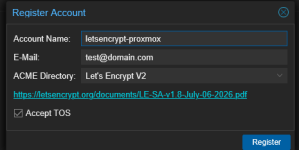
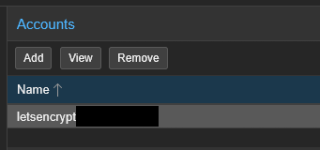
First of all I visit my Proxmox Host and log in and head to Datacenter > ACME and add an account and register

1785281700322.png

1785281765608.png

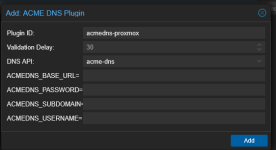
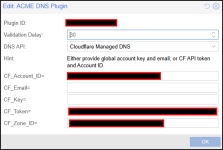
Then I added the ACME DNS Plugin using the acme-dns API

1785281805106.png

And to get this information on the Proxmox CLI I ran

Code:
curl -sS -X POST https://auth.acme-dns.io/register

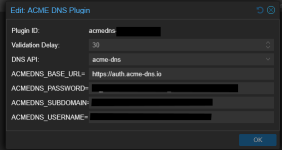
And it spits out the username, password, fulldomain and subdomain like this and then i can fill out the DNS plugin form with the values provided


Code:
{"username":"xxxxx","password":"xxxxx","fulldomain":"xxxxx.auth.acme-dns.io","subdomain":"xxxxx","allowfrom":[]}

1785282099264.png

So next task is to log into the DNS provider and create the DNS record like this

Code:
_acme-challenge.<your-proxmox-fqdn> CNAME ACMEDNS_SUBDOMAIN.auth.acme-dns.io.
where you fill out the ACMEDNS SUBDOMAIN with the subdomain that was given to you in the curl command that looked like a GUID

so looks something like this

1785282306542.png

Once it has propagated we can then order the certificate so I head to my server and go to System > Certificates > ACME and press Add

1785282448930.png

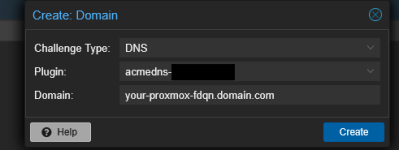
Select your acmedns plugin created earlier and give this your actual domain name that you will be using for your proxmox server then press create

1785282514996.png

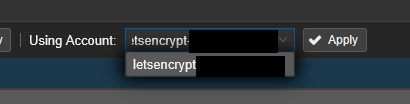
Then choose your letsencrypt account that was created at the beginning and Apply

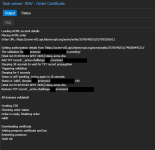
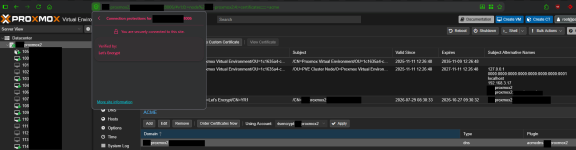
One Applied then Click Order Certificates Now and if all goes well the certificate ordering should complete like this and then then Proxmox GUI will reload with the new certificate, then if i browse to my Proxmox Host via FQDN, great success!

1785282718676.png

1785283299590.png

Hope this helps anyone else coming across this thread, especially from google where I found this thread :)
 
Last edited:
  • Like
Reactions: Onslow