USB devices connected to the vm but not working

frankz

Renowned Member
Nov 16, 2020
450
31
68
Hello everyone I performed the last day of my pve, after the reboot a vm that regularly uses a ble adapter and a wifi have ceased to work despite being correctly seen by the system


root@debianlab:~# lsusb
Bus 001 Device 001: ID 1d6b:0002 Linux Foundation 2.0 root hub
Bus 001 Device 002: ID 2c4e:0115 Mercucys INC Mercusys MA530 Adapter
Bus 001 Device 003: ID 148f:7601 Ralink Technology, Corp. MT7601U Wireless Adapter
Bus 002 Device 001: ID 1d6b:0003 Linux Foundation 3.0 root hub
Bus 003 Device 001: ID 1d6b:0001 Linux Foundation 1.1 root hub
Bus 003 Device 002: ID 0627:0001 Adomax Technology Co., Ltd QEMU Tablet


Code:
 7036.973728] usb 1-1: reset full-speed USB device number 2 using xhci_hcd
[ 7037.475732] usb 1-2: reset high-speed USB device number 3 using xhci_hcd
[ 7040.630601] usb 1-2: reset high-speed USB device number 3 using xhci_hcd
[ 7152.623531] usb 1-1: reset full-speed USB device number 2 using xhci_hcd
[ 7152.873423] usb 1-2: reset high-speed USB device number 3 using xhc
I tried with usb3=0 sees the usb cards but does not pass traffic


Code:
proxmox-ve: 9.2.0 (running kernel: 7.0.14-4-pve)
pve-manager: 9.2.4 (running version: 9.2.4/5e5ae681198514d4)
proxmox-kernel-helper: 9.2.0
proxmox-kernel-7.0.14-4-pve-signed: 7.0.14-4
proxmox-kernel-7.0: 7.0.14-4
proxmox-kernel-7.0.14-3-pve-signed: 7.0.14-3
proxmox-kernel-7.0.6-2-pve-signed: 7.0.6-2
proxmox-kernel-6.17: 6.17.13-15
proxmox-kernel-6.17.13-15-pve-signed: 6.17.13-15
proxmox-kernel-6.8: 6.8.12-15
proxmox-kernel-6.8.12-15-pve-signed: 6.8.12-15
proxmox-kernel-6.8.12-9-pve-signed: 6.8.12-9
ceph-fuse: 19.2.3-pve1
corosync: 3.1.10-pve2
criu: 4.1.1-1
frr-pythontools: 10.6.1-1+pve2
ifupdown2: 3.3.0-1+pmx12
intel-microcode: 3.20251111.1~deb13u1
ksm-control-daemon: 1.5-1
libjs-extjs: 7.0.0-5
libproxmox-acme-perl: 1.7.1
libproxmox-backup-qemu0: 2.0.2
libproxmox-rs-perl: 0.4.1
libpve-access-control: 9.1.1
libpve-apiclient-perl: 3.4.2
libpve-cluster-api-perl: 9.1.6
libpve-cluster-perl: 9.1.6
libpve-common-perl: 9.1.16
libpve-guest-common-perl: 6.0.4
libpve-http-server-perl: 6.0.5
libpve-network-perl: 1.6.6
libpve-notify-perl: 9.1.6
libpve-rs-perl: 0.15.3
libpve-storage-perl: 9.1.6
libspice-server1: 0.15.2-1+b1
lvm2: 2.03.31-2+pmx1
lxc-pve: 7.0.0-2
lxcfs: 7.0.0-pve1
novnc-pve: 1.7.0-2
proxmox-backup-client: 4.2.2-1
proxmox-backup-file-restore: 4.2.2-1
proxmox-backup-restore-image: 1.0.0
proxmox-firewall: 1.2.3
proxmox-kernel-helper: 9.2.0
proxmox-mail-forward: 1.0.3
proxmox-mini-journalreader: 1.7
proxmox-offline-mirror-helper: 0.7.4
proxmox-widget-toolkit: 5.2.6
pve-cluster: 9.1.6
pve-container: 6.1.10
pve-docs: 9.2.3
pve-edk2-firmware: 4.2025.05-2
pve-esxi-import-tools: 1.0.1
pve-firewall: 6.0.4
pve-firmware: 3.18-4
pve-ha-manager: 5.2.4
pve-i18n: 3.9.0
pve-qemu-kvm: 11.0.2-1
pve-xtermjs: 6.0.0-2
qemu-server: 9.1.18
smartmontools: 7.5-pve2
spiceterm: 3.4.2
swtpm: 0.8.0+pve3
vncterm: 1.9.2
zfsutils-linux: 2.4.3-pve1
 
Last edited:
is that the log from the guest or the host? could you attach a full journal from both?
 
is that the log from the guest or the host? could you attach a full journal from both?
Ciai e grazie per aver risposto.
Questo è il journal del pv5

Code:
root@pve5:~# journalctl -f
Jul 10 15:13:36 pve5 systemd[367988]: Starting ssh-agent.socket - OpenSSH Agent socket...
Jul 10 15:13:36 pve5 systemd[367988]: Listening on gpg-agent-ssh.socket - GnuPG cryptographic agent (ssh-agent emulation).
Jul 10 15:13:36 pve5 systemd[367988]: Listening on ssh-agent.socket - OpenSSH Agent socket.
Jul 10 15:13:36 pve5 systemd[367988]: Listening on gpg-agent.socket - GnuPG cryptographic agent and passphrase cache.
Jul 10 15:13:36 pve5 systemd[367988]: Reached target sockets.target - Sockets.
Jul 10 15:13:36 pve5 systemd[367988]: Reached target basic.target - Basic System.
Jul 10 15:13:36 pve5 systemd[1]: Started user@0.service - User Manager for UID 0.
Jul 10 15:13:36 pve5 systemd[367988]: Reached target default.target - Main User Target.
Jul 10 15:13:36 pve5 systemd[367988]: Startup finished in 275ms.
Jul 10 15:13:36 pve5 systemd[1]: Started session-134.scope - Session 134 of User root.
Jul 10 15:14:09 pve5 pvedaemon[353331]: <root@pam> update VM 104: -usb0 host=2c4e:0115
Jul 10 15:14:09 pve5 kernel: usb 1-1: reset full-speed USB device number 2 using xhci_hcd
Jul 10 15:14:09 pve5 systemd[1]: Starting systemd-rfkill.service - Load/Save RF Kill Switch Status...
Jul 10 15:14:09 pve5 systemd[1]: Reached target bluetooth.target - Bluetooth Support.
Jul 10 15:14:09 pve5 systemd[367988]: Reached target bluetooth.target - Bluetooth.
Jul 10 15:14:09 pve5 systemd[1]: Started systemd-rfkill.service - Load/Save RF Kill Switch Status.
Jul 10 15:14:11 pve5 kernel: Bluetooth: hci0: Opcode 0x0c14 failed: -110
Jul 10 15:14:11 pve5 systemd[367988]: Stopped target bluetooth.target - Bluetooth.
Jul 10 15:14:11 pve5 systemd[1]: Stopped target bluetooth.target - Bluetooth Support.
Jul 10 15:14:16 pve5 systemd[1]: systemd-rfkill.service: Deactivated successfully.
Jul 10 15:14:18 pve5 pvedaemon[353331]: <root@pam> update VM 104: -usb1 host=148f:7601
Jul 10 15:14:18 pve5 kernel: usb 1-2: reset high-speed USB device number 3 using xhci_hcd
Jul 10 15:14:19 pve5 kernel: usb 1-2: reset high-speed USB device number 3 using xhci_hcd
Jul 10 15:14:19 pve5 kernel: mt7601u 1-2:1.0: ASIC revision: 76010001 MAC revision: 76010500
Jul 10 15:14:19 pve5 kernel: mt7601u 1-2:1.0: EEPROM ver:0d fae:00
Jul 10 15:14:19 pve5 kernel: ieee80211 phy7: Selected rate control algorithm 'minstrel_ht'
Jul 10 15:14:19 pve5 systemd[1]: Starting systemd-rfkill.service - Load/Save RF Kill Switch Status...
Jul 10 15:14:19 pve5 kernel: mt7601u 1-2:1.0 wlx20e51702a6ac: renamed from wlan0
Jul 10 15:14:19 pve5 systemd[1]: Started systemd-rfkill.service - Load/Save RF Kill Switch Status.
Jul 10 15:14:24 pve5 s
ystemd[1]: systemd-rfkill.service: Deactivated successfully.

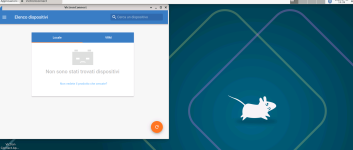
The strange thing that sometimes the ble on usb has always worked perfectly even if you have errors on the journal -110 reset ... now for examples from xrdp the apps do not communicate with ble but if I run a scan here :

Code:
root@debianlab:~# bluetoothctl devices
Device D5:71:09:E2:75:40 SmartSolar HQ2315KW69P
Device F1:8D:57:7C:C2:61 SmartSolar HQ2428CGUKJ
Device F4:BD:E3:0F:74:12 SmartShunt HQ251376J9Z

You see the devices detected but no communication with applications and more.
Only clue, only after doing the latest updates has ceased to work everything, including the wifi usb key.

Code:
root@debianlab:~# iw dev wlx20e51702a6ac info
Interface wlx20e51702a6ac
    ifindex 4
    wdev 0x100000001
    addr de:8d:c4:05:2f:6a
    type managed
    wiphy 1
    txpower 20.00 dBm
    multicast TXQ:
        qsz-byt    qsz-pkt    flows    drops    marks    overlmt    hashcol    tx-bytes    tx-packets
        0    0    0    0    0    0    0    0        0
root@debianlab:~# sudo iw dev wlx20e51702a6ac scan | grep SSID

Code:
g 10 15:27:11 debianlab sudo[2286]: pam_unix(sudo:session): session opened for user root(uid=0) by root(uid=0)
lug 10 15:27:38 debianlab sudo[2286]: pam_unix(sudo:session): session closed for user root
lug 10 15:27:39 debianlab sudo[2291]:     root : TTY=pts/0 ; PWD=/root ; USER=root ; COMMAND=/usr/sbin/iw dev wlx20e51702a6ac link
lug 10 15:27:39 debianlab sudo[2291]: pam_unix(sudo:session): session opened for user root(uid=0) by root(uid=0)
lug 10 15:27:39 debianlab sudo[2291]: pam_unix(sudo:session): session closed for user root
lug 10 15:28:10 debianlab NetworkManager[801]: <info>  [1783690090.9094] device (wlx20e51702a6ac): set-hw-addr: set MAC address to AA:31:F2:7F:47:7B (scanning)
lug 10 15:28:10 debianlab kernel: mt7601u 5-2:1.0: Error: Time out with reg 00001200
lug 10 15:28:10 debianlab kernel: mt7601u 5-2:1.0: Warning: MAC RX did not stop!
lug 10 15:28:10 debianlab NetworkManager[801]: <info>  [1783690090.9482] device (wlx20e51702a6ac): supplicant interface state: inactive -> disconnected
lug 10 15:28:10 debianlab NetworkManager[801]: <info>  [1783690090.9737] device (wlx20e51702a6ac): supplicant interface state: disconnected -> inactive


However, to give you an idea even if bad to say, after restarting the knot, without touching anything is wifi and ble, they have ceased to communicate .... Doing the most desperate tests, changing cpu model, type of machine e.g. from kvm to host and more, even the version of the hardware only once the wifi card resumed working, but I think it was a case.


Code:
ug 10 15:27:11 debianlab sudo[2286]: pam_unix(sudo:session): session opened for user root(uid=0) by root(uid=0)
lug 10 15:27:38 debianlab sudo[2286]: pam_unix(sudo:session): session closed for user root
lug 10 15:27:39 debianlab sudo[2291]:     root : TTY=pts/0 ; PWD=/root ; USER=root ; COMMAND=/usr/sbin/iw dev wlx20e51702a6ac link
lug 10 15:27:39 debianlab sudo[2291]: pam_unix(sudo:session): session opened for user root(uid=0) by root(uid=0)
lug 10 15:27:39 debianlab sudo[2291]: pam_unix(sudo:session): session closed for user root
lug 10 15:28:10 debianlab NetworkManager[801]: <info>  [1783690090.9094] device (wlx20e51702a6ac): set-hw-addr: set MAC address to AA:31:F2:7F:47:7B (scanning)
lug 10 15:28:10 debianlab kernel: mt7601u 5-2:1.0: Error: Time out with reg 00001200
lug 10 15:28:10 debianlab kernel: mt7601u 5-2:1.0: Warning: MAC RX did not stop!
lug 10 15:28:10 debianlab NetworkManager[801]: <info>  [1783690090.9482] device (wlx20e51702a6ac): supplicant interface state: inactive -> disconnected
lug 10 15:28:10 debianlab NetworkManager[801]: <info>  [1783690090.9737] device (wlx20e51702a6ac): supplicant interface state: disconnected -> inactive
 
Since the host is detecting both USB devices with lsusb, but they are repeatedly resetting and the VM can see them without any traffic passing through, it looks more like a USB passthrough or kernel regression after the PVE 9 upgrade rather than a VM configuration issue.

Could you please check the following and share the outputs?

  1. VM configuration:
qm config <VMID>

  1. USB topology:
lsusb -t
  1. Host USB-related logs while starting the VM:
dmesg -w
  1. Check if the issue is related to the new kernel by booting the previous working kernel (if available) and verify whether the USB devices work normally.
Also, are the Wi-Fi and Bluetooth adapters passed through using the Vendor roduct ID (e.g. host=148f:7601) or by Bus/Port? Using the Vendor roduct ID is generally more reliable.

These details should help determine whether this is a USB passthrough issue or a regression introduced after the upgrade.
 
Since the host is detecting both USB devices with lsusb, but they are repeatedly resetting and the VM can see them without any traffic passing through, it looks more like a USB passthrough or kernel regression after the PVE 9 upgrade rather than a VM configuration issue.

Could you please check the following and share the outputs?

  1. VM configuration:
qm config <VMID>

  1. USB topology:
lsusb -t
  1. Host USB-related logs while starting the VM:
dmesg -w
  1. Check if the issue is related to the new kernel by booting the previous working kernel (if available) and verify whether the USB devices work normally.
Also, are the Wi-Fi and Bluetooth adapters passed through using the Vendor roduct ID (e.g. host=148f:7601) or by Bus/Port? Using the Vendor roduct ID is generally more reliable.

These details should help determine whether this is a USB passthrough issue or a regression introduced after the upgrade.
Hello, thank you, from what you have just written the situation is clear to you .

Here :

Code:
root@pve5:~# qm config 104
agent: 1
boot: order=scsi0;ide2;net0
cores: 2
cpu: host
description:
ide2: none,media=cdrom
machine: q35
memory: 8192
meta: creation-qemu=11.0.0,ctime=1780375495
name: debianlab
net0: virtio=BC:24:11:EA:50:CE,bridge=vmbr0
numa: 0
onboot: 1
ostype: l26
protection: 1
scsi0: local-zfs:vm-104-disk-0,iops_rd=1500,iops_wr=800,iothread=1,mbps_rd=30,mbps_wr=15,size=64G
scsihw: virtio-scsi-single
smbios1: uuid=926c556a-987f-4ec9-ae27-41bbf5464bfb
sockets: 1
usb0: host=2c4e:0115
usb1: host=148f:7601
vmgenid: 2262a40d-a441-45c4-8fad-492bdcf36a62
I also tried with Q35 .. nothing to do .

Code:
root@pve5:~# lsusb -t
/:  Bus 001.Port 001: Dev 001, Class=root_hub, Driver=xhci_hcd/10p, 480M
    |__ Port 001: Dev 002, If 0, Class=Wireless, Driver=usbfs, 12M
    |__ Port 001: Dev 002, If 1, Class=Wireless, Driver=usbfs, 12M
    |__ Port 002: Dev 003, If 0, Class=Vendor Specific Class, Driver=usbfs, 480M
/:  Bus 002.Port 001: Dev 001, Class=root_hub, Driver=xhci_hcd/4p, 5000M

Code:
   5.615824] audit: type=1400 audit(1783776169.088:3): apparmor="STATUS" operation="profile_load" profile="unconfined" name="1password" pid=431 comm="apparmor_parser"
[    5.619723] audit: type=1400 audit(1783776169.092:4): apparmor="STATUS" operation="profile_load" profile="unconfined" name=4D6F6E676F444220436F6D70617373 pid=434 comm="apparmor_parser"
[    5.620067] audit: type=1400 audit(1783776169.092:5): apparmor="STATUS" operation="profile_load" profile="unconfined" name="QtWebEngineProcess" pid=435 comm="apparmor_parser"
[    5.627229] audit: type=1400 audit(1783776169.100:6): apparmor="STATUS" operation="profile_load" profile="unconfined" name="balena-etcher" pid=439 comm="apparmor_parser"
[    5.631874] audit: type=1400 audit(1783776169.104:7): apparmor="STATUS" operation="profile_load" profile="unconfined" name="brave" pid=441 comm="apparmor_parser"
[    5.636872] audit: type=1400 audit(1783776169.108:8): apparmor="STATUS" operation="profile_load" profile="unconfined" name="buildah" pid=442 comm="apparmor_parser"
[    5.640991] audit: type=1400 audit(1783776169.112:9): apparmor="STATUS" operation="profile_load" profile="unconfined" name="Xorg" pid=437 comm="apparmor_parser"
[    5.641984] audit: type=1400 audit(1783776169.112:10): apparmor="STATUS" operation="profile_load" profile="unconfined" name="busybox" pid=444 comm="apparmor_parser"
[    5.647879] audit: type=1400 audit(1783776169.120:11): apparmor="STATUS" operation="profile_load" profile="unconfined" name="ch-checkns" pid=447 comm="apparmor_parser"
[    5.986688] RAPL PMU: API unit is 2^-32 Joules, 0 fixed counters, 10737418240 ms ovfl timer
[    6.015860] cryptd: max_cpu_qlen set to 1000
[    6.016903] Bluetooth: Core ver 2.22
[    6.016925] NET: Registered PF_BLUETOOTH protocol family
[    6.016927] Bluetooth: HCI device and connection manager initialized
[    6.016930] Bluetooth: HCI socket layer initialized
[    6.016933] Bluetooth: L2CAP socket layer initialized
[    6.016939] Bluetooth: SCO socket layer initialized
[    6.049619] AES CTR mode by8 optimization enabled
[    6.131224] cfg80211: Loading compiled-in X.509 certificates for regulatory database
[    6.174754] Loaded X.509 cert 'benh@debian.org: 577e021cb980e0e820821ba7b54b4961b8b4fadf'
[    6.176772] Loaded X.509 cert 'romain.perier@gmail.com: 3abbc6ec146e09d1b6016ab9d6cf71dd233f0328'
[    6.176923] Loaded X.509 cert 'sforshee: 00b28ddf47aef9cea7'
[    6.177067] Loaded X.509 cert 'wens: 61c038651aabdcf94bd0ac7ff06c7248db18c600'
[    6.214485] Process accounting resumed
[    6.246253] snd_hda_intel 0000:00:1b.0: no codecs found!
[    6.435833] usbcore: registered new interface driver btusb
[    6.937951] usb 3-2: reset high-speed USB device number 3 using xhci_hcd
[    7.091046] mt7601u 3-2:1.0: ASIC revision: 76010001 MAC revision: 76010500
[    7.171208] Bluetooth: BNEP (Ethernet Emulation) ver 1.3
[    7.171212] Bluetooth: BNEP filters: protocol multicast
[    7.171216] Bluetooth: BNEP socket layer initialized
[    7.176102] Bluetooth: MGMT ver 1.23
[    7.229556] NET: Registered PF_ALG protocol family
[    7.239330] mt7601u 3-2:1.0: EEPROM ver:0d fae:00
[    7.466146] Bluetooth: RFCOMM TTY layer initialized
[    7.466152] Bluetooth: RFCOMM socket layer initialized
[    7.466158] Bluetooth: RFCOMM ver 1.11
[    7.526802] ieee80211 phy0: Selected rate control algorithm 'minstrel_ht'
[    7.527281] usbcore: registered new interface driver mt7601u
[    7.574919] mt7601u 3-2:1.0 wlx20e51702a6ac: renamed from wlan0
[    8.469719] NET: Registered PF_QIPCRTR protocol family
[    8.581588] mt7601u 3-2:1.0: Error: Time out with reg 00001200
[    8.581943] mt7601u 3-2:1.0: Warning: MAC RX did not stop!
[   11.685921] kauditd_printk_skb: 117 callbacks suppressed

As for restarting with the previous kernel I am not on the spot where pve5 is turning , so I can not . Anyway, it was a proof I wanted to do.
 
Since the host is detecting both USB devices with lsusb, but they are repeatedly resetting and the VM can see them without any traffic passing through, it looks more like a USB passthrough or kernel regression after the PVE 9 upgrade rather than a VM configuration issue.

Could you please check the following and share the outputs?

  1. VM configuration:
qm config <VMID>

  1. USB topology:
lsusb -t
  1. Host USB-related logs while starting the VM:
dmesg -w
  1. Check if the issue is related to the new kernel by booting the previous working kernel (if available) and verify whether the USB devices work normally.
Also, are the Wi-Fi and Bluetooth adapters passed through using the Vendor roduct ID (e.g. host=148f:7601) or by Bus/Port? Using the Vendor roduct ID is generally more reliable.

These details should help determine whether this is a USB passthrough issue or a regression introduced after the upgrade.
Inoltre sembra che il ble funzioni ma non comunica con le app !!

Code:
busctl tree org.bluez
└─ /org/bluez/hci0/dev_D5_71_09_E2_75_40
└─ /org/bluez/hci0/dev_F1_8D_57_7C_C2_61
└─ /org/bluez/hci0/dev_F4_BD_E3_0F_74_12
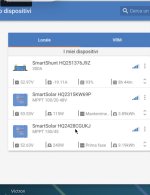
what you see are the three ble in a solar system configuration that I moment with victronconnect

The app is always that, but it no longer reads! It seems that the ble does not pass him the data. or anything else .


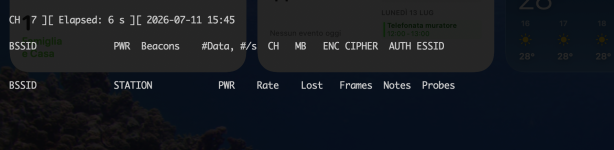
Anche la scheda di rete usb wifi fa lo stesso .


sudo ip link set wlx20e51702a6ac down
sudo iw wlx20e51702a6ac set monitor control
sudo ip link set wlx20e51702a6ac up
sudo airodump-ng wlx20e51702a6ac

Code:
sudo ip link set wlx20e51702a6ac down
sudo iw wlx20e51702a6ac set monitor control
sudo ip link set wlx20e51702a6ac up
sudo airodump-ng wlx20e51702a6ac
 

Attachments

  • Screenshot 2026-07-11 alle 15.39.20.png
    Screenshot 2026-07-11 alle 15.39.20.png
    508.3 KB · Views: 1
  • Screenshot 2026-07-11 alle 15.45.11.png
    Screenshot 2026-07-11 alle 15.45.11.png
    513.2 KB · Views: 1
Last edited: